

The “Important Alert on Your Microsoft Account” phishing scam is an email-based credential theft attack that impersonates Microsoft account security notifications. The email falsely claims that a security issue has been detected on the recipient’s Microsoft account and that action is required to prevent restricted access or further risk. The message is designed to appear authoritative and urgent, encouraging the recipient to follow instructions without verifying their authenticity.
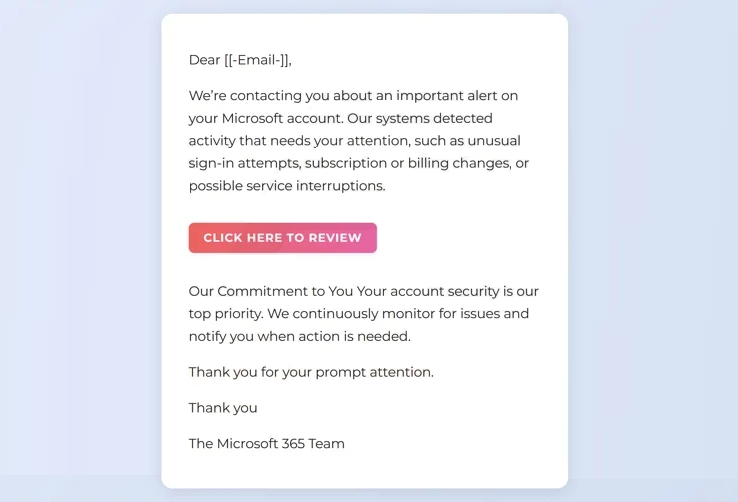
The email presents itself as an automated alert generated by Microsoft’s security systems. It references account protection, suspicious activity, or policy enforcement, but it does not provide verifiable technical details. The message avoids specific data such as device identifiers, login timestamps, or geographic locations. Instead, it relies on broad statements that imply risk without offering evidence.
A prominent link or button is included in the email, often labelled as a review or verification step. This link does not lead to a legitimate Microsoft website. It redirects to a phishing page that imitates Microsoft’s sign-in or account management interface. The phishing page uses visual elements similar to official Microsoft pages, including colour schemes, layout structure, and branding cues, to create a sense of familiarity.
The phishing page requests the user’s Microsoft account credentials. This typically includes the email address and password. Some versions of the scam request additional information such as phone numbers, account recovery data, or payment details under the pretext of identity verification. All information submitted through the page is collected by the attackers.
After credentials are entered, the phishing page may display a confirmation message indicating that the account has been secured. In some cases, the page redirects the user to another site or returns them to a Microsoft-related page to reduce suspicion. No real security action takes place. The only outcome is unauthorised disclosure of account credentials.
With access to a compromised Microsoft account, attackers can read emails, access cloud-stored documents, and interact with services connected to the account. This may include Outlook, OneDrive, Microsoft 365 subscriptions, and other linked platforms. Because Microsoft accounts are commonly used as identity providers for third-party services, attackers may attempt password resets on external accounts using the compromised email address.
The scam does not involve malware, attachments, or exploit code. Its effectiveness depends entirely on social engineering. The attackers exploit the expectation that Microsoft sends security alerts and that such alerts require prompt action. The message imitates the form of a legitimate notification while removing the safeguards Microsoft uses in genuine communications.
This phishing attack is distributed broadly and does not require the recipient to actually have a Microsoft account. The attackers rely on the probability that many recipients will use Microsoft services or assume the alert applies to them. The email does not confirm account ownership before requesting credentials.
The full “Important Alert on Your Microsoft Account” phishing email is below:
Subject: Security Alert
Dear [[-Email-]],
We’re contacting you about an important alert on your Microsoft account. Our systems detected activity that needs your attention, such as unusual sign-in attempts, subscription or billing changes, or possible service interruptions.
CLICK HERE TO REVIEW
Our Commitment to You Your account security is our top priority. We continuously monitor for issues and notify you when action is needed.
Thank you for your prompt attention.
Thank you
The Microsoft 365 Team
How to identify phishing emails claiming to be Microsoft security alerts
Identifying phishing emails such as “Important Alert on Your Microsoft Account” requires attention to both technical indicators and message behaviour. One of the most important indicators is how the email instructs the recipient to respond. Microsoft does not request account verification through embedded email links that lead to credential entry pages. Legitimate security alerts direct users to sign in through official websites or applications accessed independently.
The sender address is a critical element. While the display name may reference Microsoft or account security, the actual sender address often originates from an unrelated domain. Examining the full sender information reveals whether the email was sent from an authorised Microsoft domain.
The message content itself provides further clues. Phishing emails of this type are deliberately vague. They claim that an issue exists, but do not include technical specifics such as sign-in location, device type, or time of detection. Authentic Microsoft security notifications include contextual information that allows users to evaluate whether the activity was legitimate.
The embedded link should be treated with caution. Hovering over the link without clicking it often reveals a destination that does not match Microsoft’s official domain structure. Phishing pages frequently use unrelated domains, misleading subdomains, or complex URLs designed to appear technical rather than trustworthy.
Language consistency is another factor. Even when well written, phishing emails may contain phrasing or formatting that differs slightly from Microsoft’s standard communication style. Differences in spacing, capitalisation, or sentence construction can indicate that the message was not generated by Microsoft systems.
Another indicator is the request for sensitive information. Microsoft does not ask users to submit passwords, security codes, or payment information through email links. Any message requesting such data outside of a secure, user-initiated login session should be considered fraudulent.
Context should also be considered. If there has been no recent account activity, password change, or sign-in from a new device, an unexpected alert should raise suspicion. Phishing emails often arrive without any corresponding event in the account’s activity history.
Users can safely verify account status by manually navigating to Microsoft’s official account website or using trusted Microsoft applications. If a genuine security issue exists, it will be visible after signing in directly. Relying on direct access rather than email links prevents credential exposure.
Phishing scams impersonating Microsoft security alerts succeed by exploiting trust in automated systems and fear of account compromise. Applying technical scrutiny to sender details, link destinations, and information requests allows users to identify fraudulent messages and avoid unauthorised account access.
Incoming search terms:
Site Disclaimer
2-remove-virus.com is not sponsored, owned, affiliated, or linked to malware developers or distributors that are referenced in this article. The article does not promote or endorse any type of malware. We aim at providing useful information that will help computer users to detect and eliminate the unwanted malicious programs from their computers. This can be done manually by following the instructions presented in the article or automatically by implementing the suggested anti-malware tools.
The article is only meant to be used for educational purposes. If you follow the instructions given in the article, you agree to be contracted by the disclaimer. We do not guarantee that the artcile will present you with a solution that removes the malign threats completely. Malware changes constantly, which is why, in some cases, it may be difficult to clean the computer fully by using only the manual removal instructions.