

The “LinkedIn Email Scam” refers to phishing emails that pretend to come from the professional networking service LinkedIn. These emails are designed to trick recipients into believing they have received a legitimate notification related to their LinkedIn account. The messages may claim that someone sent a business request, a connection invitation, or a new message. The goal of these emails is not to provide real account updates but to direct users to fraudulent websites that steal login credentials.
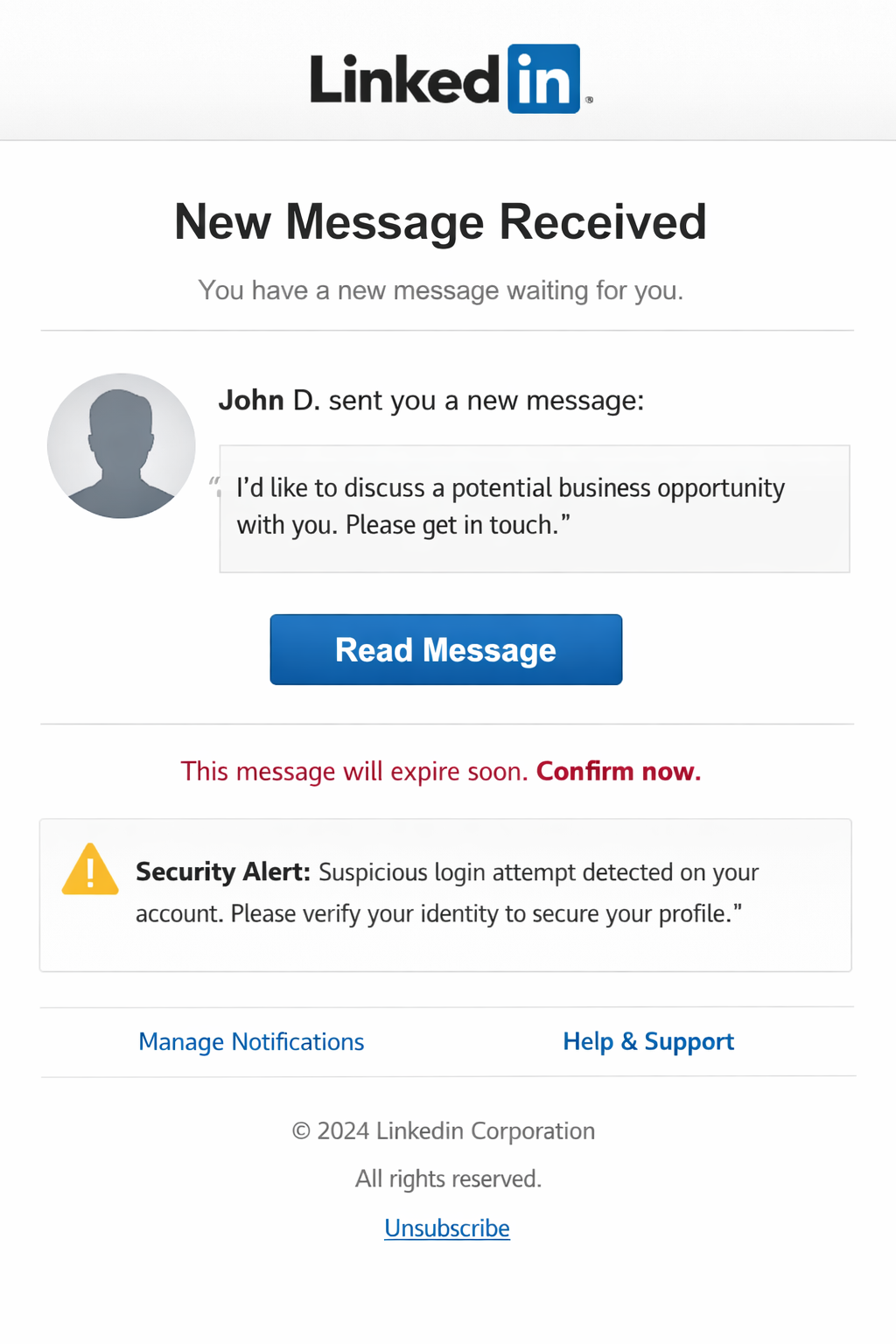
Many variations of this scam exist. Some emails claim that a new contact wants to connect or that a message request is waiting to be viewed. Others present a supposed business opportunity or order request from a company representative. The email usually includes a button such as “View message,” “Accept invitation,” or “View contact details.” Clicking this button does not open the official LinkedIn platform. Instead, it leads to a phishing page that imitates the LinkedIn sign-in interface.
The fake page is designed to look convincing. It may display the LinkedIn logo and a layout similar to the real login screen. However, the page is hosted on a domain that has no connection to LinkedIn. The form asks users to enter their email address, username, and password to access the supposed message or request. When this information is submitted, it is sent directly to the scammers operating the campaign.
Once attackers obtain these credentials, they can attempt to sign in to the victim’s real LinkedIn account. Access to such an account allows them to read private messages, view personal information, and contact other users. Compromised accounts may be used to send additional phishing messages to contacts, spreading the scam further. Stolen login information can also expose email accounts and other online services linked to the same credentials.
In some cases, these phishing emails also include attachments or links that lead to additional malicious content. Users who interact with these elements risk exposing their devices to harmful software or data theft attempts. Because the messages appear to come from a widely used professional platform, recipients may be more likely to trust them.
The main claim in the “LinkedIn Email Scam” is entirely fabricated. The messages are not generated by LinkedIn servers, and the notifications described in the email do not exist. The emails are distributed as part of large-scale spam campaigns targeting many recipients at once.
How the “LinkedIn Email Scam” emails are delivered
The “LinkedIn Email Scam” is distributed through mass email campaigns that send deceptive messages to large numbers of recipients. These emails imitate the style of legitimate LinkedIn notifications and may include similar formatting, branding, and wording. The objective is to make the email appear familiar so the recipient clicks the included link without verifying its authenticity.
The sender address often looks similar to an official LinkedIn address, but closer inspection usually reveals differences. The domain may contain additional characters or unrelated words. Another sign is the use of generic greetings rather than addressing the recipient by name.
The content of the email also tends to be vague. Instead of providing clear details about the supposed message or invitation, it simply instructs the user to click a link to view it. This lack of specific information is common in phishing emails because scammers send the same message to thousands of recipients.
The phishing website linked in the email is another key indicator. Legitimate LinkedIn notifications direct users to sign in through the official linkedin.com domain. Scam emails instead lead to unrelated domains that host fake login forms. These sites are designed only to collect credentials.
Another tactic used in this scam is urgency. The email may suggest that a message request is waiting or that a business inquiry requires immediate attention. This pressure encourages quick action without checking whether the email is genuine.
Recognizing these warning signs helps distinguish the “LinkedIn Email Scam” from real LinkedIn notifications. Messages that request login credentials through unfamiliar links or originate from suspicious domains should be treated as fraudulent.
Site Disclaimer
2-remove-virus.com is not sponsored, owned, affiliated, or linked to malware developers or distributors that are referenced in this article. The article does not promote or endorse any type of malware. We aim at providing useful information that will help computer users to detect and eliminate the unwanted malicious programs from their computers. This can be done manually by following the instructions presented in the article or automatically by implementing the suggested anti-malware tools.
The article is only meant to be used for educational purposes. If you follow the instructions given in the article, you agree to be contracted by the disclaimer. We do not guarantee that the artcile will present you with a solution that removes the malign threats completely. Malware changes constantly, which is why, in some cases, it may be difficult to clean the computer fully by using only the manual removal instructions.