

The “Mail Cloud System Update” email scam is a phishing email that claims the recipient’s email account requires an urgent “system update” to maintain access. The message presents itself as an official announcement from a service that manages email systems, implying that an infrastructure upgrade or cloud maintenance is underway. The email states that the user must verify their account to complete the update. In reality, the email is not sent by any legitimate provider, and no system update is required.
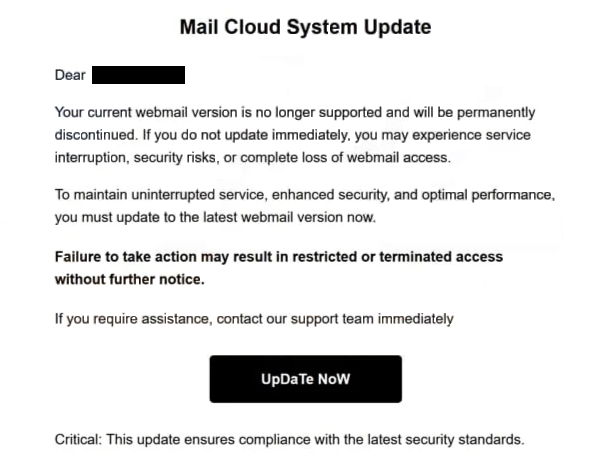
In this scam, the email begins with a headline such as “Mail Cloud System Update Required” or “Important Update to Your Mail Cloud Service.” The body of the message asserts that the email account is part of a cloud migration or platform enhancement. It then states that there are pending actions that must be completed to avoid interruption of email services. The wording is designed to suggest that failing to act will result in limited access or even suspension of the mailbox.
The email does not reference any authentic account information. It does not include the recipient’s actual email provider name, account plan, recent login history, or details that tie the message to the user’s real email account. This lack of contextual information exists because the scammers do not have access to the recipient’s secure account data. Instead, the message uses generic language that could apply broadly to many users.
Embedded in the email is a link or button that claims to be the route to complete the “Mail Cloud System Update.” Clicking this link does not direct the recipient to the legitimate login portal of any email service. Instead, it opens a fake webpage that imitates an email login interface or an account verification portal. This page is designed to capture credentials.
When the user arrives at the fraudulent page, they are prompted to enter their email address and password. The page may also ask for additional information that appears to be part of a verification step. Any information entered on this page is intercepted by scammers. It is not used to complete a real update or to secure an account.
Once attackers have these credentials, they can attempt to sign in to the actual email account using the stolen information. Access to an email account allows them to read messages, search for personal or financial data, and monitor incoming traffic. Email accounts are often linked to password recovery systems for other services. Gaining control of an inbox can therefore lead to unauthorized access to banking, social media, cloud storage, and other accounts.
After submitting credentials on the fake page, the victim may be shown a message indicating that the “Mail Cloud System Update” has been completed successfully or that verification was accepted. These confirmation messages are only designed to prevent immediate suspicion. No legitimate update occurs.
A genuine system update from an email provider would not require users to enter credentials on a page reached via an email link. Authentic updates are communicated through secure channels, and account verification is handled within the provider’s official login interface after signing in directly. No reputable email provider asks for passwords or verification codes through a link embedded in an unsolicited email.
The full “Mail Cloud System Update” phishing email is below:
Subject: – Mailbox confirmation required to continue service.
Mail Cloud System Update
Dear -,
Your current webmail version is no longer supported and will be permanently discontinued. If you do not update immediately, you may experience service interruption, security risks, or complete loss of webmail access.
To maintain uninterrupted service, enhanced security, and optimal performance, you must update to the latest webmail version now.
Failure to take action may result in restricted or terminated access without further notice.
If you require assistance, contact our support team immediately
UpDaTe NoWCritical: This update ensures compliance with the latest security standards.
2026 CPanel Inc
Rights reserved –
Our Services | Unsubscribe | Contact us
How the “Mail Cloud System Update” email scam is delivered and how to recognize it
The “Mail Cloud System Update” email scam is distributed through phishing campaigns that send identical or similar messages to large numbers of email addresses. These campaigns do not verify whether the recipient actually uses the referenced cloud mail system. Instead, the generic “Mail Cloud System Update” language is broad enough that it could concern many users.
One of the first signs that the email is fraudulent is the sender’s address. Although the display name may reference a mail service or system administrator team, the actual sending domain often does not match a legitimate email provider’s domain. When the full sender address is reviewed, it typically belongs to a domain unrelated to known providers.
The content of the email lacks useful details. The “Mail Cloud System Update” email scam does not include specific identifiers, such as part of the email address, account plan name, storage metrics, or timestamps tied to real server events. Legitimate notifications about infrastructure changes usually include contextual information that connects the message to actual account usage.
Another red flag is the link included in the message. Hovering over the link without clicking can reveal that the destination domain is not part of an official mail service domain. Phishing links often point to unfamiliar web addresses that host fake login pages.
The fake login page itself may appear convincing because it imitates the design of a real email service login screen. However, even if the interface looks familiar, the web address does not match the official domain of any trusted email provider. Entering credentials on such a page gives them directly to attackers.
The email often uses urgency to push action. It may claim that access will be limited if the “Mail Cloud System Update” is not completed within a short timeframe. Legitimate providers do not pressure users in this manner or require credentials through email links to complete system changes.
Another clear indicator of phishing is the request for personal information beyond normal login credentials, such as security question answers, recovery emails, or full passwords. Reputable services do not ask for these details through links in unsolicited emails.
The “Mail Cloud System Update” email scam relies on familiar terms like “system update” and “cloud service” to make the message feel important and technical. Verifying sender domains, avoiding embedded login links, and accessing accounts only through official provider websites or apps are effective ways to identify and avoid this phishing attempt. Always treat unexpected requests for credentials with caution and confirm account status independently through secure channels.
Site Disclaimer
2-remove-virus.com is not sponsored, owned, affiliated, or linked to malware developers or distributors that are referenced in this article. The article does not promote or endorse any type of malware. We aim at providing useful information that will help computer users to detect and eliminate the unwanted malicious programs from their computers. This can be done manually by following the instructions presented in the article or automatically by implementing the suggested anti-malware tools.
The article is only meant to be used for educational purposes. If you follow the instructions given in the article, you agree to be contracted by the disclaimer. We do not guarantee that the artcile will present you with a solution that removes the malign threats completely. Malware changes constantly, which is why, in some cases, it may be difficult to clean the computer fully by using only the manual removal instructions.