

The “Mailbox Patch 13JCS20 Update” email is a phishing attempt that claims users must apply a mailbox patch to prevent disruptions to their email service. The email presents Patch 13JCS20 as a required update. It states that this patch must be confirmed to ensure that mailbox functions continue to operate normally. Although the email uses a tone that resembles a system maintenance notice, it is not linked to any real update. Its purpose is to direct the user to a website controlled by attackers who attempt to capture login credentials.
The email claims that the mailbox is using outdated settings or that recent system changes require user confirmation. These claims are written to suggest urgency. The email states that failure to apply the patch may affect the delivery or syncing of email. None of this information is correct. There is no patch called 13JCS20, and no provider distributes mandatory updates through unsolicited email links.
A button included in the “Mailbox Patch 13JCS20 Update” email is presented as the activation method for the patch. When the user clicks it, the link opens a website styled to resemble a legitimate mail login page. The page may use colours or icons similar to those of real providers. Its goal is to encourage the user to enter their email address and password. Although the page looks familiar, it is controlled by attackers. Any details entered on the page are collected.
If attackers obtain login credentials, they can sign in to the user’s email account. Access to an email account grants the ability to view personal correspondence, search for financial records and read contained data. Attackers may also review notification emails from other platforms and attempt password resets. This may allow them to access banking accounts, online stores or cloud accounts linked to the compromised email address. The attackers may also send phishing emails from the compromised account. This increases the risk to the user’s contacts.
The “Mailbox Patch 13JCS20 Update” email may also mention expiration times. Some versions state that the patch must be activated by a certain date. Others warn that the mailbox will stop working until the patch is applied. This approach encourages users to respond quickly. Urgency is used because users may not examine the email closely when they believe that their access to email is threatened.
The phishing email does not contain personalised information. It does not include the user’s name, account details or other identifying data. The email is written so that it can be sent to many recipients. A real maintenance notice includes clear information linked to the account. The absence of such information is an indicator that the email is not legitimate.
Real providers do not issue user-applied patches or request confirmation through unsolicited links. Updates to mail systems occur without user activation. Providers do not ask users to enter credentials on external websites to continue using their mailboxes. All claims within the “Mailbox Patch 13JCS20 Update” email exist only to lead users toward the phishing website.
Users who clicked the link and entered information should change their email password as soon as possible. They should also update passwords for services linked to that account. Users who did not interact with the email are not affected.
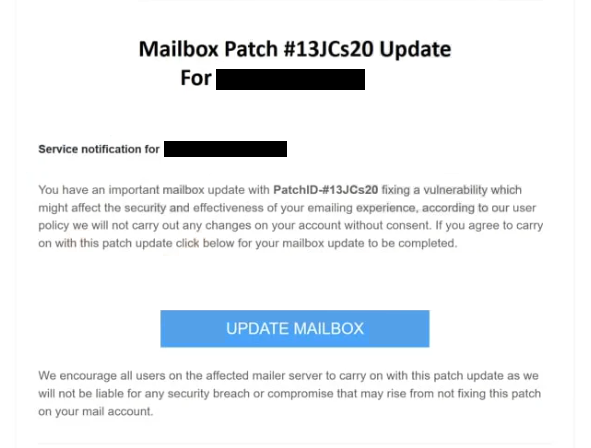
The full “Mailbox Patch #13JCs20 Update” email is below:
Mailbox Patch #13JCs20 Update For –
Service notification for –
You have an important mailbox update with PatchID-#13JCs20 fixing a vulnerability which might affect the security and effectiveness of your emailing experience, according to our user policy we will not carry out any changes on your account without consent. If you agree to carry on with this patch update click below for your mailbox update to be completed.
UPDATE MAILBOX
We encourage all users on the affected mailer server to carry on with this patch update as we will not be liable for any security breach or compromise that may rise from not fixing this patch on your mail account.
©2025 -. All Rights Reserved.
This is a system generated notification. Do not reply
How to recognise phishing emails
The “Mailbox Patch 13JCS20 Update” phishing email displays signs that can help users recognise it as fraudulent. These signs are specific to this email and relate directly to the tactics used in this scam.
The first sign is the sender’s address. Although the email claims to come from a system administrator or service provider, the sender address is often unrelated to any real domain. It may include unusual characters or names that do not match the user’s provider. Legitimate maintenance notices come from official domains used by the provider.
Another sign is the absence of personalised information. The “Mailbox Patch 13JCS20 Update” email does not address the user by name. It does not reference the actual mailbox or any technical details associated with the account. A genuine update notice includes information that matches the user’s account.
The wording of the email also raises concern. It refers to Patch 13JCS20 as if it were a standard update. Real updates do not use random patch identifiers and do not require users to confirm them manually. The vague reference to performance issues and outdated settings is another indicator that the email is not genuine.
The link in the email provides another clear warning. When hovering over the button, the destination website does not match any real provider’s domain. Although the link text may appear familiar, the actual address leads to an unrelated website. Users should avoid clicking links that lead to unfamiliar pages.
Requests for login credentials through external websites indicate phishing. Real providers do not send emails instructing users to confirm patches or updates by entering passwords through a link. Any such request should be viewed as unsafe.
Language quality can also assist in identifying phishing attempts. Some versions of this scam contain awkward phrasing or formatting issues. These are indications that the email was not produced by a professional support team.
The emphasis on urgency provides another warning sign. The “Mailbox Patch 13JCS20 Update” email claims that immediate action is required to avoid loss of email access. Real updates do not rely on urgency to prompt user action.
Users who notice these signs should avoid interacting with the email. They should not click the link or provide information. If a mailbox issue is suspected, the user should sign in directly through the provider’s official website and review account status there.
Incoming search terms:
Site Disclaimer
2-remove-virus.com is not sponsored, owned, affiliated, or linked to malware developers or distributors that are referenced in this article. The article does not promote or endorse any type of malware. We aim at providing useful information that will help computer users to detect and eliminate the unwanted malicious programs from their computers. This can be done manually by following the instructions presented in the article or automatically by implementing the suggested anti-malware tools.
The article is only meant to be used for educational purposes. If you follow the instructions given in the article, you agree to be contracted by the disclaimer. We do not guarantee that the artcile will present you with a solution that removes the malign threats completely. Malware changes constantly, which is why, in some cases, it may be difficult to clean the computer fully by using only the manual removal instructions.