

The “Message Has Been Blocked For Delivery” email scam presents itself as a notice informing the recipient that an outgoing email could not be delivered. It claims that the email was blocked due to an account issue, a system error or a policy change. The email states that the user must review the blocked email or restore delivery by clicking a link. The purpose of this phishing attack is to deceive the user into entering email login credentials on a website controlled by the attacker.
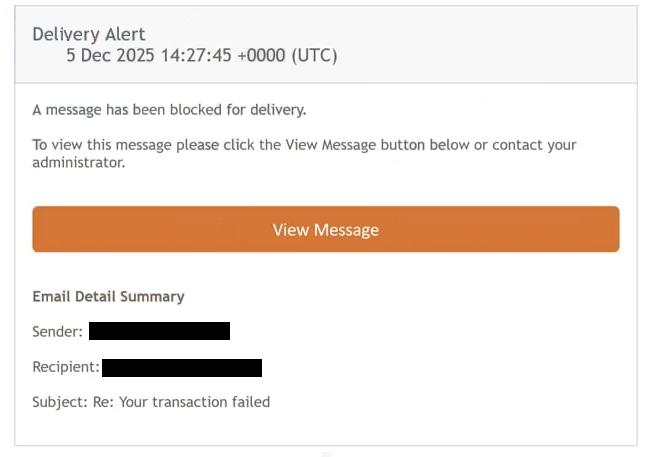
The email states that one or more outgoing emails were rejected. It may mention policy checks, delivery filter updates or account validation failures. These statements are generic and do not reflect real conditions. They are intended to create concern and prompt immediate interaction. Many users rely on email for daily communication, so warnings about blocked messages can cause them to act without carefully inspecting the content.
The “Message Has Been Blocked For Delivery” phishing email displays a View Message button. Clicking the button does not provide any information about an actual blocked email. Instead, it opens a website designed to look like a webmail login page. The website may imitate the design style of well-known mail platforms. It may include colours, icons or layout features that are intended to create a sense of authenticity. Despite the appearance, it has no connection to the user’s real email provider.
The phishing website requests the user’s email address and password. Once these details are submitted, attackers gain direct access to the email account. With access, they can read private emails, view personal information and review contact lists. They may also search for documents or correspondence containing financial information, identification details or security notifications from other services. This information can be used to carry out identity theft or unauthorised account access.
A compromised email account can also be used to target the victim’s contacts. Attackers may send additional phishing emails from the victim’s account. These emails may appear convincing because they originate from a recognised address. In some cases, attackers use compromised accounts to request money or distribute malicious links. They may also attempt to change account settings to maintain long-term access.
Some versions of the “Message Has Been Blocked For Delivery” phishing email mention deadlines. They may state that the blocked message will be removed if the user does not act or that the email account may experience further restrictions. The aim is to increase urgency. Phishing attacks often rely on this behaviour because it limits the user’s willingness to verify the legitimacy of the email.
Another characteristic of this scam is its lack of personalised details. The email does not include the recipient’s name or any specific information about the alleged blocked message. It does not reference subject lines, timestamps or recipient addresses. The absence of these details indicates that the email is part of a bulk campaign. Attackers do not know whether the user attempted to send an email at all. The content is written to apply to any recipient.
No part of this email reflects a real delivery failure. Email providers do not require users to click external links to restore delivery or review blocked emails. Any handling of rejected email is performed automatically and is usually accompanied by detailed notifications that reference the specific message involved. The “Message Has Been Blocked For Delivery” email contains none of this information because the scenario it describes is fabricated.
Users who entered their credentials into the phishing website must change their email password as soon as possible and update passwords for other services connected to that email account. Those who received the phishing email but did not interact with it face no risk and may delete it.
How to recognise phishing emails
Phishing emails share several recognisable traits, and the “Message Has Been Blocked For Delivery” scam fits these patterns. Identifying these signs helps prevent credential theft.
One of the clearest indicators is the sender address. Although the email claims to come from an administrator or delivery system, the sender address often uses unfamiliar domains. These domains may contain unusual strings or names that do not match any official email service. A genuine delivery notice would originate from a verified domain belonging to the user’s actual provider.
Another sign is the absence of personalised information. The phishing email does not refer to the user by name. It also does not provide details about the allegedly blocked email. Real delivery failure notices include the reason for the failure, the address involved and other technical details. Their absence suggests the email is a mass-distributed phishing attempt.
The link included in the email provides another warning. Hovering the cursor over the link reveals the actual website address. In this scam, the address does not match the domain of any recognised service. Even if the link text appears legitimate, the destination will not be associated with the user’s real provider. Users should avoid clicking any link that leads to an unfamiliar website.
Unexpected requests for login information are a strong indication of phishing. Providers do not ask users to enter their credentials through links in unsolicited emails to resolve delivery issues. Any such request is unsafe and should be ignored.
Language quality may also reveal the nature of the email. Some versions of this scam include inconsistent phrasing or unusual formatting. These signs suggest that the email was not produced by a legitimate support team.
Urgency is another common tactic. The “Message Has Been Blocked For Delivery” scam claims that action must be taken quickly to avoid losing access to a blocked email. Real providers do not rely on pressure tactics to make users click links.
If any of these signs appear, the safest approach is to delete the email without interacting with it. If the user is unsure about a delivery issue, they can check their email account directly through their provider’s official website rather than relying on links in unsolicited emails.
Site Disclaimer
2-remove-virus.com is not sponsored, owned, affiliated, or linked to malware developers or distributors that are referenced in this article. The article does not promote or endorse any type of malware. We aim at providing useful information that will help computer users to detect and eliminate the unwanted malicious programs from their computers. This can be done manually by following the instructions presented in the article or automatically by implementing the suggested anti-malware tools.
The article is only meant to be used for educational purposes. If you follow the instructions given in the article, you agree to be contracted by the disclaimer. We do not guarantee that the artcile will present you with a solution that removes the malign threats completely. Malware changes constantly, which is why, in some cases, it may be difficult to clean the computer fully by using only the manual removal instructions.