The “Messages Are On Hold” email scam is a phishing campaign that attempts to steal email account credentials by falsely claiming that several incoming messages have been placed on hold. Recipients are told that their mailboxes contain pending emails awaiting release and that they must review or approve them before delivery. These claims are false and are intended to persuade users to visit a credential-stealing website.
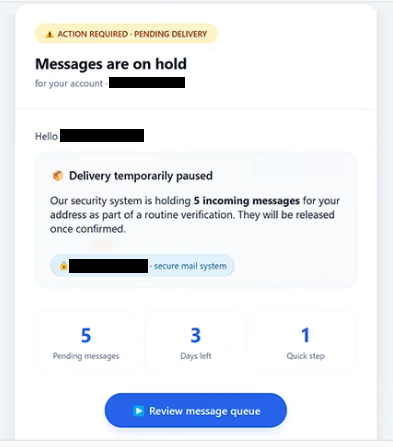
The email informs recipients that multiple incoming messages have been temporarily withheld and are not yet available in the inbox. To make the notification appear legitimate, the message may list the supposed senders, subjects, or dates of the pending emails. It then encourages the recipient to release the messages by clicking a button or hyperlink embedded in the email.
Selecting the provided button does not restore any emails. Instead, recipients are redirected to a phishing page that imitates an email account sign-in portal. The website requests the user’s email address and password under the pretense of verifying ownership of the mailbox or authorizing the release of the pending messages. In reality, the submitted credentials are sent directly to the attackers operating the phishing campaign.
Compromising an email account can expose a significant amount of sensitive information. Attackers may gain access to personal correspondence, business communications, invoices, password reset emails, and account verification messages. Since many online services rely on email for password recovery, access to a mailbox can also provide opportunities to compromise additional accounts linked to the same email address.
The “Messages Are On Hold” email scam exploits the possibility of missing important communications. Rather than claiming that an account has been hacked or suspended, the email suggests that legitimate messages are waiting for approval. This approach encourages recipients to interact with the notification out of curiosity or concern that they could miss business documents, financial information, or other important correspondence.
To increase credibility, the email may resemble an automated notification generated by a mail server or email security system. It can include tables, message summaries, mailbox references, or administrative language intended to imitate genuine email management notifications. These elements are designed to make the phishing message appear authentic.
Anyone who entered login credentials after following a link contained in the “Messages Are On Hold” email should immediately change the password for the affected email account. If the same password has been used for other services, those accounts should also be secured. Users should review recent account activity and update recovery information if they suspect unauthorized access.
The full “Messages Are On Hold” phishing email is below:
Subject: You Have Important Messages On Hold, Action Required
ACTION REQUIRED · PENDING DELIVERY
Messages are on hold
for your account · –Hello -,
Delivery temporarily pausedOur security system is holding 5 incoming messages for your address as part of a routine verification. They will be released once confirmed.
– · secure mail system5 Pending messages
3 Days left
1 Quick step
[Review message queue]What happens next:
You’ll be directed to the secure message center
Preview sender details of pending messages
Approve delivery in one tap — messages arrive instantlyWhy this matters:
This extra step prevents unsolicited emails and protects your inbox. Only confirmed messages go through.Verified by – · internal notification
Help Center • Security • System StatusThis is an automated message from your email service.
If this message arrives as spam, move it to your inbox.© 2026 *- Mail System. All rights reserved.
Secure delivery · TLS 1.3
How to recognize phishing emails like “Messages Are On Hold”
Unexpected notifications claiming that emails are pending, quarantined, blocked, or awaiting release should be treated with caution, particularly if the recipient was not expecting such a notice. Legitimate email providers generally allow users to review mailbox status by signing in through their official webmail portal rather than through links contained in unsolicited emails.
Recipients should also inspect the sender’s address carefully. Phishing campaigns frequently use display names that resemble email administrators or support departments while the underlying email address belongs to an unrelated domain.
Another warning sign is a request to sign in after clicking a link contained in an unexpected email. A legitimate email provider does not require users to enter their password on an unfamiliar website simply to release incoming messages. If a login page appears after selecting a link in an unsolicited email, the safest course of action is to close the page and access the mailbox directly through the provider’s official website.
Users should also be cautious of messages that create unnecessary urgency by claiming that pending emails will expire, be deleted, or remain inaccessible unless immediate action is taken. This tactic is commonly used in phishing campaigns to encourage recipients to act before verifying the authenticity of the notification.
The safest way to verify whether emails are actually being held is to sign in to the email account through its official webmail portal or email application instead of using links contained in unsolicited messages. If no corresponding notification appears after logging in, the email should be considered a phishing attempt.
Incoming search terms:
Site Disclaimer
2-remove-virus.com is not sponsored, owned, affiliated, or linked to malware developers or distributors that are referenced in this article. The article does not promote or endorse any type of malware. We aim at providing useful information that will help computer users to detect and eliminate the unwanted malicious programs from their computers. This can be done manually by following the instructions presented in the article or automatically by implementing the suggested anti-malware tools.
The article is only meant to be used for educational purposes. If you follow the instructions given in the article, you agree to be contracted by the disclaimer. We do not guarantee that the artcile will present you with a solution that removes the malign threats completely. Malware changes constantly, which is why, in some cases, it may be difficult to clean the computer fully by using only the manual removal instructions.