

The “Multiple Unusual Sign-In Attempts Detected” phishing scam is an email-based attack that impersonates an automated security alert. The message claims that repeated unauthorised login attempts have been detected on the recipient’s account and that immediate action is required to prevent compromise. The purpose of the email is to direct recipients to a fraudulent website where account credentials can be harvested.
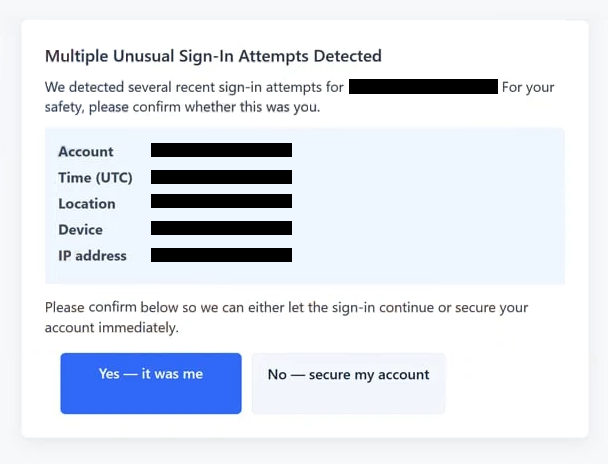
The email presents itself as originating from an account provider or security system. It states that several login attempts were blocked or flagged due to abnormal activity. The wording suggests that the account is under active threat and that intervention is necessary. No verifiable information is provided to support the claim. There are no timestamps, device identifiers, or location details that would allow the recipient to confirm the activity.
A prominent link or button is included in the email, described as a security review or account protection step. Clicking this link redirects the recipient to a phishing page designed to resemble a legitimate sign-in or account security portal. The page layout, colour scheme, and branding are intended to mirror authentic service interfaces to reduce suspicion.
The phishing page prompts the user to enter login credentials. This typically includes an email address and password. Some versions of the page request additional security information, such as verification codes or recovery details. All submitted data is transmitted to the attackers. The page may then display a confirmation message or redirect the user to another site, giving the impression that the issue has been resolved.
Once credentials are obtained, attackers can access the compromised account. This access enables them to read private communications, reset passwords for linked services, and send additional phishing emails from a trusted address. Email accounts are frequently used as recovery points for other services, which allows a single breach to cascade into broader account takeover.
This phishing scam does not rely on file attachments, malicious downloads, or exploit code. Its effectiveness depends entirely on social engineering. The attackers exploit the expectation that security alerts are legitimate and that urgent action is necessary. The email does not reflect any actual monitoring or analysis of the recipient’s account activity.
The scam targets a broad audience because most users maintain multiple online accounts. The email avoids referencing a specific platform in detail, allowing recipients to assume it relates to a service they use. This ambiguity increases the likelihood of engagement.
Although legitimate services do send security notifications, they do not request credential confirmation through email links. Real security alerts direct users to sign in through official websites or applications accessed independently. The phishing email imitates the appearance of a security notice while removing these safeguards.
How to identify phishing emails
Identifying phishing emails, such as “Multiple Unusual Sign-In Attempts Detected,” requires evaluating both the content and the requested action. One of the primary indicators is the emphasis on urgency. The message implies that the account remains vulnerable and that an immediate response is required. Legitimate providers notify users of security events but do not apply pressure through unsolicited emails.
Another significant indicator is the instruction to use an embedded link to secure the account. Reputable services do not ask users to confirm credentials through links contained in email messages. Security actions are performed after logging in through official websites or applications accessed directly by the user.
The sender’s address should be examined carefully. While the display name may appear to reference security or support, the underlying email address often originates from an unrelated or unauthorised domain. Inspecting the full sender information can reveal discrepancies that indicate impersonation.
Phishing emails of this type are intentionally vague. The message states that multiple sign-in attempts were detected but provides no supporting details. Legitimate security alerts commonly include information such as approximate locations, device types, or timestamps. The absence of such data prevents verification and is a deliberate tactic.
The destination of the embedded link is another critical factor. Hovering over the link may reveal a domain that does not match the service being impersonated. Phishing pages often use unrelated domains, complex URL structures, or naming conventions intended to appear technical without being legitimate.
Language and formatting inconsistencies may also be present. The email may use phrasing that differs slightly from official communications, including unusual capitalisation, spacing, or sentence structure. Even minor deviations can indicate that the message was not generated by a legitimate system.
Another warning sign is the lack of alternative verification methods. Authentic security notifications encourage users to review account activity through official dashboards or applications. A message that restricts resolution to a single email link is attempting to control the interaction path.
Context is also important. If there has been no recent login attempt, password change, or device activity, an unexpected alert about repeated sign-in attempts should be treated with caution. Phishing emails frequently arrive without any prior event that would justify them.
The safest response is to avoid interacting with the email entirely. Users should access their account by manually entering the official website address into the browser or using a trusted application. If no alert appears after signing in, the email can be safely dismissed.
Phishing scams that reference unusual sign-in activity succeed by exploiting trust in automated security systems. Careful examination of message content and independent verification of account status are the most effective ways to prevent credential compromise.
Site Disclaimer
2-remove-virus.com is not sponsored, owned, affiliated, or linked to malware developers or distributors that are referenced in this article. The article does not promote or endorse any type of malware. We aim at providing useful information that will help computer users to detect and eliminate the unwanted malicious programs from their computers. This can be done manually by following the instructions presented in the article or automatically by implementing the suggested anti-malware tools.
The article is only meant to be used for educational purposes. If you follow the instructions given in the article, you agree to be contracted by the disclaimer. We do not guarantee that the artcile will present you with a solution that removes the malign threats completely. Malware changes constantly, which is why, in some cases, it may be difficult to clean the computer fully by using only the manual removal instructions.