

news-kogesa.com is a website that attempts to gain permission to send browser notifications and then uses that permission to deliver advertising. The page is built around a simple prompt that asks visitors to click “Allow.” It may claim this step is required to continue to the site, confirm a check, watch a video, or access content. These instructions are misleading. Clicking “Allow” does not verify anything, as it only enables notifications from the website.
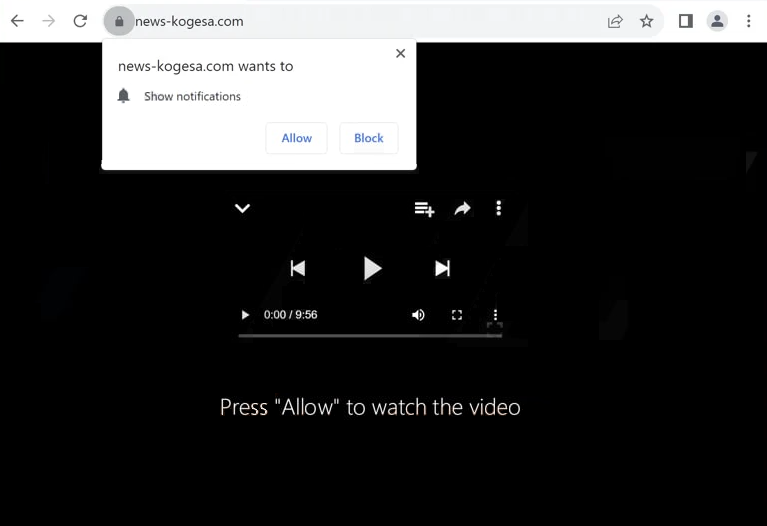
Once notification permission is granted, news-kogesa.com can push ads through the browser’s notification system. These notifications can appear on the desktop even when the browser is not actively open. They may show up repeatedly and are designed to attract clicks. The notifications are not system alerts, and they are not generated by a security tool. They come directly from the site because the browser has been allowed to display them.
The ads delivered by news-kogesa.com can lead to untrustworthy pages. Some notifications promote fake warnings, questionable downloads, suspicious offers, or other content that is meant to mislead visitors. The exact links and messages can change over time because they are controlled by advertising partners. This makes the notifications unpredictable and increases the risk of being redirected to scams.
Many visitors reach news-kogesa.com through redirects rather than typing the address directly. The site often appears after browsing pages that use aggressive advertising or unreliable ad networks. Instead of offering real information, the page focuses on getting notification access, then using it to send ads outside of normal browsing.
Allowing notifications from news-kogesa.com can lead to ongoing interruptions and repeated exposure to unsafe advertising content. The issue is caused by a browser permission that has been misused, not by a legitimate system warning.
Why users may get redirected to news-kogesa.com
Redirects to news-kogesa.com are commonly triggered by unsafe advertising. Many websites load third-party ads that can open new tabs, forward visitors to other pages, or launch pop-ups. A click on something that looks normal, such as a play button, a download link, or a navigation element, can trigger a redirect chain that ends on news-kogesa.com.
Some redirects happen automatically. Certain pages run scripts that forward visitors without clear interaction. This behavior is common on websites that rely heavily on ad revenue and do not control the quality of the ads being served.
Adware can also play a role. If adware is present on a system, it can inject extra ads into web pages, open sponsored tabs, and push the browser toward notification permission sites. This can make redirects happen more often and across many unrelated browsing sessions.
Unwanted browser extensions can contribute as well. Extensions that include advertising features may open promoted pages, redirect searches, or interfere with normal browsing. If an extension is involved, the redirects may continue until the extension is removed.
Remove news-kogesa.com notifications
It’s recommended to scan the computer with an anti-virus program to check for an adware infection. Installing an adblocker program is also a good idea.
If permission has been given to news-kogesa.com to show notifications, it should be revoked immediately. Instructions are provided below.
- Mozilla Firefox: Open the menu (the three bars at the top-right corner), click Options, then Privacy & Security. Scroll down to Permissions, press Settings next to Notifications, and remove news-kogesa.com and any other questionable websites from the list. It’s possible to permanently turn off push notification requests by checking the “Block new requests asking to allow notifications” box in the same Notifications settings.
- Google Chrome: Open the menu (the three dots top-right corner), then Settings, then Privacy and security, then Site Settings. Click on Notifications under Permissions, and remove news-kogesa.com and any other questionable websites from the list. It’s possible to permanently turn off push notification requests by toggling off “Sites can ask to send notifications”.
- Microsoft Edge: Open the menu (the three dots top-right corner), then Settings, then Cookies and site permissions, then Notifications. Review which sites have permission and remove news-kogesa.com and any other questionable websites from the list. It’s possible to permanently turn off push notification requests by toggling off “Ask before sending”.
Site Disclaimer
2-remove-virus.com is not sponsored, owned, affiliated, or linked to malware developers or distributors that are referenced in this article. The article does not promote or endorse any type of malware. We aim at providing useful information that will help computer users to detect and eliminate the unwanted malicious programs from their computers. This can be done manually by following the instructions presented in the article or automatically by implementing the suggested anti-malware tools.
The article is only meant to be used for educational purposes. If you follow the instructions given in the article, you agree to be contracted by the disclaimer. We do not guarantee that the artcile will present you with a solution that removes the malign threats completely. Malware changes constantly, which is why, in some cases, it may be difficult to clean the computer fully by using only the manual removal instructions.