

The “One Time Password Authentication” scam is a phishing email that claims a one-time password verification is required to complete a login or confirm account access. The message suggests that a recent sign-in attempt triggered an authentication request. It instructs the recipient to verify the login by following a link or entering a code on a provided page. This email is fraudulent and is not connected to a legitimate service.
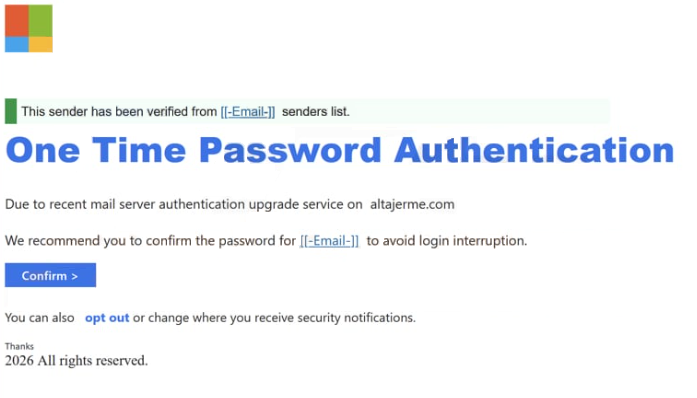
The message often appears to be a security alert generated automatically. It may state that a one-time password was requested or that authentication failed. In some versions, the email includes a button labeled with phrases such as “Verify Now,” “Confirm Login,” or “Authenticate Access.” The wording is brief and technical, which makes the request seem routine.
Clicking the link leads to a phishing web page that resembles a login portal. The page may first ask for an email address and a password. After entering those details, it may prompt the user to provide a one-time password or verification code. The design can include simple branding elements to imitate the impersonated service, but the domain displayed in the browser does not match the official website.
The purpose of the page is to collect both login credentials and authentication codes. A one-time password is meant to provide an extra layer of security during legitimate sign-in attempts. However, if a user enters their password and active verification code on a fraudulent page, the scammers can use that information to access the real account immediately.
In some cases, the phishing page requests the one-time password first, claiming that authentication is already in progress. In others, it collects login credentials before asking for the verification code. Either way, the captured information is transmitted directly to the scammers. The page does not complete any authentication process and does not display actual account content.
If attackers obtain valid credentials and a current one-time password, they can attempt to sign into the real account without triggering additional verification barriers. This may grant access to email accounts, financial services, business platforms, or cloud storage, depending on the service being impersonated. Once inside, attackers can change passwords, update recovery details, and prevent the legitimate user from regaining control.
The authentication request described in the email is fabricated. The scammers do not have insight into real login attempts or authentication events. The message is designed to create confusion and urgency, especially if the recipient was not attempting to sign in at the time.
Subject: MailBox Requesting Authentication
This sender has been verified from [[-Email-]] senders list.
One Time Password AuthenticationDue to recent mail server authentication upgrade service on altajerme.com
We recommend you to confirm the password for [[-Email-]] to avoid login interruption.
Confirm >You can also opt out or change where you receive security notifications.
Thanks
2026 All rights reserved.
How to identify phishing emails
The “One Time Password Authentication” scam can be recognized by examining how the email presents the authentication request. Legitimate one-time password notifications are usually sent only when a user initiates a login. Receiving an unexpected authentication request without attempting to sign in is a strong warning sign.
The sender address is another indicator. While the display name may reference a trusted service, the full email address often uses a domain unrelated to the legitimate provider. Authentic authentication emails come from official service domains.
The link included in the message is also revealing. When inspected, the destination does not match the official website of the service being impersonated. The domain may contain extra words, unusual endings, or subtle misspellings. Genuine services direct users to enter verification codes within their established login environment, not on unfamiliar external pages.
The linked page typically focuses on collecting sensitive information without providing access to real account features. It may request both a password and a one-time password in the same session. Legitimate platforms do not ask users to share verification codes outside their secure login interface.
The tone of the message often implies that authentication must be completed immediately to avoid account restriction. This pressure is meant to prompt quick action without careful review. Real authentication alerts do not require credential submission through unsolicited links.
By reviewing the sender domain, checking whether a login was actually attempted, and avoiding entering one-time passwords on unfamiliar websites, recipients can identify the “One Time Password Authentication” scam and protect their accounts from unauthorized access.
Site Disclaimer
2-remove-virus.com is not sponsored, owned, affiliated, or linked to malware developers or distributors that are referenced in this article. The article does not promote or endorse any type of malware. We aim at providing useful information that will help computer users to detect and eliminate the unwanted malicious programs from their computers. This can be done manually by following the instructions presented in the article or automatically by implementing the suggested anti-malware tools.
The article is only meant to be used for educational purposes. If you follow the instructions given in the article, you agree to be contracted by the disclaimer. We do not guarantee that the artcile will present you with a solution that removes the malign threats completely. Malware changes constantly, which is why, in some cases, it may be difficult to clean the computer fully by using only the manual removal instructions.