

The “Pending Email Release” email is a phishing attempt designed to look like a routine alert from an email service provider. It claims that several incoming emails are being held for delivery and tells the user they must click a link to release them. The email imitates the language and appearance of standard system notices, but it is not connected to any legitimate service. Its goal is to push recipients to open a link that leads to a fake login page.
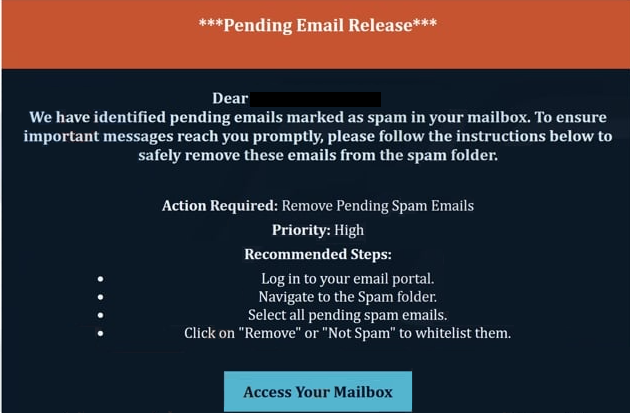
When the user clicks the link, they are directed to a site that resembles an email sign-in website. It may claim that important messages cannot be delivered unless the user signs in. Any email address and password entered on this page are sent directly to the scammers. With access to the victim’s inbox, attackers can read private messages, gather personal information, and attempt to break into other accounts linked to that email. Because password reuse is common, this type of compromise can affect many services at once.
Scammers who control an email account may use it to send new phishing messages, reset passwords, or search for financial data. Some remain unnoticed for long periods, quietly checking the inbox for recovery emails or login notifications that can help them take over more accounts. The “Pending Email Release” scam uses urgency to convince users that they must act quickly, which increases the chances that they will not notice the warning signs of a phishing attempt.
The full “Pending Email Release” email is below:
Subject: Upgrade ********l: You Have 4 pending incoming emails
***Pending Email Release***
Dear – ,
We have identified pending emails marked as spam in your mailbox. To ensure important messages reach you promptly, please follow the instructions below to safely remove these emails from the spam folder.Action Required: Remove Pending Spam Emails
Priority: HighRecommended Steps:
Log in to your email portal.
Navigate to the Spam folder.
Select all pending spam emails.
Click on “Remove” or “Not Spam” to whitelist them.Access Your Mailbox
This is an automated message from the IT department. If you encounter any issues, contact support.
© 2025 IT Support Team · Automated Notification
Signs that reveal the email is a scam
There are several indicators that show the email is not legitimate. Many versions use a generic greeting instead of the recipient’s name. The sender address often looks like a system account but comes from an unrelated domain. The message usually claims that urgent action is required to prevent messages from being lost or blocked. Real email providers do not ask users to follow unknown links to release held messages, nor do they require login details through pages linked in unsolicited emails.
Learning to identify phishing emails helps prevent account compromise. Unexpected alerts about storage limits, message delivery problems, or account issues should be treated cautiously. Users can hover over links to see where they lead, which often reveals that the site is not part of the real service. Spelling mistakes, unclear formatting, and unusual phrasing are also common in fraudulent messages. Phishing attempts often try to create pressure by warning that the account will stop working unless the user responds immediately.
Email scams that mimic system notifications rely on the fact that many people are used to receiving automated alerts from their providers. Verifying the sender, checking links before clicking, and visiting the provider’s website directly through a browser are simple habits that help avoid phishing attempts. These small steps can prevent attackers from gaining access to sensitive accounts.
Preventing similar phishing attacks
Phishing emails like “Pending Email Release” take advantage of routine emails that users expect from their email service. Staying careful with unexpected alerts can significantly reduce the risk of falling for these scams. Users should avoid clicking links in unsolicited messages and instead check their accounts directly through the official website. Strong, unique passwords and multi-factor authentication provide additional protection if credentials are ever exposed. Taking a moment to verify a suspicious notification helps prevent long-term access by attackers and stops further misuse of compromised accounts.
Site Disclaimer
2-remove-virus.com is not sponsored, owned, affiliated, or linked to malware developers or distributors that are referenced in this article. The article does not promote or endorse any type of malware. We aim at providing useful information that will help computer users to detect and eliminate the unwanted malicious programs from their computers. This can be done manually by following the instructions presented in the article or automatically by implementing the suggested anti-malware tools.
The article is only meant to be used for educational purposes. If you follow the instructions given in the article, you agree to be contracted by the disclaimer. We do not guarantee that the artcile will present you with a solution that removes the malign threats completely. Malware changes constantly, which is why, in some cases, it may be difficult to clean the computer fully by using only the manual removal instructions.