

The “Authenticate Your Email Address” email is a phishing attempt that aims to trick users into providing their email login credentials. This message claims that an important update is being applied to the recipient’s email account and that the user must authenticate their address to complete this supposed update. While the email may appear legitimate at first glance, it is entirely fraudulent. The purpose of the email is to lure users into clicking a link that leads to a fake website where their information can be harvested by cybercriminals.
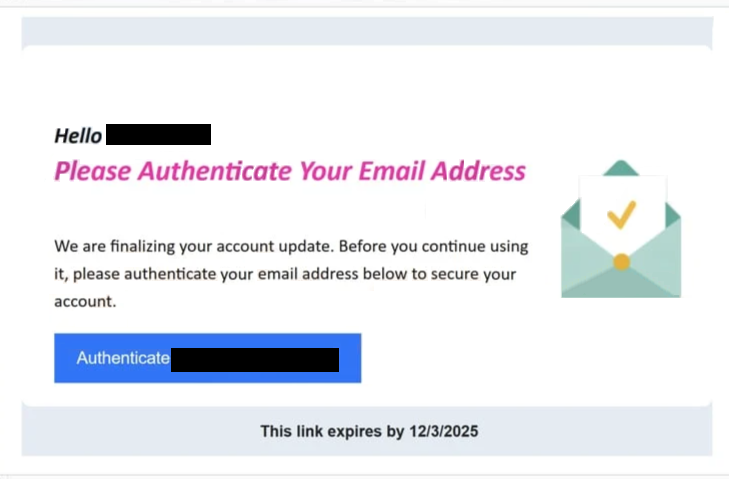
The phishing email informs the recipient that their email address needs to be authenticated, and it includes a button or link that appears to be tied to the email provider or service administrator. The email claims that the link will expire at a certain time, creating a sense of urgency. This urgent language is a common tactic used by scammers who want to pressure users into reacting quickly without questioning the validity of the request.
When the user clicks on the provided button, they are taken to a website that mimics a legitimate login website. The layout, logos, colors, and design elements are intentionally crafted to appear authentic. However, the site is completely controlled by cybercriminals. Any information entered into the login form, such as email address and password, is collected directly by the attackers. With these stolen credentials, criminals may gain full access to the victim’s email account.
Losing control of an email account can lead to serious consequences. Email accounts often serve as the central hub for identity verification, password recovery, financial notifications, and private communication. Once criminals have access, they may search through stored messages to extract personal details, including financial or billing information, addresses, phone numbers, and private conversations. They may also attempt to reset passwords for other accounts linked to the compromised email, including online banking, shopping platforms, cloud services, and social media profiles. This can result in identity theft, financial fraud, unauthorized purchases, or impersonation attempts targeting the victim’s contacts.
In addition to exploiting stolen information, attackers may also use the compromised email account to continue spreading phishing campaigns. They may send similar fraudulent messages to the victim’s friends, coworkers, or family members, making the next round of phishing attempts appear more credible. Because the messages come directly from a known account, recipients may be far more likely to trust them.
It is important to understand that this phishing email is not tied to any legitimate email service provider. It is distributed in large volumes, and the scammers do not know who the recipients are or which services they use. Recipients are selected simply because their email address was obtained through data leaks, random generation, or scraping. Receiving such an email does not mean your account is compromised by default. It only indicates that scammers are attempting to trick you into handing over information voluntarily.
The safest course of action is to avoid interacting with the email at all. Do not click any links, do not attempt to authenticate anything, and do not reply. The email should be deleted immediately. Only users who entered their information on the fake page are at risk. Those individuals should change their email passwords immediately, update passwords on any connected accounts, and enable two-factor authentication whenever possible. A fast response reduces the chance that attackers can fully exploit the stolen data.
The full “Please Authenticate Your Email Address” email is below:
Subject: Confirm your email address to contine usage
Hello -,
Please Authenticate Your Email Address
We are finalizing your account update. Before you continue using it, please authenticate your email address below to secure your account.
Authenticate –
This link expires by 12/3/2025
How to Recognize Phishing Emails
Understanding how phishing emails work is the best defense against falling victim to scams like the “Authenticate Your Email Address” email. Although phishing emails often mimic legitimate communications, they almost always contain identifiable warning signs. By learning to recognize these signs, users can avoid compromising their accounts and personal information.
One of the most common indicators of phishing is a generic greeting. Rather than addressing the recipient by name, scammers typically use vague introductions such as “Dear user”, “Hello”, or simply reference the email address itself. Companies that maintain customer accounts generally address their users personally, so a lack of personalization can reveal the email as fraudulent.
Another red flag is the sender’s email address. Scammers often use addresses that look similar to legitimate ones but include spelling errors, extra characters, or unfamiliar domains. Examining the actual address rather than relying on the display name can quickly reveal whether the sender is genuine.
Phishing emails also rely heavily on urgency. Emails may warn that an account will be disabled, that a link will expire soon, or that immediate action is required to avoid service interruption. Scammers use urgency because it discourages users from taking the time to think critically about what they are being asked to do. Legitimate companies rarely pressure customers into instant action, especially not through unsolicited emails.
Suspicious links are another major indicator. When hovering your cursor over a link, the true destination address should match the official domain of the service provider. If the URL appears unrelated or contains odd strings of characters, it is highly likely to be malicious. Even if the link text appears legitimate, the destination behind it can be entirely different.
Phishing messages frequently contain vague or generic explanations of problems. For example, they may claim that an account needs updating or verification without providing any specific details or references. Real companies provide clearer information and do not request sensitive login credentials via random emails.
By remaining alert to these signs, users can greatly reduce the risk of falling for fraudulent messages. Phishing attacks rely on deception and quick reactions, so taking a moment to inspect the content and verify its legitimacy can prevent significant harm.
Site Disclaimer
2-remove-virus.com is not sponsored, owned, affiliated, or linked to malware developers or distributors that are referenced in this article. The article does not promote or endorse any type of malware. We aim at providing useful information that will help computer users to detect and eliminate the unwanted malicious programs from their computers. This can be done manually by following the instructions presented in the article or automatically by implementing the suggested anti-malware tools.
The article is only meant to be used for educational purposes. If you follow the instructions given in the article, you agree to be contracted by the disclaimer. We do not guarantee that the artcile will present you with a solution that removes the malign threats completely. Malware changes constantly, which is why, in some cases, it may be difficult to clean the computer fully by using only the manual removal instructions.