

The “Problem with email account due to server upgrade” email scam is a phishing email that claims an email account has encountered issues as a result of a server upgrade. The message presents itself as an urgent technical notice, suggesting that the account must be verified or updated to avoid loss of access. The email is not a legitimate communication from an email provider or system administrator. Its purpose is to trick recipients into providing sensitive login information on a fraudulent page.
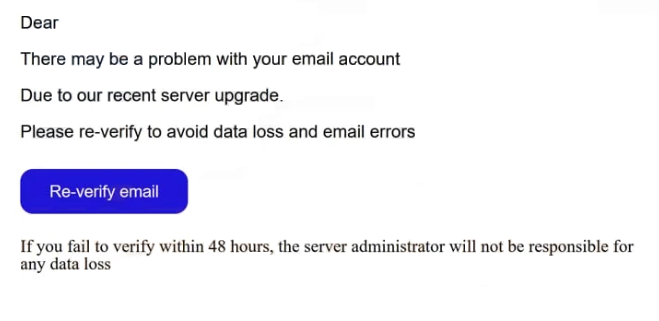
The scam email typically states that a recent server upgrade caused errors in account configuration, syncing, or security settings. It warns that unless the recipient takes immediate action, the email account may be restricted, suspended, or cease functioning properly. The language is crafted to sound technical and pressing, which can mislead users who assume it comes from their service provider.
A link or button is included to “resolve” the supposed problem. The call to action may be labeled as verification, configuration update, or account review. The link does not lead to a legitimate provider portal. Instead, it directs the recipient to a bogus web page that impersonates an email login screen. This fake page is designed to collect the recipient’s email address and password. Any credentials entered are captured by scammers.
In some variants of this scam, the fraudulent page requests additional information under the guise of further verifying the account after the initial login. Requests for recovery email addresses, phone numbers, or personal details are framed as necessary steps to complete the “upgrade fix.” In reality, providing these details gives scammers additional data they can use for account takeover or identity theft.
If scammers obtain valid login credentials, the impact can be significant. With access to the email account, they can read private messages, collect personal information, reset passwords on linked services, or use the compromised address to send further phishing emails. Accounts connected to financial services, cloud storage, or workplace systems are particularly vulnerable once email access has been compromised.
Real server upgrades and service notices are communicated through secure and verified channels. Legitimate providers do not ask users to enter credentials on pages reached through unsolicited email links, especially when the domain does not match the official service. Users are encouraged to access account settings directly through known provider websites or official apps if they have any concerns about their account status.
How this phishing email is distributed and how to recognize it
The “Problem with email account due to server upgrade” email scam is typically distributed through large-scale phishing campaigns. Scammers send this template to many email addresses at once, collected from data leaks, public sources, or automated harvesting. Because the message does not contain account-specific details tied to an actual service, it can be used broadly.
The sender information is a common clue that the email is fraudulent. Although the display name may reference technical support, server administration, or the name of an email service, the actual sending address often comes from a domain unrelated to the claimed organization. A mismatch between the display name and sending address is a red flag.
The content of the email often uses vague technical terms. It may reference server upgrades, configuration errors, or access issues without providing specific information about the email account or associated service. Genuine technical notices from providers usually include clear context and account details.
Another indicator is urgency. These scam emails often push recipients to take immediate action to avoid negative consequences, such as service suspension. Real providers typically offer multiple ways to verify or resolve issues, including access through the official account dashboard rather than requiring an immediate login via an emailed link.
The link itself is a major sign of phishing. Hovering over the link (without clicking) can reveal the true destination address. If the URL does not clearly match the official domain of the email provider, it should not be trusted. Fake login pages may mimic the design of legitimate portals, but their domain names are often unrelated or slightly altered.
A further warning sign is the type of information requested on the page that the link opens. Service providers do not request passwords, recovery details, or personal data directly through web pages reached from unsolicited emails. If the page asks for credentials or sensitive data to “resolve” a server issue, it should be treated as fraudulent.
The “Problem with email account due to server upgrade” email scam exploits fear of losing access to email services. Checking the sender address, avoiding login links in unsolicited emails, and confirming account status directly through the official service provider are effective ways to recognize and avoid this phishing attempt.
Site Disclaimer
2-remove-virus.com is not sponsored, owned, affiliated, or linked to malware developers or distributors that are referenced in this article. The article does not promote or endorse any type of malware. We aim at providing useful information that will help computer users to detect and eliminate the unwanted malicious programs from their computers. This can be done manually by following the instructions presented in the article or automatically by implementing the suggested anti-malware tools.
The article is only meant to be used for educational purposes. If you follow the instructions given in the article, you agree to be contracted by the disclaimer. We do not guarantee that the artcile will present you with a solution that removes the malign threats completely. Malware changes constantly, which is why, in some cases, it may be difficult to clean the computer fully by using only the manual removal instructions.