

The “Repair and protection” email scam is a phishing email that falsely claims an email account has been compromised or requires urgent verification. The message uses the exact phrase “Repair and protection” to make it appear as though a legitimate security process has been initiated by an email provider or security team. The email is not sent by any real service provider, and the situation it describes does not reflect an actual account event.
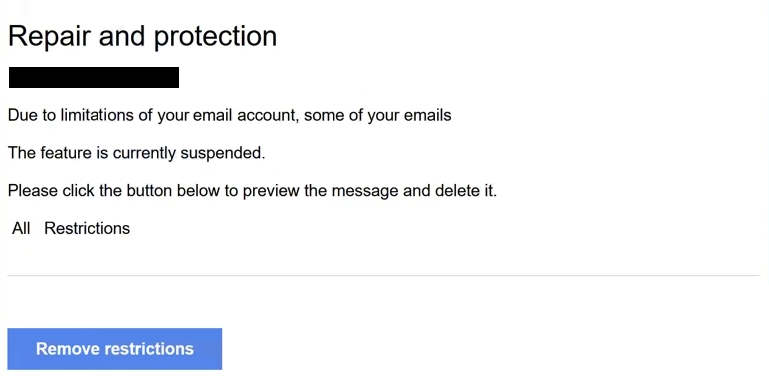
In the “Repair and protection” email scam, the message begins with a statement that a security issue has been detected in the recipient’s email account. The email asserts that immediate action is required to repair the account and protect it from further issues. It goes on to warn that, if the recipient does not complete a verification step, access to the account will remain limited or could be suspended. The wording attempts to make the issue sound urgent and technical, implying that a security process is already underway.
The email instructs the recipient to click a link in order to complete the “Repair and protection” process. The link is described as the only way to verify the account and restore full functionality. The message does not tell the recipient to log in through the official email provider website or app. Instead, all action is funneled through this single link, presented as a secure portal for verification.
Clicking the link opens a fraudulent web page that is designed to resemble a legitimate email login interface. The page displays familiar elements such as fields for an email address and password, and may even include a familiar layout or branding to make it look authentic. The page then prompts the recipient to enter their login credentials, often with text suggesting this is necessary to complete the “Repair and protection” process.
Entering credentials on this page does not activate any genuine repair or protection process. Instead, the login information is captured by scammers. The fraudulent page is not connected to the actual email provider’s systems and cannot verify, repair, or protect the account. Its sole purpose is to collect valid email credentials.
After the credentials are captured, the phishing page may display a message indicating that the verification was successful or that the account has been “protected.” These follow-up messages are designed to reassure the victim and prevent them from immediately questioning what they have entered. In reality, control of the account may now be compromised.
Once scammers obtain valid login credentials, they can attempt to sign in to the real email account. Access to an email account allows them to read private messages, search for sensitive information, and monitor incoming communications. Because many online services use email for password recovery, gaining control of the mailbox can enable attackers to compromise additional accounts. This can lead to further identity theft, financial fraud, or unauthorized access to services tied to the email address.
The “Repair and protection” email scam does not involve real tracking of threats, scans for malware, or genuine security protocols. An unsolicited email cannot detect issues in a remote account, and a web page reached through an email link cannot perform repair or protection functions. The use of technical language and phrasing such as “Repair and protection” is intended to create the impression of legitimacy and urgency, but the entire scenario is fabricated.
The full “Repair And Protection” phishing email is below:
Subject: [Abuse Notice]: Your Email account has been restricted
Repair and protection
–
Due to limitations of your email account, some of your emails
The feature is currently suspended.
Please click the button below to preview the message and delete it.
All Restrictions
Remove restrictions
How the “Repair and protection” email scam is delivered
The “Repair and protection” email scam is distributed through phishing campaigns that send the same or similar message to large numbers of email addresses. The scam does not verify whether the recipient’s email account is associated with the referenced service. Instead, it relies on the fact that most people depend on email daily and may respond quickly to a message that claims their account is at risk.
One of the clearest warning signs that the email is fraudulent is the sender’s domain. While the display name may include terms that suggest it comes from a security team or service provider, the actual sending address often belongs to a domain that does not match the official domain of any legitimate email provider. A genuine provider’s emails always originate from a verified domain controlled by the service itself.
The content of the email also lacks verifiable details. The “Repair and protection” email scam does not reference specific account information, recent activity, or any contextual data that could be checked independently. Legitimate security notices typically include references such as partial account numbers, timestamps, or context that demonstrates awareness of actual account events. The absence of this information is a strong indicator that the email is not authentic.
Another red flag is the link itself. Phishing emails often embed a link that appears legitimate but points to an unrelated domain. Hovering over the link (without clicking) reveals the destination domain. If this domain does not match the official domain of the email provider, the link should not be trusted. Fraudulent pages reached through these links may be designed to look convincing, but the address bar reveals that the site is not affiliated with the actual service.
The request for credentials is another clear indicator of phishing. A real service provider will not ask for full login information through a link in an unsolicited email. Instead, security notices direct users to sign in through the known official website or application, where they can independently verify account status.
The “Repair and protection” email scam also uses language that implies urgency without providing actual technical details. It states that action is required immediately, but does not offer alternative ways to verify the claim, such as through account settings or official support channels. This one-path approach, clicking the link and entering credentials, is a hallmark of phishing.
Site Disclaimer
2-remove-virus.com is not sponsored, owned, affiliated, or linked to malware developers or distributors that are referenced in this article. The article does not promote or endorse any type of malware. We aim at providing useful information that will help computer users to detect and eliminate the unwanted malicious programs from their computers. This can be done manually by following the instructions presented in the article or automatically by implementing the suggested anti-malware tools.
The article is only meant to be used for educational purposes. If you follow the instructions given in the article, you agree to be contracted by the disclaimer. We do not guarantee that the artcile will present you with a solution that removes the malign threats completely. Malware changes constantly, which is why, in some cases, it may be difficult to clean the computer fully by using only the manual removal instructions.