

Rusoska.com Pop-ups Virus refers to intrusive pop-up behaviour associated with visits to the rusoska.com website. Rusoska.com does not function as a conventional content site. Instead, it operates as a page designed to trigger browser notification requests and display misleading prompts that encourage users to interact. The site does not provide meaningful services or information and exists primarily to generate pop-ups and redirects.
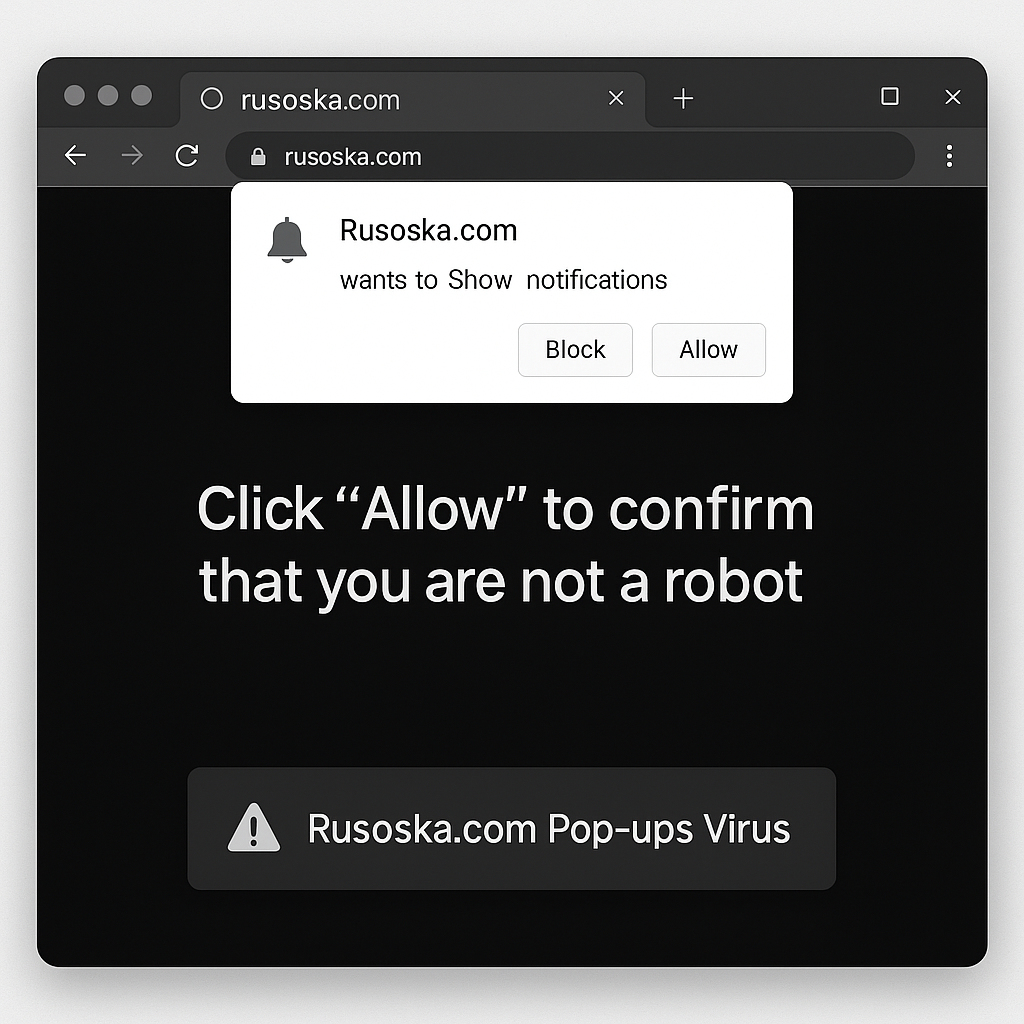
rusoska.com is considered to be a suspicious domain due to its behaviour rather than direct malware delivery. The site does not require file downloads to cause issues. Its impact is achieved through browser-level interaction, specifically by abusing the notification feature built into modern browsers.
When a user lands on rusoska.com, the page displays a message instructing them to act, such as clicking “Allow” on a notification prompt. The message may claim that this step is required to verify access, continue browsing, or confirm that the visitor is not a robot. These claims are false. Clicking “Allow” grants the site permission to send notifications directly to the browser or desktop.
Once permission is granted, Rusoska.com Pop-ups Virus activity begins. The site starts delivering pop-ups that appear outside the browser window. These notifications may show warnings, advertisements, or links to unrelated pages. They can appear even when the browser is closed, making them persistent and disruptive.
The pop-ups are not system alerts and are not generated by the operating system. They originate from the browser and are delivered because notification permission was granted. This distinction is often unclear to users, which allows the site to appear more authoritative than it actually is.
Another aspect of Rusoska.com Pop-ups Virus is the redirect behaviour. Interaction with the page or its pop-ups may lead users to other third-party sites. These destinations vary and are not consistently related to any legitimate service. The redirects serve to generate traffic rather than provide useful content.
rusoska.com has characteristics commonly associated with notification abuse and deceptive behaviour. The domain lacks transparency regarding ownership and purpose. While it may not host malware files directly, its design increases exposure to unsafe browsing environments.
In short, Rusoska.com Pop-ups Virus describes a scenario where a deceptive site uses browser permissions to push unwanted pop-ups and redirects. The risk lies in persistence and exposure rather than immediate infection.
Remove rusoska.com pop-ups
If permission to a questionable site like rusoska.com has been given, it needs to be revoked as soon as possible. Instructions are provided below.
- Mozilla Firefox: Open the menu (the three bars at the top-right corner), click Options, then Privacy & Security. Scroll down to Permissions, press Settings next to Notifications, and remove rusoska.com and any other questionable websites from the list. It’s possible to permanently turn off push notification requests by checking the “Block new requests asking to allow notifications” box in the same Notifications settings.
- Google Chrome: Open the menu (the three dots top-right corner), then Settings, then Privacy and security, then Site Settings. Click on Notifications under Permissions, and remove rusoska.com and any other questionable websites from the list. It’s possible to permanently turn off push notification requests by toggling off “Sites can ask to send notifications”.
- Microsoft Edge: Open the menu (the three dots top-right corner), then Settings, then Cookies and site permissions, then Notifications. Review which sites have permission and remove rusoska.com and any other questionable websites from the list. It’s possible to permanently turn off push notification requests by toggling off “Ask before sending”.
Site Disclaimer
2-remove-virus.com is not sponsored, owned, affiliated, or linked to malware developers or distributors that are referenced in this article. The article does not promote or endorse any type of malware. We aim at providing useful information that will help computer users to detect and eliminate the unwanted malicious programs from their computers. This can be done manually by following the instructions presented in the article or automatically by implementing the suggested anti-malware tools.
The article is only meant to be used for educational purposes. If you follow the instructions given in the article, you agree to be contracted by the disclaimer. We do not guarantee that the artcile will present you with a solution that removes the malign threats completely. Malware changes constantly, which is why, in some cases, it may be difficult to clean the computer fully by using only the manual removal instructions.