The “Security mailbox alert !” email is a phishing scam that attempts to convince recipients that their corporate or business email password has expired or requires immediate renewal. The message is typically disguised as an automated security notification from an IT department, email administrator, or mailbox security system. Although the alert may appear professional and urgent, it is fraudulent and designed to steal login credentials from unsuspecting users.
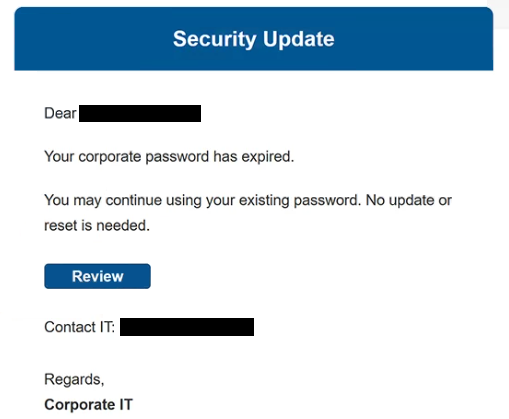
The scam usually claims that the recipient’s mailbox password has expired, is about to expire, or no longer meets updated security requirements. The “Security mailbox alert !” email often warns that failure to update the password immediately could result in restricted mailbox access, blocked incoming emails, or account suspension. These warnings are intended to pressure recipients into reacting quickly instead of carefully evaluating whether the notification is legitimate.
To supposedly restore or secure the account, the email instructs recipients to click a link or button included in the message. However, instead of directing users to a legitimate corporate login portal, the link redirects to a counterfeit sign-in page created to imitate a real email authentication interface. Once users enter their credentials, the information is captured directly by the attackers.
The “Security mailbox alert !” phishing campaign relies heavily on workplace-related urgency. Many users depend on business email accounts for communication, file sharing, and access to internal services, making password-related warnings particularly effective. Attackers exploit this dependence by presenting the issue as an urgent security matter that could interrupt daily work activities.
Compromised corporate email accounts can create serious security risks. Attackers who gain access may review confidential correspondence, search for sensitive company information, or use the account to distribute additional phishing emails internally. Since business accounts are often connected to cloud services, file storage systems, and other workplace platforms, one compromised mailbox can potentially expose multiple systems.
Another reason the “Security mailbox alert !” scam remains effective is its generic structure. The email often avoids mentioning a specific company or provider directly, allowing the same phishing template to target users across different organizations. Even recipients who are not expecting password updates may still react because the message appears related to routine workplace security procedures.
Some versions of the scam may include fake expiration dates, fabricated security warnings, or references to mailbox synchronization issues to appear more convincing. Others imitate corporate branding and formatting to create the impression that the email originated from a legitimate IT department. Despite these differences, the objective remains the same: obtaining account credentials through deception.
The full “Security mailbox alert !” phishing email is below:
Subject: Security mailbox alert !
Security Update
Dear [redacted],
Your corporate password has expired.
You may continue using your existing password. No update or reset is needed.
[Review]Contact IT:
Regards,
Corporate ITNotice:
This email and any files transmitted with it are confidential and intended solely for the use of the individual(s) or entities to whom they are addressed. If you received this communication in error, please notify the sender immediately and delete all copies in your possession.
How to recognize phishing emails
Recognizing phishing emails like the “Security mailbox alert !” scam requires paying attention to warning signs commonly found in fraudulent account notifications. Even when these emails appear convincing, they often contain inconsistencies that reveal their true purpose.
One of the clearest warning signs is urgency. Phishing emails frequently claim that immediate action is necessary to avoid account restrictions or service interruptions. In this case, the message may warn that the mailbox password has expired or that email access will soon be disabled. This pressure is intentional and is designed to encourage fast reactions instead of careful verification.
The sender’s address should also be inspected carefully. Fraudulent emails often imitate IT departments or support services but use suspicious domains, unrelated email addresses, or subtle spelling changes. Even if the sender’s name appears professional, the actual address may reveal that the message did not originate from a legitimate corporate system.
Links embedded in phishing emails are another important indicator. While the visible text may appear trustworthy, hovering over the link often reveals a suspicious or unrelated destination. These links commonly lead to fake login pages specifically designed to collect usernames and passwords. Legitimate organizations usually encourage employees to access account settings directly through official portals instead of through unsolicited email links.
The wording and formatting used in phishing emails can also provide clues. Some messages contain grammatical mistakes, awkward phrasing, or inconsistent formatting. Others appear polished but still rely heavily on vague security warnings and generic account notifications. A lack of personalization is another common sign because phishing campaigns are often distributed in large volumes.
Requests for password verification through external pages should always raise suspicion. Legitimate IT departments do not normally ask employees to confirm passwords through random links included in unexpected emails. Emails demanding immediate credential updates through embedded buttons are commonly associated with phishing activity.
Unexpected attachments should also be approached carefully. Some phishing emails include files disguised as password reset instructions, security reports, or mailbox updates. Opening these attachments may expose devices to malware if they contain malicious scripts or executable content.
A safer approach is to avoid interacting with suspicious emails directly. Instead of clicking links inside the message, users should manually access their company’s official email portal or contact the IT department through verified communication channels. If no corresponding notification exists there, the email is likely fraudulent.
Incoming search terms:
Site Disclaimer
2-remove-virus.com is not sponsored, owned, affiliated, or linked to malware developers or distributors that are referenced in this article. The article does not promote or endorse any type of malware. We aim at providing useful information that will help computer users to detect and eliminate the unwanted malicious programs from their computers. This can be done manually by following the instructions presented in the article or automatically by implementing the suggested anti-malware tools.
The article is only meant to be used for educational purposes. If you follow the instructions given in the article, you agree to be contracted by the disclaimer. We do not guarantee that the artcile will present you with a solution that removes the malign threats completely. Malware changes constantly, which is why, in some cases, it may be difficult to clean the computer fully by using only the manual removal instructions.