

The “Storage Limit Reached” scam is a phishing email that tries to convince recipients that their cloud storage is almost full and no longer working properly. The message claims that the account has reached a high usage level, sometimes stating figures like 98% of a 15 GB limit, and warns that features such as syncing or backups have been paused.
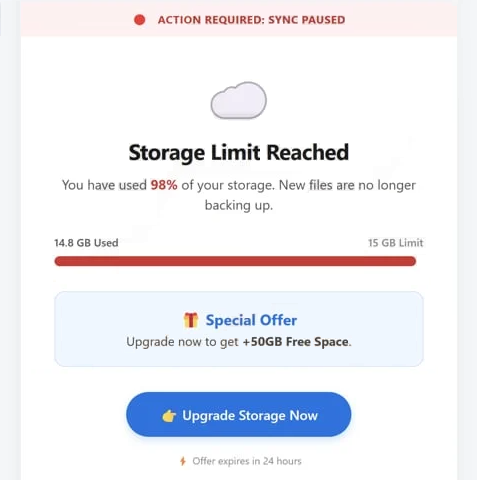
Instead of being a real system alert, the email is meant to push the user into clicking a link to fix the issue. It usually offers a quick solution, such as upgrading storage or restoring service. This is presented as a limited-time action, sometimes with a short deadline to make it feel urgent.
The link does not lead to a real account dashboard. It opens a page that repeats the same warning about storage limits or subscription problems. These pages are designed to look like service-related prompts, but they do not show real account data. They may claim that files are no longer backing up, access to stored content is restricted, or that the account could be blocked if no action is taken.
The goal of these pages is to get the user to take further steps, such as signing up, entering payment details, or clicking through offers. In some cases, the pages promote real products or services, but through misleading methods that generate profit for scammers through affiliate links.
Although the message focuses on storage issues, the actual risk is not related to space or files. The danger comes from interacting with the provided link. Users may be redirected to pages that request sensitive information or encourage actions that expose personal or financial data. The storage warning itself is only used to justify that interaction.
There is no real problem with the account’s storage. The email is not connected to any cloud service and does not reflect actual usage. It is sent as part of a large-scale campaign targeting many recipients with the same message.
The full “Storage Limit Reached” phishing email is below:
Subject: Your plan’s capacity status
Action Required: Sync Paused
Storage Limit Reached
You have used 98% of your storage. New files are no longer backing up.
14.8 GB Used 15 GB LimitSpecial Offer
Upgrade now to get +50GB Free Space.
Upgrade Storage NowOffer expires in 24 hours
Unsubscribe
How the “Storage Limit Reached” email pushes interaction
The “Storage Limit Reached” email is written to resemble a routine system notice rather than a security warning. It focuses on service functionality, mentioning syncing, backups, or file access instead of account threats. This makes the message feel more like a normal maintenance update.
The content is usually simple and direct. It states that storage is nearly full and provides a single action to resolve the issue. There is little technical detail and no personalized account information. Real storage alerts from service providers typically include account-specific data or direct users to check their storage through official platforms.
A key part of the message is the offer attached to the link. It may promise additional storage space, sometimes described as a bonus or free upgrade. This makes the action seem beneficial rather than risky, increasing the likelihood that the recipient will click.
The link itself is presented as the only way to restore normal service. It may be labeled with phrases such as “Upgrade Storage Now” or “Fix Storage Issue.” However, it leads to external pages that are not connected to the actual service provider.
Another detail is the use of time pressure. The email may mention that the offer will expire soon or that the account could lose functionality if no action is taken. This pushes the recipient to act quickly instead of checking whether the message is legitimate.
Site Disclaimer
2-remove-virus.com is not sponsored, owned, affiliated, or linked to malware developers or distributors that are referenced in this article. The article does not promote or endorse any type of malware. We aim at providing useful information that will help computer users to detect and eliminate the unwanted malicious programs from their computers. This can be done manually by following the instructions presented in the article or automatically by implementing the suggested anti-malware tools.
The article is only meant to be used for educational purposes. If you follow the instructions given in the article, you agree to be contracted by the disclaimer. We do not guarantee that the artcile will present you with a solution that removes the malign threats completely. Malware changes constantly, which is why, in some cases, it may be difficult to clean the computer fully by using only the manual removal instructions.