

The “This email account will be temporarily deactivated due to our New domain update” scam is built around a fake account recovery step that collects login credentials. The process begins after the recipient follows a link in the email, which leads to a web page designed to look like a familiar email login screen. The page may adjust its appearance based on the entered address, imitating different providers to appear convincing.
This page does not connect to any real email system. It presents a simple sign-in form and a short notice claiming that access must be restored after a domain update. There is no technical explanation, no account dashboard, and no visible system status. The only function available is entering login credentials.
When the user submits their email address and password, the data is transmitted to the attackers. The page may then reload, display a generic success message, or redirect to a legitimate email login page. This sequence is meant to make the interaction appear normal while the credentials have already been captured.
With access to an email account, attackers can view stored messages, search for sensitive information, and initiate password reset requests for other services linked to that address. Email accounts are commonly used to manage access to financial services, subscriptions, and business tools. Control of the inbox can therefore lead to further account compromises beyond the email itself.
The domain update described in the message is not real. The scammers do not have access to the recipient’s email system and cannot deactivate the account. The entire process is designed to move the user from a routine-looking notice to a login page that exists only to collect credentials.
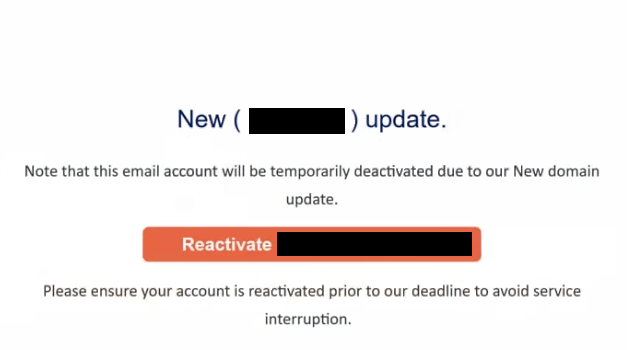
The full “This email account will be temporarily deactivated due to our New domain update” phishing email is below:
Subject: – postmaster: Reactivate Account
New ( – ) update.
Note that this email account will be temporarily deactivated due to our New domain update.
Reactivate –
Please ensure your account is reactivated prior to our deadline to avoid service interruption.
Signs of a phishing email
The email is written to resemble an administrative update rather than a security alert. It informs the recipient that a domain change is taking place and that their account must be reactivated to remain active. The message is short and focuses on a single action, which is completing the supposed update.
A link or button is included to carry out this step. It may be labeled with wording such as “Reactivate Email,” “Update Account,” or “Confirm Now.” This link does not lead to a legitimate service page. Instead, it directs the recipient to the phishing site that requests login credentials.
The message does not provide specific account details. It does not reference the email provider, account settings, or technical aspects of the claimed domain update. Legitimate service updates are handled through official account panels and do not require users to submit login details through external links.
The sender address is another detail that reveals the nature of the email. While the display name may appear to represent a support or system team, the actual domain used in the email often does not match a real email provider.
The message relies on a deadline to encourage action. It suggests that the account will be temporarily deactivated if no response is received. This pressure is intended to prompt quick interaction without checking the link destination or verifying the source.
The combination of a generic system update claim, a direct reactivation link, and a login page that adapts to different email providers defines the “This email account will be temporarily deactivated due to our New domain update” scam.
Site Disclaimer
2-remove-virus.com is not sponsored, owned, affiliated, or linked to malware developers or distributors that are referenced in this article. The article does not promote or endorse any type of malware. We aim at providing useful information that will help computer users to detect and eliminate the unwanted malicious programs from their computers. This can be done manually by following the instructions presented in the article or automatically by implementing the suggested anti-malware tools.
The article is only meant to be used for educational purposes. If you follow the instructions given in the article, you agree to be contracted by the disclaimer. We do not guarantee that the artcile will present you with a solution that removes the malign threats completely. Malware changes constantly, which is why, in some cases, it may be difficult to clean the computer fully by using only the manual removal instructions.