

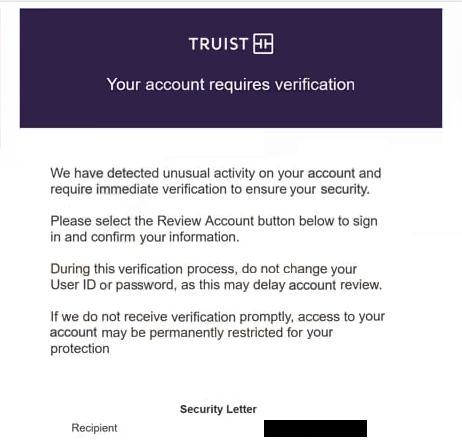
The “Truist – Your Account Requires Verification” phishing email claims that the recipient’s bank account needs to be reviewed before it can continue functioning normally. It presents the situation as a standard verification step, suggesting that recent activity or a system update requires confirmation. The email does not provide clear details about what triggered the request, but it directs the recipient to complete the process through a link.
Following that link leads to a page that imitates a banking login screen. The design may resemble a real Truist interface, but it does not display account balances, transaction history, or any other banking features. Instead, it shows a basic form asking for login credentials. The page may include a short message stating that verification is required to restore or maintain account access.
The process stops at credential collection. Entering a username and password does not confirm anything. The information is sent to the scammers, and the page may then display a generic confirmation or redirect to the real Truist website. This makes the interaction seem complete, even though no verification took place.
The verification request itself is not based on real account activity. There is no issue with the account and no requirement to confirm details through an external page. The email is used to create a believable reason for the user to enter sensitive information.
If attackers obtain valid banking credentials, they can attempt to access the account. This may allow them to view account details, monitor transactions, or attempt unauthorized actions. Financial accounts contain sensitive data, which increases the risk associated with credential exposure.
The full “Truist – Your Account Requires Verification” phishing email is below:
Subject: Truist security alert: Your Account Requires Verification
Truist
Your account requires verification
We have detected unusual activity on your account and require immediate verification to ensure your security.
Please select the Review Account button below to sign in and confirm your information.
During this verification process, do not change your User ID or password, as this may delay account review.
If we do not receive verification promptly, access to your account may be permanently restricted for your protection
Security Letter
Recipient –
Posted Date 03/23/2026
Case ID 42140479Review account
Thanks for banking with Truist.
How to recognize phishing emails like “Truist – Your Account Requires Verification”
Emails like “Truist – Your Account Requires Verification” can be identified by the way they present verification requests without clear context. The email refers to a required action but does not explain what specific activity caused it. Legitimate banking notifications usually include details that help confirm whether the alert is genuine.
The link included in the email is another important sign. Instead of directing users to log in through the official banking website, the email provides a direct link to a login page. This page is hosted on a domain that does not belong to Truist, even if it looks similar.
The sender address should also be checked. While the display name may appear to represent the bank, the actual email address often comes from a different domain. This mismatch is a strong indication that the email is not legitimate.
Another indicator is the lack of personalization. The email may not include the recipient’s name or account-specific details. Real banking emails typically include identifying information or guide users to access their accounts through official channels.
The tone of the email is intended to prompt action. It suggests that verification is required to avoid restrictions, encouraging the recipient to follow the link without verifying its authenticity.
Site Disclaimer
2-remove-virus.com is not sponsored, owned, affiliated, or linked to malware developers or distributors that are referenced in this article. The article does not promote or endorse any type of malware. We aim at providing useful information that will help computer users to detect and eliminate the unwanted malicious programs from their computers. This can be done manually by following the instructions presented in the article or automatically by implementing the suggested anti-malware tools.
The article is only meant to be used for educational purposes. If you follow the instructions given in the article, you agree to be contracted by the disclaimer. We do not guarantee that the artcile will present you with a solution that removes the malign threats completely. Malware changes constantly, which is why, in some cases, it may be difficult to clean the computer fully by using only the manual removal instructions.