

The “Urgent notice service update required” email scam is a phishing email that claims a required service update must be completed to keep an email account active. The email is written to look like an official notice from an email provider or an internal IT team. It is not a real service alert. The purpose is to push recipients into clicking a link and entering login details on a fake sign-in page.
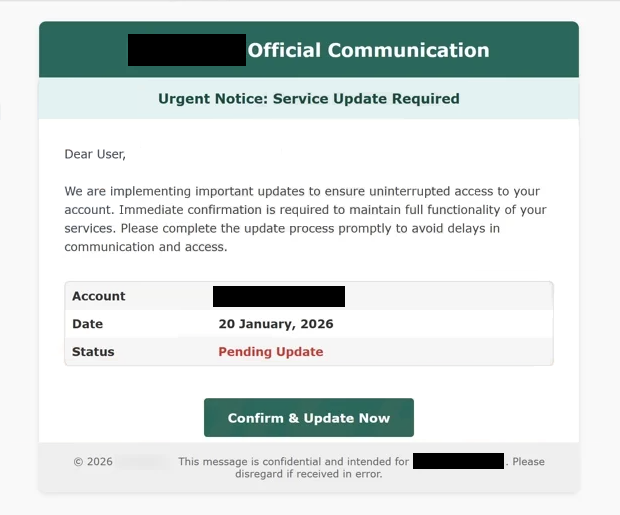
This email usually presents the update as mandatory and time-sensitive. It may claim the email system is being upgraded, that new security settings have been applied, or that an account must be confirmed to avoid disruption. The message often includes warnings such as access being limited, emails being blocked, or the account being suspended if the update is ignored. These claims are used to create pressure and make the recipient act quickly.
The email includes a link or button that is described as the update step. It may be labeled as a confirmation, verification, or service update action. The link does not lead to a real provider page. It opens a fraudulent website that imitates a webmail login screen. The fake page asks for the recipient’s email address and password. Any information entered is collected by the scammers.
Some versions of this scam attempt to collect more than just a password. After the first submission, the page may request recovery information, phone numbers, or additional credentials. This extra data can be used to keep control of the account or to bypass account recovery protections. In some cases, the scam page may also ask for payment information, claiming it is needed to complete the update or restore service. That request is part of the scam.
The main risk is account takeover. If scammers obtain valid login credentials, they can sign in to the email account and access private communications. They may search for financial details, personal documents, or messages that can be used for identity theft. They can also use the mailbox to reset passwords for other services connected to that email address, including banking, shopping, cloud storage, and workplace accounts.
A compromised email account can also be used to send more phishing emails. Messages sent from a real address are more likely to be trusted by contacts, which helps scammers reach new targets. This makes email credential theft especially damaging, since it can spread beyond the original victim.
Legitimate providers do not require account updates through random email links that lead to unfamiliar sign-in pages. Real service changes are normally communicated through official account dashboards, verified provider domains, or direct sign-in through the provider’s website or app. An unexpected email demanding an immediate update should be treated as suspicious.
The full “Urgent Notice – Service Update Required” phishing email is below:
Subject: Immediate Action Required: Confirm Your – Account Update
– Official Communication
Urgent Notice: Service Update Required
Dear User,
We are implementing important updates to ensure uninterrupted access to your account. Immediate confirmation is required to maintain full functionality of your services. Please complete the update process promptly to avoid delays in communication and access.
Account –
Date 20 January, 2026
Status Pending UpdateConfirm & Update Now
© 2026 -. This message is confidential and intended for -. Please disregard if received in error.
How to recognize phishing emails
The “Urgent notice service update required” email scam is typically distributed through spam campaigns. Scammers send the same message to many recipients at once, using lists gathered from data leaks, public sources, or automated address collection. Because the email does not rely on personal details, it can be sent broadly and still convince some recipients to click.
Sender information is one of the most important checks. The display name may suggest an official team, but the actual sending address often uses a domain that does not match the provider being referenced. Some emails also use unusual reply-to addresses, which is another sign that the message did not come from a legitimate organization.
The wording is often generic and focused on urgency. These emails commonly use short deadlines, warnings about service interruption, and instructions that push immediate action. Legitimate service notices usually provide clearer context, such as what service is being updated and where the recipient can confirm the information safely.
Links are a major indicator. The update button in these emails often hides the real destination. If the link points to an unfamiliar domain or a domain that is not owned by the email provider, it should not be trusted. A fake sign-in page may look convincing, but it cannot be considered safe if it is hosted on an unrelated website.
Another sign is the type of information requested. Routine service updates do not require users to re-enter passwords through a link delivered in an unsolicited email. Pages that ask for passwords, recovery details, or payment information as part of an “update” process are not legitimate.
Site Disclaimer
2-remove-virus.com is not sponsored, owned, affiliated, or linked to malware developers or distributors that are referenced in this article. The article does not promote or endorse any type of malware. We aim at providing useful information that will help computer users to detect and eliminate the unwanted malicious programs from their computers. This can be done manually by following the instructions presented in the article or automatically by implementing the suggested anti-malware tools.
The article is only meant to be used for educational purposes. If you follow the instructions given in the article, you agree to be contracted by the disclaimer. We do not guarantee that the artcile will present you with a solution that removes the malign threats completely. Malware changes constantly, which is why, in some cases, it may be difficult to clean the computer fully by using only the manual removal instructions.