

A deceptive “Verify your email address” email has been identified as part of an ongoing phishing campaign targeting email users. The message claims that the recipient must confirm or verify their account to prevent service interruptions. It directs users to click a verification button that leads to a fake sign-in page designed to steal login credentials.
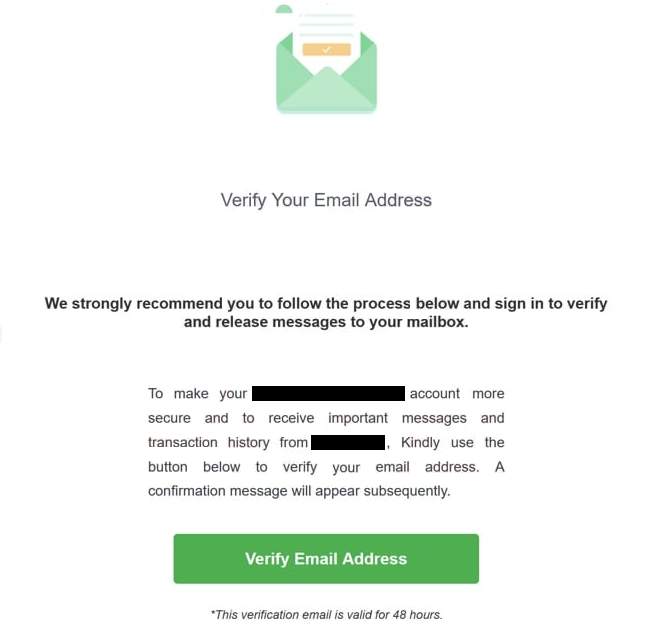
The fraudulent email mimics legitimate correspondence from well-known service providers, using official-style branding, colours, and layout. It warns that unverified accounts may lose access to incoming messages or experience temporary suspension. The message also urges the recipient to act quickly, stating that the verification link will expire within 48 hours.
The purpose of this scam is to trick users into entering their login details on a phishing page. Once submitted, the credentials are transmitted directly to the attackers. These stolen details can then be used to access email accounts and any linked services.
The full “Verify Your Email Address” phishing email:
Subject: – Suspicion login Please Verify Your – Account
Verify Your Email Address
We strongly recommend you to follow the process below and sign in to verify and release messages to your mailbox.
To make your – account more secure and to receive important messages and transaction history from -, Kindly use the button below to verify your email address. A confirmation message will appear subsequently.
Verify Email Address
*This verification email is valid for 48 hours.
This email is automatically generated.
Your privacy is important to us. See our online Security Center to learn how to protect your information.
©2022 Message Notification, N.A. 949794_FE_DE
If you think you received this email by mistake, report the issue
Copyright © 2022 –
Falling for the email verification scam can lead to serious privacy and financial consequences. Stolen credentials can give attackers full access to the user’s email history, attachments, and linked online accounts. This allows them to reset passwords on other platforms, impersonate the victim, or commit financial fraud.
Email accounts are often used to manage online banking, subscription services, and business communications. Once compromised, attackers can intercept verification codes or transaction alerts, making it easier to complete unauthorized activities.
Victims may also face identity theft. Attackers can use personal information found in emails or attached files to create fake accounts or make fraudulent purchases. In many reported cases, stolen email access was later used to send similar phishing messages to the victim’s contacts, continuing the scam cycle.
The verify your email address message itself cannot install malware or infect systems directly. However, its links may lead to additional fraudulent pages that attempt to download unwanted software or trigger fake alerts about compromised accounts.
How the scam email works
The “Verify Your Email Address” phishing email relies on social engineering. It appears authentic, sometimes addressing recipients by name and using corporate-sounding language. The subject line often includes phrases such as “Suspicious login detected,” “Action required,” or “Verify to avoid deactivation.” The message body typically features a “Verify Email” or “Confirm Account” button, presented as a routine security step.
When the recipient clicks the button, the link opens a web page that closely resembles the sign-in portal of the user’s email provider. The imitation is often detailed, copying logos, fonts, and layouts of popular services like Microsoft Outlook, Gmail, or Yahoo. Despite this appearance, the site is controlled by scammers. Any username or password entered is captured and stored for later misuse.
The phishing campaign has been distributed through mass email delivery systems, reaching both individual and corporate addresses. In some cases, these emails bypass spam filters by using slightly altered domain names that appear trustworthy.
Once credentials are compromised, attackers may immediately attempt to access the victim’s account to search for sensitive information. They can also use the compromised inbox to send further phishing messages to contacts, increasing the spread of the scam.
How to recognize phishing emails
The campaign operates through large-scale spam distribution. The phishing emails are often sent from compromised mail servers or domains created to resemble legitimate ones. These domains use small misspellings or alternate characters to appear trustworthy at a glance.
The same strategy has been observed in related scams, such as “Your mailbox storage is full” or “Email not validated” messages, which use similar tactics to harvest login credentials. Some variations also promote fake account recovery services or identity verification tools that request sensitive personal data.
Users may also encounter fake “Verify Your Email Address” phishing emails through online contact forms or pop-up prompts on unsafe websites. These forms are sometimes used to collect email addresses for further spam campaigns.
The “Verify Your Email Address” phishing email can be recognized by several common traits:
- Urgent language pressuring the recipient to act quickly.
- Claims that account access will be restricted without verification.
- Unfamiliar sender addresses or domain names that do not match the genuine service.
- Embedded links that lead to sites with misspelled URLs or unfamiliar domains.
Legitimate email providers never require users to confirm their accounts through external links. Verification and security alerts are always handled within official account dashboards. Users are advised to access their accounts directly through trusted bookmarks or by typing the provider’s address into the browser rather than clicking embedded links.
The verify your email address email scam continues to circulate widely because it mimics real corporate communication and exploits urgency. Awareness remains the most effective defense. Users who receive similar messages should ignore the instructions, delete the email, and avoid submitting any credentials on linked sites.
Site Disclaimer
2-remove-virus.com is not sponsored, owned, affiliated, or linked to malware developers or distributors that are referenced in this article. The article does not promote or endorse any type of malware. We aim at providing useful information that will help computer users to detect and eliminate the unwanted malicious programs from their computers. This can be done manually by following the instructions presented in the article or automatically by implementing the suggested anti-malware tools.
The article is only meant to be used for educational purposes. If you follow the instructions given in the article, you agree to be contracted by the disclaimer. We do not guarantee that the artcile will present you with a solution that removes the malign threats completely. Malware changes constantly, which is why, in some cases, it may be difficult to clean the computer fully by using only the manual removal instructions.