

The “Webmail Security Team important email notice” email scam is a phishing email that claims there is a security issue with the recipient’s email account. The message presents itself as an official notice from a webmail security team and tells the recipient that action is required to keep the account accessible. The email is not sent by any legitimate email provider.
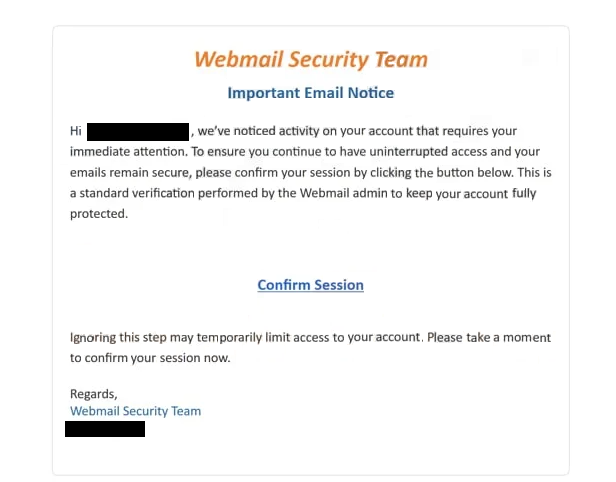
The content of the email is written to sound formal and authoritative. It informs the recipient that their mailbox has been flagged for a security reason and that action is required to avoid potential access issues. The wording is chosen to sound routine, as if the notice is part of standard account management rather than an unusual event. This makes the message easier to believe, especially for recipients who regularly receive automated service emails.
The email instructs the recipient to follow a link provided in the message. The link is presented as the only way to confirm the account or complete the required security step. The email does not suggest signing in through a known webmail website or using an official app. All instructions are centered on clicking the embedded link.
The page opened by that link is a phishing page. It is designed to look like a typical webmail login screen and asks the recipient to enter their email address and password. Submitting this information does not confirm account security or resolve any issue. The credentials are sent directly to scammers who operate the page.
The email does not include accurate account information. It does not name a specific email provider, reference recent login locations, list security events, or show account-specific identifiers. This is because the scammers do not have access to the recipient’s account. The message is generic, so it can be sent to many recipients and still appear relevant.
If valid login details are entered on the phishing page, scammers can attempt to sign in to the email account. Email access gives them the ability to read messages, download attachments, and search for sensitive information such as invoices, password reset emails, and personal correspondence. Many online services rely on email for password recovery, so access to the inbox can be used to take over other accounts.
The compromised email account may also be used to send further phishing emails. Messages sent from a real address are more likely to be trusted by recipients, which increases the reach of the scam. This can affect contacts, coworkers, or clients who receive emails that appear to come from a familiar sender.
A real webmail security team does not operate this way. Legitimate providers do not send unsolicited emails that require users to enter passwords through external links. Real security notices are reviewed after signing in directly through the provider’s official website or application, not through pages reached from unexpected email messages.
Subject: “Please Confirm Your Information”
Webmail Security Team
Important Email NoticeHi -, we’ve noticed activity on your account that requires your immediate attention. To ensure you continue to have uninterrupted access and your emails remain secure, please confirm your session by clicking the button below. This is a standard verification performed by the Webmail admin to keep your account fully protected.
Confirm Session
Ignoring this step may temporarily limit access to your account. Please take a moment to confirm your session now.
Regards,
Webmail Security Team
–
How to identify phishing emails
The “Webmail Security Team important email notice” email scam is distributed through spam campaigns. The same message is sent to large numbers of email addresses collected from various sources. The email is not tailored to a specific provider or account, which is why it avoids naming a service directly and relies on general language.
One of the most reliable signs that the email is fraudulent is the sender’s address. While the display name may reference a security team or administrative department, the actual sending address does not belong to a recognized email provider. The domain used to send the message often has no connection to webmail services at all. Checking the full sender address reveals this mismatch.
The structure of the email is another indicator. It focuses on authority rather than explanation. The message states that action is required, but does not explain what triggered the notice or what exact issue was detected. Legitimate security alerts usually provide clearer context, such as a sign-in attempt, a new device, or a configuration change, and allow users to review details safely within their account.
The link included in the email is a critical warning sign. It leads to a domain that is unrelated to real webmail login pages. Even if the page looks convincing, the web address shows that it is not hosted by a legitimate provider. Real email services do not ask users to sign in through links embedded in security warning emails.
The type of request made by the email is also important. The message asks the recipient to enter their password to confirm security status. Email providers do not request passwords, recovery details, or personal information through email notices. Any message that demands credentials to keep an account active should be treated as unsafe.
Another sign is the lack of alternative verification options. The email does not suggest contacting support through official channels or signing in through the normal website to review the notice. The entire process depends on clicking the link and entering credentials, which is characteristic of phishing.
Site Disclaimer
2-remove-virus.com is not sponsored, owned, affiliated, or linked to malware developers or distributors that are referenced in this article. The article does not promote or endorse any type of malware. We aim at providing useful information that will help computer users to detect and eliminate the unwanted malicious programs from their computers. This can be done manually by following the instructions presented in the article or automatically by implementing the suggested anti-malware tools.
The article is only meant to be used for educational purposes. If you follow the instructions given in the article, you agree to be contracted by the disclaimer. We do not guarantee that the artcile will present you with a solution that removes the malign threats completely. Malware changes constantly, which is why, in some cases, it may be difficult to clean the computer fully by using only the manual removal instructions.