

The “Your Webmail Account Is Inactive” email scam is a phishing email that falsely claims an email account has been marked as inactive. The email presents the issue as an account status problem that requires immediate action to avoid loss of access. It is written to resemble an administrative notification and attempts to create urgency by implying that the mailbox may be disabled, suspended, or removed if the recipient does not respond.
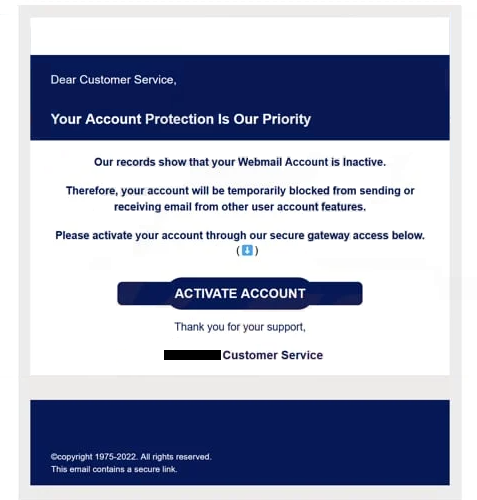
This email is not connected to any legitimate webmail provider or email service administrator. It is sent by scammers who impersonate account support or system management teams. The message typically instructs the recipient to confirm their account status, reactivate the mailbox, or verify details through a link included in the email. The instructions are designed to push the recipient toward a single action without providing meaningful account-specific information.
The link in the “Your Webmail Account Is Inactive” email leads to a fraudulent web page that imitates a webmail sign-in screen or verification form. The page requests login credentials, including the email address and password. Any information entered is collected by scammers. The page does not restore account access, update settings, or change account status. It functions only as a credential harvesting tool.
Compromise of an email account can have a wide impact. Email inboxes often contain sensitive messages, stored documents, contact lists, and password reset emails for other services. If scammers gain access, they can attempt to take over additional accounts linked to the email address, send scam emails from the compromised account, or monitor communications for valuable information. In business environments, access to a work email account can enable impersonation and further fraud.
The “Your Webmail Account Is Inactive” email scam relies on social engineering rather than technical exploitation. It does not claim a device infection or require a download. Its effectiveness comes from presenting inactivity as an urgent administrative issue, which can prompt recipients to respond quickly without verifying the request through trusted channels.
The full “Your Webmail Account Is Inactive” phishing email is below:
Subject: Invalid Email Received
Dear Customer Service,
–Your Account Protection Is Our Priority
Our records show that your Webmail Account is Inactive.
Therefore, your account will be temporarily blocked from sending or receiving email from other user account features.
Please activate your account through our secure gateway access below.
ACTIVATE ACCOUNT
Thank you for your support,
– Customer Service
©copyright 1975-2022. All rights reserved.
This email contains a secure link.
How this phishing email is delivered and how to recognize it
The “Your Webmail Account Is Inactive” email scam is distributed through spam campaigns that send the same template to large numbers of recipients. Scammers use address lists collected from data breaches, public sources, marketing databases, or automated generation. The email is not limited to users of a specific provider, which allows it to be reused across many targets.
Several indicators can help identify phishing emails like the “Your Webmail Account Is Inactive” email. Sender details are often inconsistent with real service providers. The display name may appear official, but the sending address may not match the domain used by a legitimate webmail service. Phishing emails may also use generic sender formats that do not align with normal account notifications.
The email commonly includes a link that claims to restore access or confirm account status. The destination often leads to an unfamiliar domain that is not associated with a legitimate provider. The use of a sign-in form reached through an unsolicited email is a strong indicator of phishing, particularly when the email attempts to force immediate action.
Urgency is another common characteristic. The “Your Webmail Account Is Inactive” email may warn of mailbox removal, suspension, or immediate deactivation. This pressure is used to reduce careful review and increase the likelihood of clicking the link. Legitimate providers do not rely on vague warnings without account-specific context or clear verification steps.
The content may also contain generic language and formatting inconsistencies. Phishing templates frequently use broad wording that applies to any recipient, rather than including accurate account details. Errors in grammar, unusual phrasing, or inconsistent branding can also indicate that the email is not legitimate.
Phishing pages linked from this email often request credentials immediately, sometimes followed by additional prompts for personal information. Legitimate webmail providers do not require account reactivation through third-party web pages linked from unsolicited emails. Requests for passwords or sensitive data through an external site are a key sign that the email is fraudulent.
The “Your Webmail Account Is Inactive” email scam is designed to obtain login credentials by creating a false account status problem. Recognition depends on checking sender legitimacy, verifying link destinations, and treating urgent requests for credential entry as suspicious, especially when the email does not provide verifiable information about the account or service involved.
Incoming search terms:
Site Disclaimer
2-remove-virus.com is not sponsored, owned, affiliated, or linked to malware developers or distributors that are referenced in this article. The article does not promote or endorse any type of malware. We aim at providing useful information that will help computer users to detect and eliminate the unwanted malicious programs from their computers. This can be done manually by following the instructions presented in the article or automatically by implementing the suggested anti-malware tools.
The article is only meant to be used for educational purposes. If you follow the instructions given in the article, you agree to be contracted by the disclaimer. We do not guarantee that the artcile will present you with a solution that removes the malign threats completely. Malware changes constantly, which is why, in some cases, it may be difficult to clean the computer fully by using only the manual removal instructions.