

The “Abuse Complaint Regarding Your Account” email scam is a phishing attempt designed to steal email account credentials. It uses a fabricated abuse complaint to convince recipients that they must confirm their email addresses to continue using an online service. The phishing email does not identify a legitimate complaint or provide evidence that the recipient’s account has violated any rules.
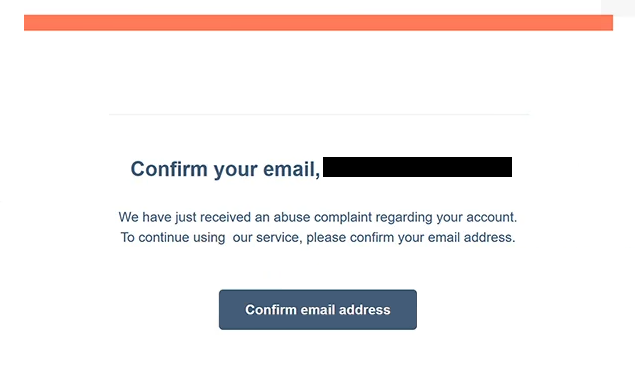
The email arrives with the subject line “Comfirm Your Email Address” and claims that an abuse complaint has recently been submitted against the recipient’s account. It then instructs the recipient to verify their email address to maintain access to the service. The warning is deliberately vague, as it does not identify the alleged violation, the person who submitted the complaint, or the service supposedly affected.
A button labeled “Confirm email address” is provided to complete the supposed verification. Clicking it opens a counterfeit Webmail login page that imitates the interface used by cPanel. The website requests an email address and password, creating the impression that signing in is necessary to resolve the complaint.
The phishing page is hosted using Google Firebase Storage, a legitimate cloud hosting service that can be misused to distribute deceptive content. The use of a recognizable hosting platform does not make the page trustworthy. Its purpose is to collect the credentials entered by visitors and make them available to the scammers.
If the attackers obtain valid email credentials, they may attempt to access the victim’s mailbox without authorization. A compromised email account can expose private correspondence, attachments, and other sensitive information. Scammers may also impersonate the account owner to send additional phishing emails or attempt password resets for other online services associated with the compromised address.
The phishing email includes a company-style footer containing an address in Cambridge, Massachusetts. However, the company name is incomplete, appearing only as “Inc.”, and the address does not establish any legitimate connection to the recipient’s email provider. These details appear intended to make the notification resemble ordinary business correspondence.
The “Abuse Complaint Regarding Your Account” email scam is focused on credential theft rather than malware distribution. There is no indication that the identified phishing email contains a malicious attachment or installs software. The supposed abuse complaint is simply a pretext for directing recipients to a counterfeit login form.
The full “Abuse Complaint Regarding Your Account” phishing email is below:
Subject: Comfirm Your Email Address
Confirm your email, –
We have just received an abuse complaint regarding your account.
To continue using our service, please confirm your email address.[Confirm email address]
Inc.
25 Sims Street, 2nd Floor
Cambridge, MA 92141
How to recognize phishing emails
One of the clearest warning signs in the “Abuse Complaint Regarding Your Account” phishing email is the spelling mistake in its subject line. The word “Comfirm” is used instead of “Confirm,” which is unusual for an official account notification. Although spelling mistakes alone do not prove that an email is malicious, they can indicate that the communication has not originated from a legitimate service provider.
The email also fails to identify the organization supposedly responsible for handling the abuse complaint. It refers to “our service” without explaining which service is involved or providing a recognizable company identity. This lack of context is particularly suspicious because the warning concerns an alleged violation involving the recipient’s account.
Another indicator is the request to confirm an email address by signing in through an embedded button. The phishing email claims that verification is required to continue using the service, but the linked page requests both an email address and password. This inconsistency suggests that the verification procedure is intended to obtain login credentials rather than confirm ownership of an email address.
The destination website provides further evidence of deception. Although the login page resembles cPanel Webmail, it is hosted through Google Firebase Storage rather than the recipient’s actual webmail provider. Phishing websites often copy familiar login interfaces while operating from unrelated domains or hosting platforms.
The incomplete company information at the bottom of the email is another warning sign. The footer includes a physical address but identifies the supposed sender only as “Inc.” without a proper company name. Such generic business details can be added to phishing emails to create an impression of legitimacy without establishing who sent them.
Site Disclaimer
2-remove-virus.com is not sponsored, owned, affiliated, or linked to malware developers or distributors that are referenced in this article. The article does not promote or endorse any type of malware. We aim at providing useful information that will help computer users to detect and eliminate the unwanted malicious programs from their computers. This can be done manually by following the instructions presented in the article or automatically by implementing the suggested anti-malware tools.
The article is only meant to be used for educational purposes. If you follow the instructions given in the article, you agree to be contracted by the disclaimer. We do not guarantee that the artcile will present you with a solution that removes the malign threats completely. Malware changes constantly, which is why, in some cases, it may be difficult to clean the computer fully by using only the manual removal instructions.