

The “Account Violation Notice” phishing email is a fraudulent message created to steal email account credentials. It falsely informs recipients that their account has violated service policies and warns that corrective action must be taken immediately to prevent restrictions or suspension. The notification is not sent by a legitimate email provider but is part of a phishing campaign that attempts to redirect users to a credential-stealing website.
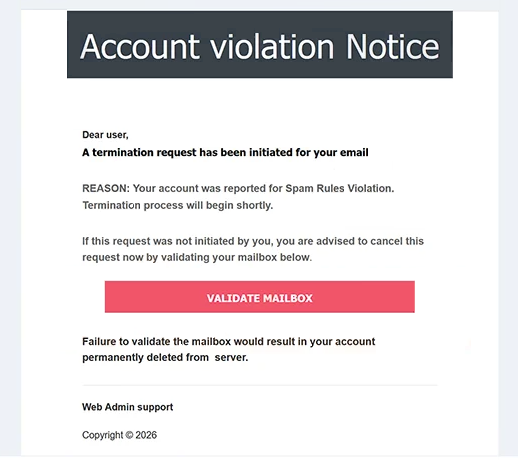
Instead of explaining what rule was supposedly broken, the email usually refers to a generic account violation and urges the recipient to review the issue without delay. The message may claim that the mailbox has breached security standards, acceptable use policies, or platform guidelines. These allegations are intentionally vague and are designed to make recipients click the provided link to learn more.
The email typically includes a button inviting users to verify their account, review the reported violation, or restore normal account status. Rather than opening a genuine webmail portal, the button redirects to a phishing page that imitates an email sign-in screen. Victims are instructed to authenticate using their email address and password before they can supposedly resolve the reported issue.
No account review or verification actually occurs. Any credentials entered into the counterfeit login form are transmitted directly to the operators of the phishing campaign. Stolen login details may then be used to access the victim’s mailbox, monitor communications, or attempt to compromise additional online accounts associated with the same email address.
Access to an email account can provide attackers with valuable information beyond email messages. A compromised mailbox may contain password reset links, authentication codes, financial statements, contracts, invoices, customer communications, and other confidential data. Attackers may also misuse the account to send phishing emails to colleagues, clients, or personal contacts while impersonating the legitimate account owner.
Unlike phishing campaigns that focus on password expiration or mailbox storage limits, the “Account Violation Notice” phishing email attempts to create uncertainty by accusing recipients of violating unspecified account policies. The absence of concrete details encourages users to open the provided link in an effort to determine what allegedly happened.
To make the notification appear authentic, the message often uses administrative language associated with compliance reviews, security monitoring, or account management. It may also include a short response deadline, claiming that failure to act will result in the mailbox being suspended or permanently disabled. Artificial urgency is a common tactic used to reduce the likelihood that recipients will verify the legitimacy of the email before responding.
Anyone who submitted credentials through a website linked from the “Account Violation Notice” phishing email should immediately change the password for the affected email account. If the same password has been reused on other services, it should be changed there as well. Users should also review recent account activity and verify that recovery settings have not been altered.
The full “Account Violation Notice” phishing email is below:
Subject: -: ACCOUNT VIOLATION NOTICE.
Account violation Notice
Dear user,
A termination request has been initiated for your emailREASON: Your account was reported for Spam Rules Violation. Termination process will begin shortly.
If this request was not initiated by you, you are advised to cancel this request now by validating your mailbox below.
[VALIDATE MAILBOX]
Failure to validate the mailbox would result in your account permanently deleted from server.
Web Admin support
Copyright © 2026
How to identify phishing emails
Emails alleging policy or account violations should be approached carefully, especially when they instruct recipients to resolve the issue through an embedded link. Legitimate email providers generally allow users to review account status after signing in through their official websites rather than requiring authentication through unsolicited emails.
Recipients should examine the sender’s address instead of relying only on the displayed sender name. Phishing campaigns commonly imitate technical support teams or account administrators while using domains unrelated to the organization they claim to represent.
Another warning sign is a notification that refers to a serious policy violation without identifying the specific rule that was allegedly broken. Legitimate service providers typically provide more detailed information or direct users to their official account management portal rather than relying on vague accusations.
Before entering login credentials, users should verify the destination website. A login page hosted on an unfamiliar domain should not be trusted, even if it closely resembles the official webmail interface.
The safest response to an unexpected “Account Violation Notice” email is to ignore any links contained in the message and access the email account by manually entering the provider’s official web address into a browser. If no corresponding notification appears after signing in, the email should be treated as a phishing attempt.
Incoming search terms:
Site Disclaimer
2-remove-virus.com is not sponsored, owned, affiliated, or linked to malware developers or distributors that are referenced in this article. The article does not promote or endorse any type of malware. We aim at providing useful information that will help computer users to detect and eliminate the unwanted malicious programs from their computers. This can be done manually by following the instructions presented in the article or automatically by implementing the suggested anti-malware tools.
The article is only meant to be used for educational purposes. If you follow the instructions given in the article, you agree to be contracted by the disclaimer. We do not guarantee that the artcile will present you with a solution that removes the malign threats completely. Malware changes constantly, which is why, in some cases, it may be difficult to clean the computer fully by using only the manual removal instructions.