

The “Action Required: Deliverability Protection Recommended” email scam is a phishing campaign that targets email users by claiming that their mailbox requires additional protection to prevent delivery problems. The message warns that email communication may be disrupted unless the recipient enables a recommended deliverability protection feature. In reality, the email is designed to steal login credentials through a fraudulent verification process.
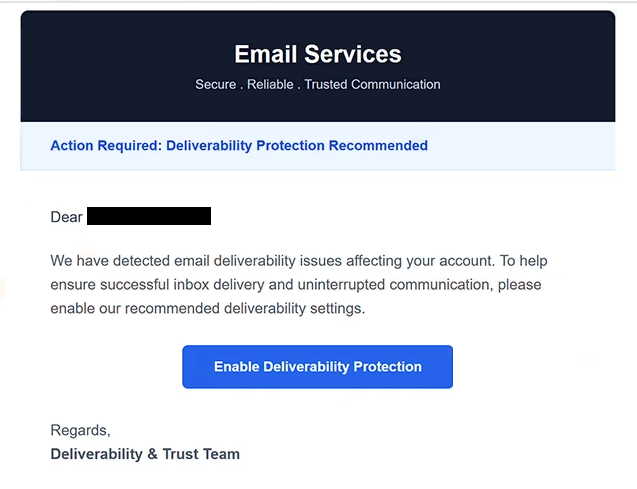
The phishing email presents itself as a security or email administration notification. It informs recipients that recent deliverability issues, authentication concerns, or email filtering problems have been detected and that corrective action is required. According to the message, activating the recommended protection will help ensure that incoming and outgoing emails continue functioning normally.
To supposedly implement the protection measure, the “Action Required: Deliverability Protection Recommended” email instructs recipients to click a button or hyperlink included in the message. Instead of directing users to a legitimate account management portal, the link opens a phishing website designed to imitate a webmail login page. The fake portal requests email account credentials under the guise of verifying account ownership and enabling the recommended protection feature.
Once login credentials are entered, they are transmitted directly to the cybercriminals behind the campaign. Attackers can then gain access to the compromised mailbox and potentially use it to collect sensitive information, distribute malicious emails, impersonate the account owner, or launch additional phishing attacks against contacts.
The “Action Required: Deliverability Protection Recommended” scam exploits concerns about email reliability and communication security. Since email remains a critical tool for personal and professional communication, warnings about potential deliverability issues can appear legitimate and encourage recipients to react without carefully evaluating the message.
Another reason the scam can appear convincing is its use of technical language. The email may reference authentication protocols, sender reputation, spam filtering, email protection systems, or delivery optimization measures. These references are intended to create the impression that the message originated from an email administrator, hosting provider, or technical support department.
Unlike phishing campaigns that focus on password expiration or account suspension, the “Action Required: Deliverability Protection Recommended” scam presents itself as a preventative measure designed to improve email performance. This approach can lower suspicion because the message appears to offer a solution rather than warn about an immediate crisis.
The email often uses professional formatting and support-style communication to strengthen credibility. It may include technical references, security recommendations, or service-related terminology designed to resemble legitimate email management notifications. However, the ultimate objective remains the same: directing recipients to a credential-harvesting website.
A compromised email account can expose a significant amount of sensitive information. Attackers may search for personal data, financial records, business communications, stored documents, or password reset links associated with other services. Because email accounts frequently serve as the central hub for online identity management, unauthorized access can lead to additional account compromises.
Anyone who entered credentials into a phishing page connected to the “Action Required: Deliverability Protection Recommended” scam should immediately change their password and review the account for suspicious activity. If the same password was reused elsewhere, those accounts should also be secured to reduce the risk of further compromise.
The full “Action Required: Deliverability Protection Recommended” phishing email is below:
Subject: Please confirm to continue.
Email Services
Secure . Reliable . Trusted Communication
Action Required: Deliverability Protection Recommended
Dear -,
We have detected email deliverability issues affecting your account. To help ensure successful inbox delivery and uninterrupted communication, please enable our recommended deliverability settings.
[Enable Deliverability Protection]Regards,
Deliverability & Trust Team© 2026 Email Services. All rights reserved.
This automated notification was sent to the email address associated with your account.
Please do not reply to this email. For assistance, visit the Help Center or contact Support through your account dashboard.
How to recognize phishing emails
Phishing campaigns such as the “Action Required: Deliverability Protection Recommended” scam frequently imitate technical support notifications and account management alerts to gain the trust of recipients. Understanding the warning signs can help users avoid credential theft.
One common indicator is an unsolicited recommendation to perform account verification or activate a security feature. Legitimate providers generally allow users to manage account settings through official portals rather than demanding immediate action through links contained in unexpected emails.
The sender’s address should always be reviewed carefully. Fraudulent emails often impersonate support teams, email administrators, or hosting providers while using unrelated domains or suspicious email addresses. Even if the display name appears legitimate, the underlying address may reveal that the message is fraudulent.
Links included inside phishing emails are another major warning sign. In the “Action Required: Deliverability Protection Recommended” scam, the provided link redirects users to a counterfeit login page rather than an official email service website. Hovering over links before clicking can help reveal suspicious destinations.
Another indicator is the use of urgency. The email may suggest that deliverability issues will continue, emails may be blocked, or communication services may be affected unless immediate action is taken. Cybercriminals use these warnings to encourage rushed decisions rather than careful verification.
Users should also be cautious whenever an email requests login credentials through an external verification page. Legitimate service providers generally do not require users to submit passwords through links contained in unsolicited messages.
Generic wording can provide another clue. Many phishing emails avoid detailed account-specific information and instead use broad references to email protection, deliverability improvements, or security recommendations. This allows attackers to distribute the same message to large numbers of recipients.
The safest response to suspicious service notifications is to avoid interacting with the email directly. Instead of clicking embedded links, users should manually access their email provider’s official website and review account notifications there. If no corresponding alert exists, the message is likely fraudulent.
Incoming search terms:
Site Disclaimer
2-remove-virus.com is not sponsored, owned, affiliated, or linked to malware developers or distributors that are referenced in this article. The article does not promote or endorse any type of malware. We aim at providing useful information that will help computer users to detect and eliminate the unwanted malicious programs from their computers. This can be done manually by following the instructions presented in the article or automatically by implementing the suggested anti-malware tools.
The article is only meant to be used for educational purposes. If you follow the instructions given in the article, you agree to be contracted by the disclaimer. We do not guarantee that the artcile will present you with a solution that removes the malign threats completely. Malware changes constantly, which is why, in some cases, it may be difficult to clean the computer fully by using only the manual removal instructions.