

The “Adobe Acrobat – Your document is completed” phishing email is a scam that impersonates Adobe to steal email account credentials. It claims that a document has been signed and completed, encouraging recipients to access it through an embedded link. However, the supposed document is used as bait to direct users to a phishing website.
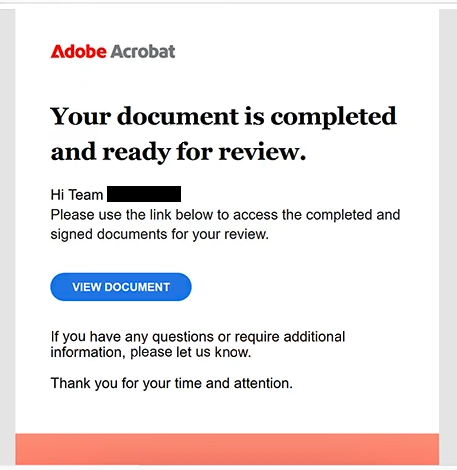
The email uses the subject line “Review Shared Document -” and addresses recipients by their organization name. It features Adobe branding and a button labeled “VIEW DOCUMENT,” creating the impression that a completed document is available through Adobe Acrobat. The notification also incorporates corporate information and trademark references to appear legitimate.
Clicking the button directs recipients to a phishing website. Instead of displaying an Adobe Acrobat document, the website imitates Google Drive and presents several document previews to create the appearance of a legitimate file-sharing environment.
A verification window asks visitors to confirm their email addresses before accessing the documents. The recipient’s email address is already entered, while the password field must be completed manually. The form is designed to capture email account credentials rather than provide access to shared files.
Scammers who obtain valid credentials may attempt to access the victim’s mailbox, read private emails, and retrieve sensitive attachments. They could also impersonate the account owner, distribute additional phishing emails, or initiate password resets for other online services associated with the compromised email address.
For business users, unauthorized mailbox access could expose confidential documents, invoices, contracts, and communications with customers or suppliers. Attackers could potentially exploit this information in subsequent business impersonation or payment redirection scams.
The full “Adobe Acrobat – Your document is completed” phishing email is below:
Subject: Review Shared Document –
Adobe Acrobat
Your document is completed and ready for review.
Hi Team -,
Please use the link below to access the completed and signed documents for your review.
[VIEW DOCUMENT]
If you have any questions or require additional information, please let us know.
Thank you for your time and attention.
How to recognize phishing emails
One of the distinguishing characteristics of the “Adobe Acrobat – Your document is completed” phishing email is the lack of meaningful information about the supposed document. Although recipients are informed that a signed document is available, the notification does not identify its filename, contents, author, or signatories. This lack of context is particularly suspicious when no document is expected.
The greeting also deserves attention. Addressing recipients by their organization name makes the notification appear personalized, but it does not demonstrate that the sender has a legitimate business relationship with them. Scammers can obtain publicly available company information and incorporate it into phishing emails.
Another significant warning sign is the inconsistency between the services presented during the interaction. The email claims to originate from Adobe Acrobat, while the linked website imitates Google Drive and is hosted on a Cloudflare Tunnel domain. These discrepancies undermine the credibility of the document-sharing notification.
The password request is particularly revealing. Rather than displaying the promised document, the website requires visitors to provide their email account passwords. The document previews visible behind the verification window make it appear that authentication is the only remaining obstacle to accessing the files.
The automatically inserted email address is not evidence of a legitimate authentication process. Scammers can obtain recipients’ addresses before distributing phishing emails and use that information to personalize deceptive login forms.
Site Disclaimer
2-remove-virus.com is not sponsored, owned, affiliated, or linked to malware developers or distributors that are referenced in this article. The article does not promote or endorse any type of malware. We aim at providing useful information that will help computer users to detect and eliminate the unwanted malicious programs from their computers. This can be done manually by following the instructions presented in the article or automatically by implementing the suggested anti-malware tools.
The article is only meant to be used for educational purposes. If you follow the instructions given in the article, you agree to be contracted by the disclaimer. We do not guarantee that the artcile will present you with a solution that removes the malign threats completely. Malware changes constantly, which is why, in some cases, it may be difficult to clean the computer fully by using only the manual removal instructions.