

The “An attempt to log in to your Rawbank account” phishing email is a scam designed to steal online banking credentials by impersonating Rawbank, a banking institution based in the Democratic Republic of the Congo. The phishing email warns recipients about an alleged unauthorized login attempt and claims that their bank accounts have been temporarily restricted to prevent further suspicious activity.
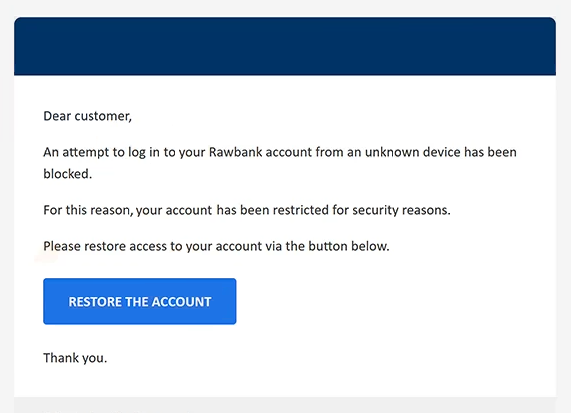
The email uses the subject line “Compte restreint – action requise,” meaning “Account restricted – action required.” Its content claims that an unfamiliar device attempted to access the recipient’s Rawbank account and that the bank blocked the attempt. Recipients are told they must complete an account restoration procedure to regain access to their banking services.
To create a sense of urgency, the phishing email includes a button labeled “RESTORE THE ACCOUNT.” Clicking it directs recipients to a counterfeit Rawbank website designed to resemble the bank’s online authentication portal. The page displays a French-language login interface requesting a username and personal identification number (PIN), including an on-screen numerical keypad.
Although the website resembles a legitimate banking website, it is controlled by scammers. Any credentials entered into its login form can be captured and used in attempts to access the victim’s actual banking account. The scammers may then attempt unauthorized transactions, collect sensitive financial information, or prevent the account owner from accessing their account.
The full “An attempt to log in to your Rawbank account” phishing email is below:
Subject: Compte restreint – action requise.
Dear customer,
An attempt to log in to your Rawbank account from an unknown device has been blocked.
For this reason, your account has been restricted for security reasons.
Please restore access to your account via the button below.
[RESTORE THE ACCOUNT]Thank you.
© Rawbank — All rights reserved
How to recognize phishing emails
The “An attempt to log in to your Rawbank account” phishing email uses several techniques commonly associated with banking phishing campaigns. One prominent warning sign is its alarming claim that an unfamiliar device attempted to access the recipient’s account. Such warnings can encourage recipients to act quickly without independently verifying whether the supposed security incident occurred.
Another suspicious detail is the generic greeting “Dear customer.” Although legitimate banks sometimes use standardized greetings, an impersonal introduction can be a warning sign when an email claims to concern a specific customer’s banking security. The combination of a French subject line and English email content may also warrant closer examination.
The phishing email provides limited information about the alleged login attempt. It does not identify the unfamiliar device or supply other meaningful details that would allow recipients to understand the supposed incident. Instead, it focuses on persuading them to click the account restoration button.
The destination of the “RESTORE THE ACCOUNT” button is a particularly important indicator. Rather than directing recipients to Rawbank’s legitimate online banking service, it opens an unrelated website displaying a counterfeit authentication form. Familiar banking graphics, a French-language interface, and a numerical PIN keypad can make such pages appear convincing, but they do not establish authenticity.
Phishing emails may also reproduce company names, logos, and formal administrative language to create an impression of legitimacy. These elements are easy to imitate and should not be treated as proof that an email originated from the organization it claims to represent.
Site Disclaimer
2-remove-virus.com is not sponsored, owned, affiliated, or linked to malware developers or distributors that are referenced in this article. The article does not promote or endorse any type of malware. We aim at providing useful information that will help computer users to detect and eliminate the unwanted malicious programs from their computers. This can be done manually by following the instructions presented in the article or automatically by implementing the suggested anti-malware tools.
The article is only meant to be used for educational purposes. If you follow the instructions given in the article, you agree to be contracted by the disclaimer. We do not guarantee that the artcile will present you with a solution that removes the malign threats completely. Malware changes constantly, which is why, in some cases, it may be difficult to clean the computer fully by using only the manual removal instructions.