

The “Final Reminder Action required: Verify your Account information” phishing email is a fraudulent message that attempts to trick recipients into revealing their email account credentials. It is presented as an urgent notification claiming that important account information must be verified immediately to avoid service interruptions or account restrictions. The message is not sent by a legitimate email provider and is instead part of a phishing campaign designed to steal sensitive login information.
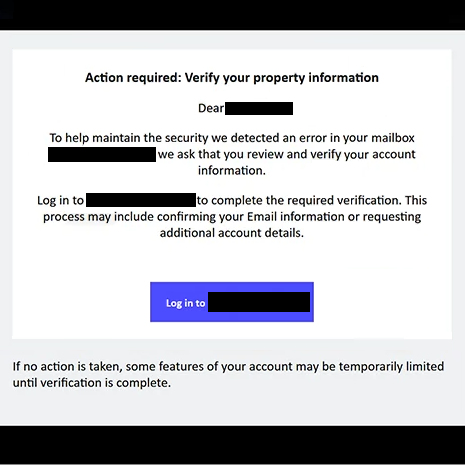
The email typically informs recipients that this is the final reminder to verify their account details because previous notifications have allegedly gone unanswered. It warns that failure to complete the verification process may result in the mailbox being suspended, incoming messages being rejected, or certain account features becoming unavailable. These claims are intended to pressure recipients into acting quickly without checking whether the notification is genuine.
To reinforce its legitimacy, the email often includes official-looking branding, security-related language, and a prominent button labelled with phrases such as “Verify Account”, “Confirm Information”, or “Update Details”. Rather than directing users to the official website of their email provider, the embedded link leads to a counterfeit login page created by cybercriminals.
The fake website is designed to closely resemble a genuine webmail sign-in portal. Visitors are instructed to enter their email address and password before they can supposedly verify their account information. However, instead of confirming any account details, the website transmits the submitted credentials directly to the operators of the phishing campaign.
Email accounts are attractive targets because they often provide access to a wide range of personal and professional information. Attackers who obtain login credentials may read private correspondence, access financial notifications, retrieve password reset messages, intercept authentication codes, and potentially compromise other online services linked to the same email address.
The “Final Reminder Action required: Verify your Account information” phishing email relies heavily on urgency to manipulate recipients. By presenting the message as the final opportunity to prevent account problems, the scammers attempt to discourage careful evaluation of the email. Victims who fear losing access to their mailbox are more likely to click the embedded link and disclose their credentials.
Some versions of this phishing campaign may also claim that recent security checks detected incomplete account information or outdated records requiring immediate confirmation. Others may state that new security policies require all users to complete identity verification. These statements are fabricated solely to make the fraudulent message appear more convincing.
Anyone who entered credentials after interacting with the “Final Reminder Action required: Verify your Account information” phishing email should immediately change the password for the affected account. If the same password has been used on other services, those accounts should also be secured. Users should review recent login activity, update recovery information if necessary, and enable legitimate multi-factor authentication through the official account settings.
The full “Final Reminder Action required: Verify your Account information” phishing email is below:
Subject: Final Reminder Action required: Verify your Account information
Action required: Verify your property information
Dear -,
To help maintain the security we detected an error in your mailbox – we ask that you review and verify your account information.
Log in to – to complete the required verification. This process may include confirming your Email information or requesting additional account details.
Log in to –
If no action is taken, some features of your account may be temporarily limited until verification is complete.
© 2026, Inc. All rights reserved. Confidential and account information.
Unsubscribe from these emails.
How to recognise emails that attempt to steal account credentials
Unexpected messages requesting immediate account verification should always be treated with caution. Legitimate email providers rarely require users to verify their account through links included in unsolicited emails. Instead, they generally advise customers to sign in directly through the provider’s official website if account changes are required.
The sender’s email address should always be examined carefully. Phishing campaigns frequently use display names that resemble legitimate organisations while the actual sending domain has no connection to the company being impersonated.
Recipients should also be suspicious of messages that create unnecessary urgency by claiming that an account will be suspended unless immediate action is taken. Cybercriminals commonly rely on time pressure to prevent recipients from verifying the authenticity of the notification.
Before entering any login credentials, users should inspect the destination website. A login page hosted on an unfamiliar domain or one that differs from the official website of the email provider should never be trusted, regardless of how convincing it appears.
The safest way to verify whether account action is genuinely required is to ignore links contained in unexpected emails and manually navigate to the official website of the email provider using a web browser. If no notification appears after signing in, the email should be considered a phishing attempt and deleted.
Incoming search terms:
Site Disclaimer
2-remove-virus.com is not sponsored, owned, affiliated, or linked to malware developers or distributors that are referenced in this article. The article does not promote or endorse any type of malware. We aim at providing useful information that will help computer users to detect and eliminate the unwanted malicious programs from their computers. This can be done manually by following the instructions presented in the article or automatically by implementing the suggested anti-malware tools.
The article is only meant to be used for educational purposes. If you follow the instructions given in the article, you agree to be contracted by the disclaimer. We do not guarantee that the artcile will present you with a solution that removes the malign threats completely. Malware changes constantly, which is why, in some cases, it may be difficult to clean the computer fully by using only the manual removal instructions.