GopherRAT is a form of malicious software classified as a trojan horse. The term “trojan” refers to malware that appears harmless or conceals its true purpose until it is executed. GopherRAT is designed to infiltrate a computer without legitimate user consent, then perform actions that compromise the system’s integrity, confidentiality, or stability.
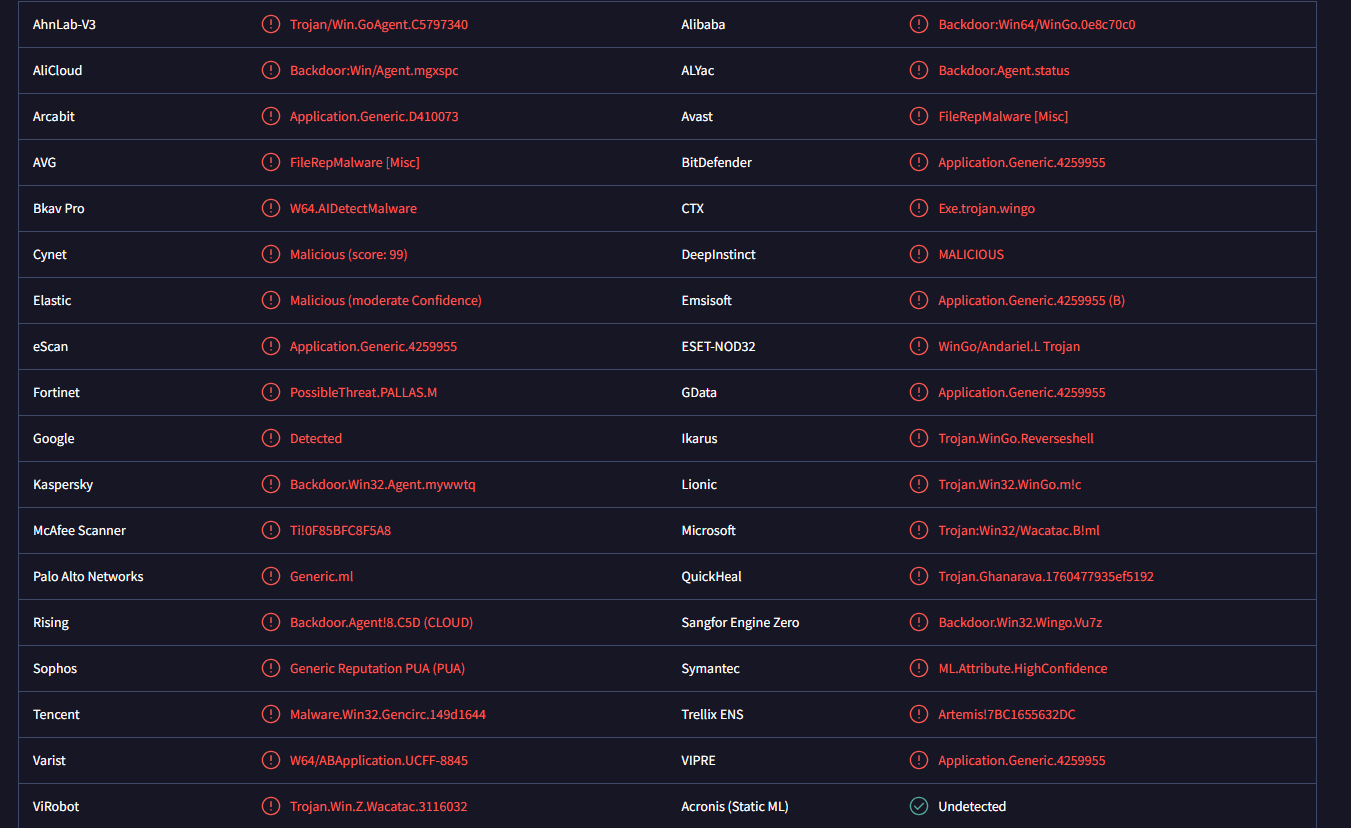
Once GopherRAT is present on a system, it can establish persistence. Persistence means the malware configures itself so it runs automatically whenever the computer starts or a user logs in. This allows it to remain active over extended periods without requiring repeated execution by the user. Persistence mechanisms can include adding entries to system startup locations, modifying system configuration files, or installing components that automatically relaunch the malware.
GopherRAT is capable of operating covertly. Users may not immediately notice its presence because it often runs silently in the background without displaying obvious symptoms such as error messages or interface changes. In some cases, system performance may become sluggish because the malware consumes resources while executing its tasks. These tasks can include contacting remote servers and waiting for instructions.
The malware’s remote control capability is a defining aspect of its operation. GopherRAT can communicate with attacker-controlled servers to receive commands. These commands can direct the malware to carry out a range of operations. Typical remote commands include downloading additional malicious files, uploading collected data, executing arbitrary code, or running system utilities. Because of this communication channel, the computer infected with GopherRAT effectively becomes part of a network controlled by the attacker.
GopherRAT may also attempt to collect information from the infected system. Data collection can encompass browsing history, stored credentials, system configuration details, or documents and files. Any information deemed valuable by the attacker may be transmitted back to the controlling server. This data exfiltration can occur without user knowledge because the malware initiates the transfer in the background.
Another aspect of GopherRAT’s behavior is its ability to modify system files or settings. The malware can alter registry values on Windows systems, change configuration files, or replace legitimate files with malicious versions. These modifications can weaken system defenses, disable security tools, or make it easier for the malware to remain concealed.
GopherRAT is not a self-propagating threat like a worm. It does not automatically spread from one computer to another without external help. Instead, it relies on methods that bring it onto a system in the first place. Its impact depends on the intentions of the attacker and the commands issued after it establishes a foothold. Because GopherRAT allows remote control of the infected machine, the range of possible malicious actions is broad and can include credential harvesting, surveillance, and additional malware deployment.
How GopherRAT malware gets installed
GopherRAT is typically introduced to a system through social engineering and deceptive delivery techniques. One of the most common infection vectors is disguised attachments delivered via email. The attacker sends an email containing an attachment that appears legitimate, such as an invoice, document, or image file. When the recipient opens the attachment, the malware is executed, often without a clear indication that anything harmful has occurred.
Another installation method is through deceptive file downloads. Users may be directed to download what appears to be a legitimate utility, media file, or software update. The file they receive, however, is bundled with the GopherRAT payload. Because the malware is packaged inside a file that seems useful, users may install it believing they are obtaining legitimate software.
GopherRAT can also be delivered through compromised websites. These sites may host drive-by download mechanisms that automatically download and execute malware when a visitor accesses the page, especially if the visitor’s system is not fully updated or lacks effective security protections. In these cases, simply visiting the compromised page is enough for the malware to begin installation.
Links distributed via messaging platforms, forums, or social networks can also lead to GopherRAT infection. These links may claim to provide downloads, media, or other content of interest. Clicking the link directs the user to a site that initiates a download of the malware, again often bundled with seemingly legitimate files.
In some attacks, GopherRAT is distributed through bundled installers that include unwanted components. Users who download software from unofficial sources or file aggregators may encounter installers that bundle the desired program with additional unwanted software, including trojans such as GopherRAT.
Once downloaded and executed, GopherRAT often leverages system permissions to install itself. If the user account has administrative privileges, the malware can make system-wide changes, increasing its persistence and ability to operate covertly.
Because GopherRAT does not reveal itself directly to the user, it can remain hidden for long periods. Users may not notice any change until significant damage has occurred. Effective prevention includes avoiding suspicious email attachments, downloading software only from trusted sources, and keeping security software and operating systems up to date. Once GopherRAT is installed, removal typically requires specialized tools or professional assistance to ensure that all components are eradicated and that the system’s integrity is restored.
Remove GopherRAT trojan
Trojans are very serious infections and should be dealt with using anti-malware programs. It’s not recommended to try to delete GopherRAT trojan manually, as it could cause further issues.
Offers
Download Removal Toolto scan for GopherRAT trojanUse our recommended removal tool to scan for GopherRAT trojan. Trial version of provides detection of computer threats like GopherRAT trojan and assists in its removal for FREE. You can delete detected registry entries, files and processes yourself or purchase a full version.
More information about SpyWarrior and Uninstall Instructions. Please review SpyWarrior EULA and Privacy Policy. SpyWarrior scanner is free. If it detects a malware, purchase its full version to remove it.
WiperSoft Review Details WiperSoft (www.wipersoft.com) is a security tool that provides real-time security from potential threats. Nowadays, many users tend to download free software from the Intern ...
Download|moreIs MacKeeper a virus? MacKeeper is not a virus, nor is it a scam. While there are various opinions about the program on the Internet, a lot of the people who so notoriously hate the program have neve ...
Download|moreWhile the creators of MalwareBytes anti-malware have not been in this business for long time, they make up for it with their enthusiastic approach. Statistic from such websites like CNET shows that th ...
Download|more
Incoming search terms:
Site Disclaimer
2-remove-virus.com is not sponsored, owned, affiliated, or linked to malware developers or distributors that are referenced in this article. The article does not promote or endorse any type of malware. We aim at providing useful information that will help computer users to detect and eliminate the unwanted malicious programs from their computers. This can be done manually by following the instructions presented in the article or automatically by implementing the suggested anti-malware tools.
The article is only meant to be used for educational purposes. If you follow the instructions given in the article, you agree to be contracted by the disclaimer. We do not guarantee that the artcile will present you with a solution that removes the malign threats completely. Malware changes constantly, which is why, in some cases, it may be difficult to clean the computer fully by using only the manual removal instructions.