

The “Inbound Message Rejection Report” email scam is a phishing campaign that uses fabricated email delivery problems to steal account passwords. The phishing emails appear to come from an email administrator and inform recipients that several incoming emails have failed to reach their inboxes. To supposedly recover these emails and restore normal delivery, recipients are directed to a website that collects their login credentials.
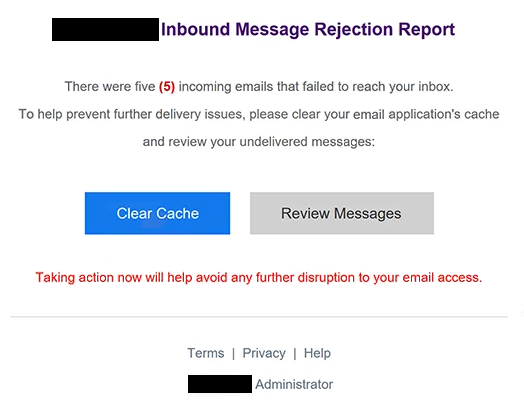
The phishing emails use the subject line “Inbound Message Rejection Report” and claim that five incoming emails were rejected before reaching the recipient’s mailbox. Rather than explaining why the emails were rejected, the notification suggests that clearing the email application’s cache and reviewing undelivered emails will resolve the problem. This explanation gives recipients a seemingly routine technical task to complete.
Two buttons, “Clear Cache” and “Review Messages,” are included in the phishing email. Although they suggest different actions, both lead to the same phishing website. The destination displays a generic webmail login form hosted using Google Cloud Storage infrastructure. The use of a legitimate cloud hosting service does not make the website trustworthy, as the phishing page is not associated with an authorized email provider.
The counterfeit login form automatically displays the recipient’s email address in the username field and asks for a password. This detail makes the page appear connected to the recipient’s mailbox and reduces the amount of information the visitor needs to enter. However, passwords submitted through the form are captured by the scammers rather than used to resolve any delivery issue.
Obtaining valid email credentials could allow attackers to access private correspondence, examine attachments, and impersonate the account owner. A compromised mailbox could also be used to request password resets for other services, including shopping platforms, social media accounts, and financial services. Attackers might additionally send phishing emails from the affected account to exploit the trust of existing contacts.
The full “Inbound Message Rejection Report” phishing email is below:
Subject: Inbound Message Rejection Report
– Inbound Message Rejection Report
There were five (5) incoming emails that failed to reach your inbox.
To help prevent further delivery issues, please clear your email application’s cache
and review your undelivered messages:
[Clear Cache] [Review Messages]Taking action now will help avoid any further disruption to your email access.
Terms | Privacy | Help
– Administrator
How to recognize phishing emails
Phishing emails impersonating email administrators often use delivery failures, account restrictions, or technical problems to persuade recipients to follow external links. In this campaign, the warning about five rejected incoming emails is the main deception. The phishing email presents a specific number of missing emails but does not provide meaningful delivery details that would allow recipients to verify the claim.
The instruction to clear the email application’s cache is another suspicious characteristic. Clearing cached information is not a typical requirement for retrieving incoming emails that have been rejected by a mail server. The phishing email uses this technical-sounding explanation to make the requested action appear reasonable.
Recipients should also pay attention to the two buttons included in the notification. “Clear Cache” and “Review Messages” appear to perform separate functions, yet both direct users to the same external login page. This inconsistency is a useful indication that the buttons are intended to capture credentials rather than provide genuine email management features.
The login page itself provides additional warning signs. Although the username field is already populated with the recipient’s email address, this does not demonstrate that the website belongs to the email provider. Phishing websites can use information obtained from the original email link to personalize their login forms and make them appear more convincing.
Another important detail is the website’s hosting location. The phishing page uses Google Cloud Storage infrastructure, but a website hosted through a legitimate cloud service is not necessarily operated by a trustworthy organization. Recipients should examine the actual website address and determine whether it belongs to their email provider before entering account credentials.
The phishing email is also signed simply as “Administrator” and includes generic links labeled “Terms,” “Privacy,” and “Help.” These elements give the notification an administrative appearance without establishing which email service supposedly issued it. The lack of identifiable provider information, combined with an unexpected password request, makes the notification particularly suspicious.
Site Disclaimer
2-remove-virus.com is not sponsored, owned, affiliated, or linked to malware developers or distributors that are referenced in this article. The article does not promote or endorse any type of malware. We aim at providing useful information that will help computer users to detect and eliminate the unwanted malicious programs from their computers. This can be done manually by following the instructions presented in the article or automatically by implementing the suggested anti-malware tools.
The article is only meant to be used for educational purposes. If you follow the instructions given in the article, you agree to be contracted by the disclaimer. We do not guarantee that the artcile will present you with a solution that removes the malign threats completely. Malware changes constantly, which is why, in some cases, it may be difficult to clean the computer fully by using only the manual removal instructions.