

The “Incoming Mail Is Being Misrouted” phishing email is a scam that attempts to steal email account credentials by impersonating a mail routing service. It warns recipients that their incoming emails are being blocked because of an alleged domain configuration problem. The notification encourages users to correct the issue through a link that leads to a phishing website.
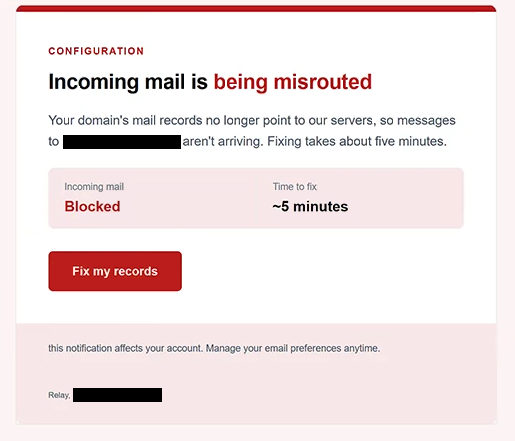
The email uses the subject line “Incoming Emails Not Reaching Your Inbox”. It claims that the recipient’s domain mail records no longer point to the company’s servers, preventing incoming emails from reaching their destination. However, the email provides no evidence that the recipient’s domain settings have changed or that mail delivery has been interrupted.
To make the supposed problem appear urgent, the email displays the status “Incoming mail: Blocked” and states that resolving the issue will take approximately five minutes. Recipients are encouraged to click a button labeled “Fix my records.” This creates the impression that a serious email delivery problem can be resolved through a quick administrative procedure.
Clicking the button opens a phishing website. The page requests a username or email address and password, while the link automatically supplies the recipient’s email address to make the login form appear personalized. Despite its appearance, the website is not associated with the claimed mail routing service.
Credentials entered into the phishing form are intended for the scammers. If attackers obtain valid login information, they may attempt to access the victim’s mailbox, read private correspondence, and retrieve sensitive attachments. They could also impersonate the account owner, distribute additional phishing emails, or attempt password resets for connected online services.
The full “Incoming Mail Is Being Misrouted” phishing email is below:
Subject: Incoming Emails Not Reaching Your Inbox
Configuration
Incoming mail is being misrouted
Your domain’s mail records no longer point to our servers, so messages to – aren’t arriving. Fixing takes about five minutes.
Incoming mail: Blocked
Time to fix: ~5 minutes[Fix my records]
this notification affects your account. Manage your email preferences anytime.
Relay, –
How to recognize phishing emails
The “Incoming Mail Is Being Misrouted” phishing email uses a technical explanation to make its warning appear credible. References to domain mail records and server configurations may sound convincing, particularly to recipients unfamiliar with email infrastructure. However, the email does not provide specific configuration details or evidence that incoming mail is actually being blocked.
Another warning sign is the simplified solution offered for the supposed problem. The email claims that mail delivery has stopped but suggests that clicking “Fix my records” will resolve the issue in approximately five minutes. This combination of a serious technical warning and an immediate solution is intended to encourage recipients to follow the link without questioning the notification.
The website behind the button is particularly suspicious. Rather than directing recipients to a recognizable mail administration portal, it opens a page hosted on an unrelated domain. The website requests email login credentials even though the original notification concerns domain mail records, creating a mismatch between the alleged problem and the requested action.
The automatically populated email address may also make the phishing page appear trustworthy. Recipients might assume that the website recognizes their accounts because their addresses are already displayed. However, scammers can include email addresses in URLs to personalize phishing forms without having legitimate access to the accounts.
The sender’s claimed identity deserves examination as well. Scammers can impersonate service providers by copying their names and presenting their emails as automated technical alerts.
The email also includes a configuration heading and a note about managing email preferences. These details resemble ordinary administrative communications, but they do not verify the sender’s identity. The absence of specific domain information makes the claimed delivery problem especially difficult to substantiate.
Site Disclaimer
2-remove-virus.com is not sponsored, owned, affiliated, or linked to malware developers or distributors that are referenced in this article. The article does not promote or endorse any type of malware. We aim at providing useful information that will help computer users to detect and eliminate the unwanted malicious programs from their computers. This can be done manually by following the instructions presented in the article or automatically by implementing the suggested anti-malware tools.
The article is only meant to be used for educational purposes. If you follow the instructions given in the article, you agree to be contracted by the disclaimer. We do not guarantee that the artcile will present you with a solution that removes the malign threats completely. Malware changes constantly, which is why, in some cases, it may be difficult to clean the computer fully by using only the manual removal instructions.