

The “Mail System Update Required” phishing email is a credential-stealing scam disguised as an automated notification from an email service provider. It falsely claims that the recipient’s mailbox settings are outdated and need to be updated immediately.
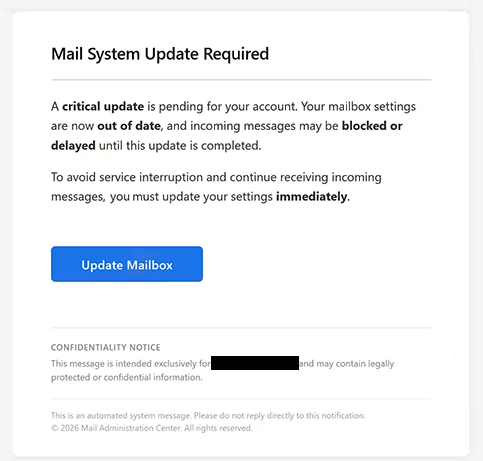
The email uses the subject “Important System Notice: Update Your Mailbox”. It warns recipients that a critical update is pending for their account and suggests that incoming emails could be blocked or delayed until the supposed problem is resolved.
To prevent a service interruption, recipients are instructed to select the “Update Mailbox” button. The email presents this as a necessary step for updating mailbox settings and continuing to receive incoming emails.
The warning is fabricated. Clicking “Update Mailbox” leads to a phishing page rather than a legitimate mailbox settings page. The fraudulent site is hosted on a legitimate cloud-storage platform, which can make the link appear less suspicious at first glance.
In the analyzed case, the phishing page imitated Gmail’s login interface. It displayed a Google-branded sign-in form and asked visitors to provide their email address and password. The page claimed that these credentials were required to “access secure settings”.
Entering credentials does not update the mailbox or fix a mail delivery problem. The submitted information is instead sent to the scammers operating the phishing page.
The email is signed as coming from the “Mail Administration Center”, but this name does not represent a genuine organization behind the notification. The supposed mailbox update, outdated settings, and potential interruption of incoming emails are all part of the deception.
Anyone who has entered credentials on the fake page should change the affected email password promptly. Passwords should also be changed on other accounts where the same credentials have been reused.
The full “Mail System Update Required” phishing email is below:
Subject: Important System Notice: Update Your Mailbox
Mail System Update Required
A critical update is pending for your account. Your mailbox settings are now out of date, and incoming messages may be blocked or delayed until this update is completed.
To avoid service interruption and continue receiving incoming messages, you must update your settings immediately.
[Update Mailbox]CONFIDENTIALITY NOTICE
This message is intended exclusively for – and may contain legally protected or confidential information.
This is an automated system message. Please do not reply directly to this notification.
© 2026 Mail Administration Center. All rights reserved.
How to recognize phishing emails
The “Mail System Update Required” phishing email relies heavily on urgency. It tells recipients that their mailbox settings are already outdated and that an update must be completed immediately to prevent problems with incoming emails.
The vague explanation of the supposed technical problem is another reason for caution. The email claims that emails could be blocked or delayed but does not provide a legitimate account-management process for resolving the issue. Instead, it directs recipients to an embedded “Update Mailbox” button.
Where that button leads is particularly important. A phishing page does not necessarily have to be hosted on an obviously suspicious website. In this case, the scammers used a legitimate cloud-storage platform to host the fraudulent page. The reputation of the hosting service therefore does not establish that the page itself is trustworthy.
The login request provides another clue. After following an email about mailbox settings, visitors are shown a Gmail-style page asking for an email address and password to supposedly “access secure settings”. Familiar Google branding does not prove that the page is operated by Google or the recipient’s email provider.
Recipients should examine the actual address of a login page before entering credentials. The domain is more informative than logos, colors, or familiar sign-in forms, all of which can be copied for phishing purposes.
Unexpected mailbox problems can also be checked without selecting buttons in an email. Recipients can access their email service through its official application or website and review account settings there. This prevents an unsolicited email from determining where the user’s password is entered.
Site Disclaimer
2-remove-virus.com is not sponsored, owned, affiliated, or linked to malware developers or distributors that are referenced in this article. The article does not promote or endorse any type of malware. We aim at providing useful information that will help computer users to detect and eliminate the unwanted malicious programs from their computers. This can be done manually by following the instructions presented in the article or automatically by implementing the suggested anti-malware tools.
The article is only meant to be used for educational purposes. If you follow the instructions given in the article, you agree to be contracted by the disclaimer. We do not guarantee that the artcile will present you with a solution that removes the malign threats completely. Malware changes constantly, which is why, in some cases, it may be difficult to clean the computer fully by using only the manual removal instructions.