

The “McAfee Antivirus Subscription Pending” phishing email is a scam that impersonates the antivirus company McAfee to trick recipients into providing their payment information. It falsely claims that several attempts to process a subscription payment have failed and that the recipient must renew their antivirus protection immediately.
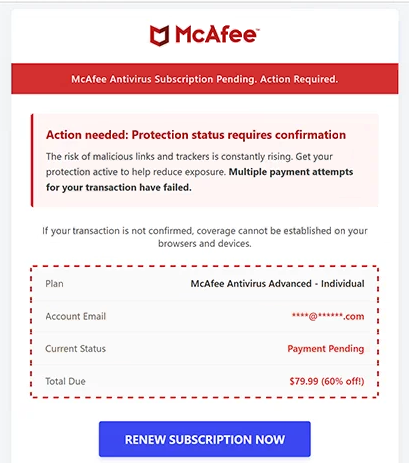
The email presents the problem as a security concern, suggesting that the recipient’s devices and browsers may not be adequately protected until the payment is confirmed. This approach is intended to make the supposed billing issue seem urgent, particularly for people who are concerned about viruses and other online threats.
According to the email, the affected subscription is “McAfee Antivirus Advanced – Individual”. A fabricated account summary lists the payment status as “Payment Pending” and shows an outstanding amount of $79.99, supposedly offered at a 60% discount.
Recipients are encouraged to select the “RENEW SUBSCRIPTION NOW” button to resolve the issue. The combination of a failed payment warning and a discounted renewal offer is designed to persuade users to act without independently checking their subscription status.
However, the button does not lead to a legitimate McAfee payment service. Instead, it redirects users to a fraudulent website promoting a cloud storage subscription. The observed destination was hosted using DigitalOcean Spaces, a legitimate cloud storage service that is not responsible for the scam.
The fraudulent website uses additional pressure tactics to encourage visitors to provide their payment information. These include countdown timers, warnings that an account has been blocked, and alerts claiming that cloud storage is full.
This sudden change from antivirus renewal to cloud storage payment is an important part of the deception. Although the original email discusses McAfee protection, the destination attempts to obtain payment information through a different subscription offer.
The scammers’ objective is to collect credit card details. Victims who enter their financial information risk unauthorized transactions, monetary losses, and potential misuse of their personal details.
Neither McAfee nor Norton is involved in the campaign. Their names are being used without authorization to make the fraudulent email appear trustworthy.
The full “McAfee Antivirus Subscription Pending” phishing email is below:
Subject: Notice: Your Norton subscription has lapsed – Reactivate now with a renewal discount
Premium Antivirus
McAfee Antivirus Subscription Pending. Action Required.
Action needed: Protection status requires confirmationThe risk of malicious links and trackers is constantly rising. Get your protection active to help reduce exposure. Multiple payment attempts for your transaction have failed.
If your transaction is not confirmed, coverage cannot be established on your browsers and devices.
Plan McAfee Antivirus Advanced – Individual
Current Status Payment Pending
Total Due $79.99 (60% off!)[RENEW SUBSCRIPTION NOW] Guarantees
You may unsubscribe at any time by clicking here.
How to recognize the “McAfee Antivirus Subscription Pending” phishing email
One of the clearest warning signs is the inconsistency between the email’s subject line and its contents. The subject says “Notice: Your Norton subscription has lapsed – Reactivate now with a renewal discount”, while the body claims that a McAfee subscription payment is pending.
Norton and McAfee are separate antivirus companies. A genuine subscription notification would not normally identify one company’s product in the subject line and another company’s service in the billing information.
The payment warning is another suspicious detail. The email claims that multiple transactions have failed but does not provide a reliable way to verify the alleged payment attempts. Instead, it directs recipients toward a renewal button and encourages immediate action.
The $79.99 charge and advertised 60% discount also serve a persuasive purpose. By presenting the payment as both necessary and discounted, the scammers attempt to make the offer seem financially attractive while discouraging recipients from questioning its legitimacy.
The email also uses concerns about online security to strengthen its claims. It warns about malicious links and trackers and suggests that protection cannot be established until the transaction is confirmed. These statements are intended to make recipients worry about leaving their devices unprotected.
The website opened through the renewal button provides further evidence of fraud. Rather than displaying a recognizable antivirus account or subscription management page, it presents unrelated cloud storage warnings and payment requests.
Countdown timers and blocked-account notifications are particularly suspicious when they appear on an unfamiliar website reached through an unsolicited email. Their purpose is to create urgency and encourage visitors to submit payment details before examining the website.
Recipients who receive this phishing email should avoid using the renewal button or providing payment information. Anyone who genuinely uses McAfee or Norton can check their subscription by opening the relevant company’s official website or application independently.
The sender’s address and the destination of the renewal link should also be examined carefully. Familiar logos and product names are not proof of authenticity, especially when the email contains contradictory branding and redirects to an unrelated service.
Anyone who has already entered card details on the fraudulent website should contact their bank or card issuer promptly. The card may need to be blocked or replaced, and recent transactions should be reviewed for unauthorized charges.
The “McAfee Antivirus Subscription Pending” phishing email relies on a false billing problem, familiar security brands, and misleading renewal offers. Its ultimate purpose is not to restore antivirus protection but to lead recipients to fraudulent payment pages where their financial information can be stolen.
Site Disclaimer
2-remove-virus.com is not sponsored, owned, affiliated, or linked to malware developers or distributors that are referenced in this article. The article does not promote or endorse any type of malware. We aim at providing useful information that will help computer users to detect and eliminate the unwanted malicious programs from their computers. This can be done manually by following the instructions presented in the article or automatically by implementing the suggested anti-malware tools.
The article is only meant to be used for educational purposes. If you follow the instructions given in the article, you agree to be contracted by the disclaimer. We do not guarantee that the artcile will present you with a solution that removes the malign threats completely. Malware changes constantly, which is why, in some cases, it may be difficult to clean the computer fully by using only the manual removal instructions.