The myvideolibrary.info redirect is a browser issue associated with a browser hijacker that promotes the myvideolibrary.info website. After the hijacker is installed, users may notice that browser settings have been modified without their approval, causing searches, new tabs, and homepage activity to be routed through the promoted domain.
The website connected to the myvideolibrary.info redirect is presented as a search-related platform designed to help users find online content. However, rather than operating as a legitimate standalone search engine, the site primarily functions as a redirect service that processes search queries and displays results obtained from other providers. This allows its operators to generate traffic and potentially profit from advertisements and sponsored content.
One of the most common symptoms of the myvideolibrary.info redirect is the unauthorized modification of browser settings. The browser hijacker may replace the homepage, default search engine, and new tab page with settings that favor myvideolibrary.info. Users who attempt to restore their preferred configuration often find that the unwanted changes reappear after restarting the browser.
This persistence is typically achieved through browser extensions or supporting components installed alongside the hijacker. These components monitor browser preferences and automatically restore the promoted settings whenever modifications are detected, making manual removal more difficult.
Another concern associated with the myvideolibrary.info redirect is exposure to intrusive advertising. Browser hijackers commonly inject sponsored links, banners, pop-ups, and promotional content into browsing sessions. Some of these advertisements may lead to deceptive websites promoting scams, fake software updates, misleading browser extensions, technical support fraud, or additional potentially unwanted applications.
Privacy issues are also commonly associated with browser hijackers. The software responsible for the myvideolibrary.info redirect may collect information such as search queries, browsing activity, browser settings, IP addresses, and interactions with advertisements. This data can be used for targeted advertising purposes and may potentially be shared with third parties.
Users may additionally notice reduced browser performance while the hijacker remains active. Redirect chains, advertising scripts, and background browser modifications can contribute to slower page loading times, delayed search results, and increased resource consumption.
Although the myvideolibrary.info redirect is not generally considered highly destructive malware, it can interfere with normal browsing activities, reduce user control over browser settings, and expose users to privacy and security risks. For this reason, browser hijackers are widely classified as potentially unwanted applications.
How browser hijackers causing myvideolibrary.info redirect get installed
The browser hijacker responsible for the myvideolibrary.info redirect is commonly distributed through bundled software installations. Free applications downloaded from unofficial websites may contain additional browser-modifying components packaged alongside the desired software. Users who choose default installation settings may unknowingly authorize the installation of these extra programs.
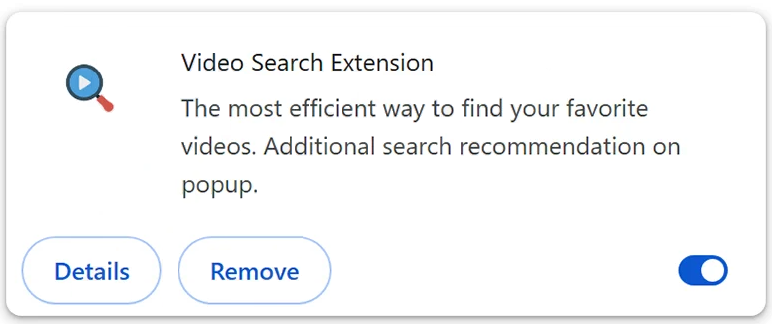
Browser extensions are another common source of infections associated with the myvideolibrary.info redirect. Extensions advertised as video search tools, media finders, browsing enhancements, or productivity utilities may secretly modify browser settings after installation. Once active, they can redirect browser activity through myvideolibrary.info and make browser changes difficult to reverse.
Misleading advertisements also contribute to the spread of browser hijackers. Some websites display fake update notifications, deceptive download buttons, or alerts claiming that browser improvements are required. Users who interact with these promotions may install browser-modifying software instead of legitimate applications.
Another tactic involves hiding important information during installation. Details regarding homepage modifications, search engine replacement, and browser extensions may be buried within lengthy agreements or concealed inside advanced setup menus that many users fail to review.
To reduce the risk of infection, users should download software only from trusted sources, carefully review installation settings, and avoid installing unnecessary browser extensions. Choosing “Custom” or “Advanced” installation options can help identify bundled software before installation is completed.
Remove myvideolibrary.info redirect
To remove myvideolibrary.info redirect, it’s necessary to remove the browser hijacker promoting it. The easiest way to do that is to use an anti-virus program because while hijackers are not malicious, they can be difficult to remove manually.
Offers
Download Removal Toolto scan for myvideolibrary.info redirectUse our recommended removal tool to scan for myvideolibrary.info redirect. Trial version of provides detection of computer threats like myvideolibrary.info redirect and assists in its removal for FREE. You can delete detected registry entries, files and processes yourself or purchase a full version.
More information about SpyWarrior and Uninstall Instructions. Please review SpyWarrior EULA and Privacy Policy. SpyWarrior scanner is free. If it detects a malware, purchase its full version to remove it.
WiperSoft Review Details WiperSoft (www.wipersoft.com) is a security tool that provides real-time security from potential threats. Nowadays, many users tend to download free software from the Intern ...
Download|moreIs MacKeeper a virus? MacKeeper is not a virus, nor is it a scam. While there are various opinions about the program on the Internet, a lot of the people who so notoriously hate the program have neve ...
Download|moreWhile the creators of MalwareBytes anti-malware have not been in this business for long time, they make up for it with their enthusiastic approach. Statistic from such websites like CNET shows that th ...
Download|more
Quick Menu
Step 1. Uninstall myvideolibrary.info redirect and related programs.
Remove myvideolibrary.info redirect from Windows 8
Right-click in the lower left corner of the screen. Once Quick Access Menu shows up, select Control Panel choose Programs and Features and select to Uninstall a software.
Uninstall myvideolibrary.info redirect from Windows 7
Click Start → Control Panel → Programs and Features → Uninstall a program.
Delete myvideolibrary.info redirect from Windows XP
Click Start → Settings → Control Panel. Locate and click → Add or Remove Programs.
Remove myvideolibrary.info redirect from Mac OS X
Click Go button at the top left of the screen and select Applications. Select applications folder and look for myvideolibrary.info redirect or any other suspicious software. Now right click on every of such entries and select Move to Trash, then right click the Trash icon and select Empty Trash.
Step 2. Delete myvideolibrary.info redirect from your browsers
Terminate the unwanted extensions from Internet Explorer
- Tap the Gear icon and go to Manage Add-ons.
- Pick Toolbars and Extensions and eliminate all suspicious entries (other than Microsoft, Yahoo, Google, Oracle or Adobe)
- Leave the window.
Change Internet Explorer homepage if it was changed by virus:
- Tap the gear icon (menu) on the top right corner of your browser and click Internet Options.
- In General Tab remove malicious URL and enter preferable domain name. Press Apply to save changes.
Reset your browser
- Click the Gear icon and move to Internet Options.
- Open the Advanced tab and press Reset.
- Choose Delete personal settings and pick Reset one more time.
- Tap Close and leave your browser.
- If you were unable to reset your browsers, employ a reputable anti-malware and scan your entire computer with it.
Erase myvideolibrary.info redirect from Google Chrome
- Access menu (top right corner of the window) and pick Settings.
- Choose Extensions.
- Eliminate the suspicious extensions from the list by clicking the Trash bin next to them.
- If you are unsure which extensions to remove, you can disable them temporarily.
Reset Google Chrome homepage and default search engine if it was hijacker by virus
- Press on menu icon and click Settings.
- Look for the “Open a specific page” or “Set Pages” under “On start up” option and click on Set pages.
- In another window remove malicious search sites and enter the one that you want to use as your homepage.
- Under the Search section choose Manage Search engines. When in Search Engines..., remove malicious search websites. You should leave only Google or your preferred search name.
Reset your browser
- If the browser still does not work the way you prefer, you can reset its settings.
- Open menu and navigate to Settings.
- Press Reset button at the end of the page.
- Tap Reset button one more time in the confirmation box.
- If you cannot reset the settings, purchase a legitimate anti-malware and scan your PC.
Remove myvideolibrary.info redirect from Mozilla Firefox
- In the top right corner of the screen, press menu and choose Add-ons (or tap Ctrl+Shift+A simultaneously).
- Move to Extensions and Add-ons list and uninstall all suspicious and unknown entries.
Change Mozilla Firefox homepage if it was changed by virus:
- Tap on the menu (top right corner), choose Options.
- On General tab delete malicious URL and enter preferable website or click Restore to default.
- Press OK to save these changes.
Reset your browser
- Open the menu and tap Help button.
- Select Troubleshooting Information.
- Press Refresh Firefox.
- In the confirmation box, click Refresh Firefox once more.
- If you are unable to reset Mozilla Firefox, scan your entire computer with a trustworthy anti-malware.
Uninstall myvideolibrary.info redirect from Safari (Mac OS X)
- Access the menu.
- Pick Preferences.
- Go to the Extensions Tab.
- Tap the Uninstall button next to the undesirable myvideolibrary.info redirect and get rid of all the other unknown entries as well. If you are unsure whether the extension is reliable or not, simply uncheck the Enable box in order to disable it temporarily.
- Restart Safari.
Reset your browser
- Tap the menu icon and choose Reset Safari.
- Pick the options which you want to reset (often all of them are preselected) and press Reset.
- If you cannot reset the browser, scan your whole PC with an authentic malware removal software.
Incoming search terms:
Site Disclaimer
2-remove-virus.com is not sponsored, owned, affiliated, or linked to malware developers or distributors that are referenced in this article. The article does not promote or endorse any type of malware. We aim at providing useful information that will help computer users to detect and eliminate the unwanted malicious programs from their computers. This can be done manually by following the instructions presented in the article or automatically by implementing the suggested anti-malware tools.
The article is only meant to be used for educational purposes. If you follow the instructions given in the article, you agree to be contracted by the disclaimer. We do not guarantee that the artcile will present you with a solution that removes the malign threats completely. Malware changes constantly, which is why, in some cases, it may be difficult to clean the computer fully by using only the manual removal instructions.