

The “Notification: 12 Messages Pending Delivery” phishing email is a credential-stealing scam that impersonates an email service provider. It falsely claims that a temporary system problem has prevented several emails from reaching the recipient’s inbox and asks them to take action to release the supposedly pending emails.
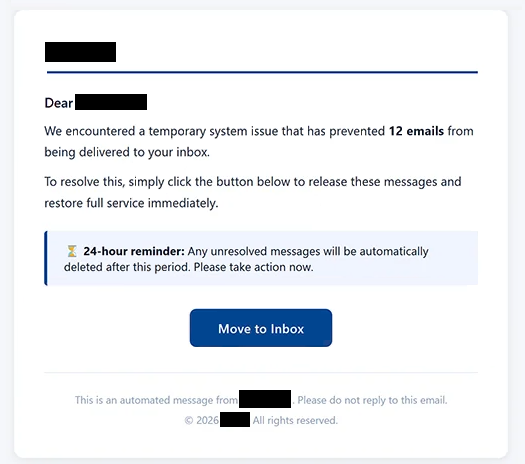
The email claims that 12 emails are awaiting delivery because of a “temporary system issue”. Recipients are told that the problem can be resolved by selecting the “Move to Inbox” button, which supposedly releases the affected emails and restores normal service.
The scammers also introduce a 24-hour deadline. According to the email, pending emails that remain unresolved after this period will be automatically deleted. This warning is intended to create urgency and encourage recipients to follow the instructions without checking whether the delivery problem is genuine.
There are no 12 pending emails waiting to be released. Selecting “Move to Inbox” does not resolve an email problem. Instead, the button directs users to a phishing website designed to obtain their account credentials.
In the analyzed case, the linked site displayed a fake Google sign-in page. The recipient’s email address was already shown in the login form, leaving the password as the main information that needed to be entered. This can make the page appear as though the user simply needs to authenticate again.
Passwords submitted through this page are provided to the scammers rather than used to access a legitimate email service. With stolen email credentials, scammers may be able to access information stored in the mailbox and target other accounts connected to the compromised email address.
Anyone who has entered a password on the phishing page should change the affected account password. If the same credentials are used elsewhere, those passwords should also be replaced.
The full “Notification: 12 Messages Pending Delivery” phishing email is below:
Subject: Notification:12 Messages Pending Delivery
–
Dear -,
We encountered a temporary system issue that has prevented 12 emails from being delivered to your inbox.
To resolve this, simply click the button below to release these messages and restore full service immediately.
24-hour reminder: Any unresolved messages will be automatically deleted after this period. Please take action now.[Move to Inbox]
This is an automated message from – . Please do not reply to this email.
© 2026 -. All rights reserved.
How to recognize phishing emails
The fabricated delivery problem is one of the main warning signs in the “Notification: 12 Messages Pending Delivery” phishing email. An unexpected email claims that exactly 12 emails could not be delivered, yet the recipient is required to use an embedded button to supposedly resolve the problem.
The 24-hour deadline adds further pressure. Recipients are warned that the pending emails will be deleted if they do not act within the stated period. Urgent consequences like these are commonly intended to reduce the likelihood that a recipient will independently verify the claim before responding.
The “Move to Inbox” button is another important detail to check. Instead of leading to the recipient’s legitimate email service, it opens a phishing website. Users should examine the destination of unexpected links before entering account information.
The login page itself may appear convincing. In this case, the phishing site displayed a counterfeit Google sign-in interface and already contained the recipient’s email address. Familiar branding and a pre-filled email address, however, do not prove that a login page is legitimate. The website’s actual domain should be checked before entering a password.
Recipients can also verify claims about email delivery without following instructions in an unexpected email. Opening the email provider’s official application or accessing its website independently makes it possible to check the account without relying on a link selected by the sender.
The sender address should also be examined rather than trusting only the displayed name. Unexpected requests to sign in, artificial deadlines, and threats that emails will be deleted are additional reasons to verify an email before taking action.
Site Disclaimer
2-remove-virus.com is not sponsored, owned, affiliated, or linked to malware developers or distributors that are referenced in this article. The article does not promote or endorse any type of malware. We aim at providing useful information that will help computer users to detect and eliminate the unwanted malicious programs from their computers. This can be done manually by following the instructions presented in the article or automatically by implementing the suggested anti-malware tools.
The article is only meant to be used for educational purposes. If you follow the instructions given in the article, you agree to be contracted by the disclaimer. We do not guarantee that the artcile will present you with a solution that removes the malign threats completely. Malware changes constantly, which is why, in some cases, it may be difficult to clean the computer fully by using only the manual removal instructions.