

The “Resolve Security Concerns” phishing email is a fake account security alert created to steal email login credentials. It pretends to come from an IT department and tells recipients that security problems have been found with their email account. The supposed problems are not real, and the instructions lead to a phishing page rather than a legitimate security service.
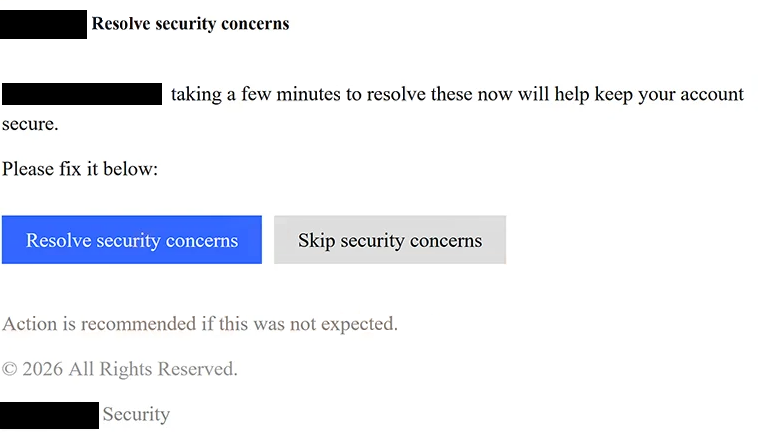
The subject is “Resolve security concerns.” Inside, the email presents itself as a notice from an “IT Operations Department” and tells the recipient that their account has security concerns that require attention.
The wording is brief and deliberately vague. It does not explain what security problem was found, when it was detected, or what activity caused the warning. Instead, the email says that spending a few minutes dealing with the issue will help keep the account secure.
Recipients are given two choices: “Resolve security concerns” and “Skip security concerns.” Providing a second option can make the email seem more like a genuine account notification, but neither the warning nor the supposed IT department should be trusted.
Choosing “Resolve security concerns” opens a phishing website. A pop-up titled “Re-Authentication Required” appears and tells the user to log in again so that a supposed repair process can continue. The recipient’s email address is already entered, and the page asks for the account password.
Entering the password does not fix an account problem. The information is sent to the scammers, who can then try to sign in to the real email account.
The “IT Operations Department” mentioned in the email is not a real organization involved with the recipient’s account. The scammers use a generic department name because it can sound relevant to people using many different email providers, workplace accounts, or hosting services.
Access to a stolen mailbox can allow scammers to read private emails and search for useful personal or business information. They may also impersonate the account owner and send phishing emails from the compromised address.
Email accounts are often used to recover access to other online services, which makes a stolen password particularly useful. If the same password has also been reused elsewhere, scammers can try those credentials on other accounts.
The full “Resolve Security Concerns” phishing email is below:
Subject: Resolve security concerns
– Resolve security concerns
– taking a few minutes to resolve these now will help keep your account secure.
Please fix it below:
[Resolve security concerns] [Skip security concerns]
Action is recommended if this was not expected.
© 2026 All Rights Reserved.
– Security
How to recognize the “Resolve Security Concerns” phishing email
One problem with the “Resolve Security Concerns” phishing email is how little information it actually provides. It says that there are security concerns but never explains what happened. There is no description of an unusual login, password change, suspicious device, or other specific event that would justify the warning.
The generic “IT Operations Department” name is another reason to be cautious. A legitimate security email should make it clear which company, email provider, or organization is contacting the user. In this case, the identity is broad enough to apply to almost anyone.
The request to re-enter a password after selecting “Resolve security concerns” is the most important part of the scam. Recipients are first made worried about their account and are then immediately asked to authenticate. This gives scammers a believable reason to request the exact information they want to steal.
Having the correct email address already displayed on the phishing page does not make it genuine. Scammers can include a recipient’s address in the link and automatically place it into a fake login form.
The “Re-Authentication Required” pop-up also refers to a “repair process,” even though the original email never clearly explains what needs to be repaired. This vague language allows the phishing page to continue the security story without providing any verifiable details.
Anyone who receives this email should avoid using either option provided in it. If there is concern about account security, the email service should be opened normally, and recent activity can be checked from the real account settings.
Receiving or reading the “Resolve Security Concerns” phishing email does not expose the password. The account is put at risk when credentials are entered on the fake re-authentication page.
Site Disclaimer
2-remove-virus.com is not sponsored, owned, affiliated, or linked to malware developers or distributors that are referenced in this article. The article does not promote or endorse any type of malware. We aim at providing useful information that will help computer users to detect and eliminate the unwanted malicious programs from their computers. This can be done manually by following the instructions presented in the article or automatically by implementing the suggested anti-malware tools.
The article is only meant to be used for educational purposes. If you follow the instructions given in the article, you agree to be contracted by the disclaimer. We do not guarantee that the artcile will present you with a solution that removes the malign threats completely. Malware changes constantly, which is why, in some cases, it may be difficult to clean the computer fully by using only the manual removal instructions.