

The “Roundcube Webmail – mandatory security patches” phishing email is a fraudulent message that impersonates Roundcube Webmail in an attempt to steal email account credentials. It falsely claims that mandatory security patches and authentication protocol updates are being deployed and instructs recipients to review their account settings within 24 hours to avoid losing access to their mailboxes. The notification is not sent by Roundcube and should be ignored.
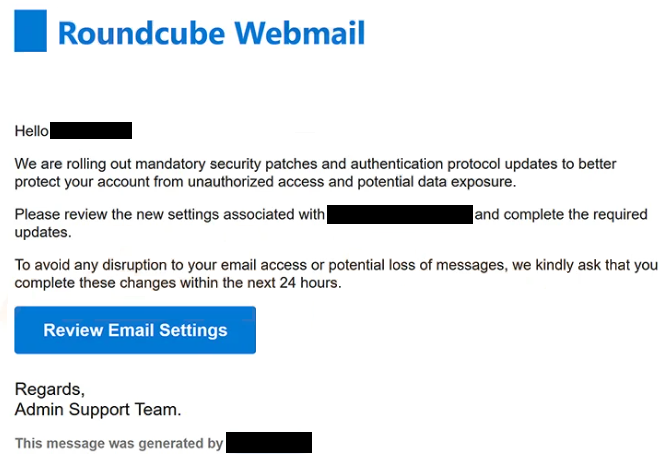
The email is typically presented as an automated security notice with the subject “Urgent Action Needed”. It informs recipients that their email accounts require immediate attention because new security measures are being implemented. According to the message, failing to complete the requested review before the deadline may result in disrupted email access or the loss of incoming messages. These claims are fabricated to pressure recipients into acting without verifying the legitimacy of the notification.
Recipients are instructed to click the “Review Email Settings” button embedded in the email. Rather than directing users to a legitimate Roundcube login page or their hosting provider’s webmail portal, the button opens a phishing website designed to capture login credentials. During analysis of this campaign, the phishing page was found to be hosted on habitatcyprus.com, a legitimate website that had been compromised and abused to host the fraudulent login form.
The counterfeit login page requests the visitor’s email address and password under the pretense of completing the required security update. Entering these credentials does not update the account or install any security patches. Instead, the information is transmitted directly to the attackers behind the phishing campaign.
A compromised email account can expose far more than email messages alone. Attackers who obtain access may read confidential conversations, collect sensitive documents, search for password reset emails, impersonate the account owner, or send additional phishing messages from the compromised mailbox. Since email accounts are commonly used to recover access to other online services, stolen credentials can also facilitate unauthorized access to additional accounts associated with the same email address.
An important detail about this campaign is that it abuses the Roundcube name to appear legitimate. Roundcube is open-source webmail software installed and managed by individual hosting providers. It is not a standalone email service that sends users account verification or security update notifications. The Roundcube project has previously warned users about phishing campaigns that misuse its name to steal credentials.
The attackers rely on urgency throughout the message. By imposing a 24-hour deadline and warning about possible loss of mailbox access, they attempt to discourage recipients from carefully inspecting the email or independently confirming whether the request is genuine.
Anyone who entered login credentials through the phishing page linked in the “Roundcube Webmail – mandatory security patches” phishing email should immediately change the password for the affected account. If the same password has been reused elsewhere, those accounts should also be secured. Reviewing account activity for unauthorized logins and updating recovery information are recommended additional steps.
The full “Roundcube Webmail – mandatory security patches” phishing email is below:
Subject: Urgent Action Needed
Roundcube Webmail
Hello, –
We are rolling out mandatory security patches and authentication protocol updates to better protect your account from unauthorized access and potential data exposure.
Please review the new settings associated with – and complete the required updates.
To avoid any disruption to your email access or potential loss of messages, we kindly ask that you complete these changes within the next 24 hours.
[Review Email Settings]
Regards,
Admin Support Team.This message was generated –
How to identify emails like “Roundcube Webmail – mandatory security patches”
One of the clearest warning signs is an unsolicited email claiming that mandatory security patches must be applied through a button contained in the message. Legitimate account maintenance can normally be performed by signing in directly to the official webmail portal rather than by following links contained in unexpected emails.
The destination of embedded links should also be verified. In this campaign, the “Review Email Settings” button leads to habitatcyprus.com, which has no official relationship with Roundcube or the recipient’s email provider. A login page hosted on an unrelated domain is a strong indicator of phishing.
Recipients should also be suspicious of emails imposing short deadlines and threatening account restrictions unless immediate action is taken. Creating artificial urgency is one of the most common social engineering techniques used in phishing campaigns.
Another warning sign is any request to enter email credentials after following a link received in an unsolicited message. Legitimate hosting providers generally allow users to manage account settings after they manually access the provider’s official webmail portal or hosting dashboard.
The safest approach is to ignore links contained in unexpected security notifications and instead navigate directly to the official webmail login page provided by the email hosting company. If no corresponding notification appears after signing in, the email can be treated as a phishing attempt.
Site Disclaimer
2-remove-virus.com is not sponsored, owned, affiliated, or linked to malware developers or distributors that are referenced in this article. The article does not promote or endorse any type of malware. We aim at providing useful information that will help computer users to detect and eliminate the unwanted malicious programs from their computers. This can be done manually by following the instructions presented in the article or automatically by implementing the suggested anti-malware tools.
The article is only meant to be used for educational purposes. If you follow the instructions given in the article, you agree to be contracted by the disclaimer. We do not guarantee that the artcile will present you with a solution that removes the malign threats completely. Malware changes constantly, which is why, in some cases, it may be difficult to clean the computer fully by using only the manual removal instructions.