

The “Social Security Statement Update” email is a phishing scam that attempts to trick recipients into revealing sensitive personal information by pretending to be an official notification related to Social Security records or benefits. The message is usually disguised as a statement update, account verification request, or document review notice and is designed to create concern about account status or missing information. Although the email may appear formal and government-related, it is fraudulent and should not be trusted.
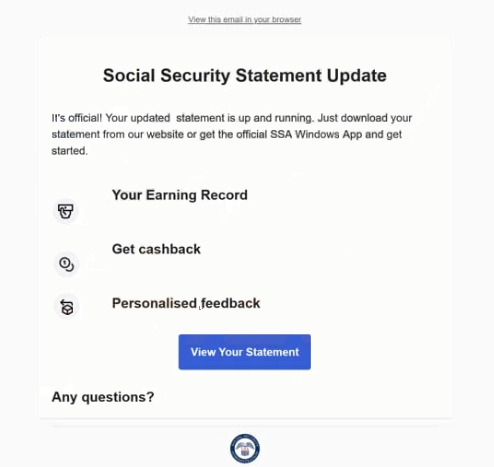
The scam commonly claims that a new Social Security statement is available or that important account information requires confirmation. The “Social Security Statement Update” email may warn that records cannot be processed correctly unless the recipient verifies details or reviews the attached update immediately. Some versions suggest that account access could be restricted or that benefit information may become outdated if no action is taken.
To supposedly review the update, recipients are instructed to click a link or open an attached file included in the email. However, instead of leading to a legitimate government portal, the link typically redirects users to a fake login page designed to imitate an official website. In other cases, the attachment may contain malicious content intended to install malware or steal information from the device.
The “Social Security Statement Update” scam relies heavily on trust in government institutions and concern about personal records. Notifications related to taxes, benefits, or identification information naturally attract attention because they may affect finances, retirement planning, or legal documentation. Attackers exploit this trust to make the phishing email appear more believable.
A compromised account or stolen personal information can create serious consequences. Attackers may attempt identity theft, financial fraud, or unauthorized access to additional online services using the collected details. Since Social Security-related information is highly sensitive, phishing campaigns involving government impersonation can be especially dangerous.
Another reason the “Social Security Statement Update” phishing campaign remains effective is its broad targeting approach. The email often uses generic wording rather than referencing specific personal details, allowing the same phishing template to be distributed to large numbers of recipients at once. Even users who are not actively expecting Social Security-related communication may still react because the topic appears important and official.
The full “Social Security Statement Update” phishing email is below:
Subject: Your Social Security Statement Is Ready Now – Download Now
View this email in your browser
Social Security Statement Update
It’s official! Your updated statement is up and running. Just download your statement from our website or get the official SSA Windows App and get started.
Your Earning Record
Get cashback
Personalised feedbackView Your Statement
Any questions?
Agency logo SSA.gov An official website of the Social Security Administration.
Accessibility support Privacy policy FOIA requests
Civil Rights/Compliance Office of the Inspector General Office of the Chief Actuary Performance reports Looking for U.S. government information and services? Visit USA.gov
How to recognize phishing emails
Recognizing phishing emails like the “Social Security Statement Update” scam requires paying close attention to warning signs commonly found in fraudulent government-related notifications. Even when these emails appear professional, they often contain inconsistencies that expose their true purpose.
One major warning sign is urgency. Phishing emails frequently claim that immediate action is necessary to avoid account issues, delayed records, or restricted access. In this case, the email may pressure recipients to review a statement update or verify information quickly. This urgency is intentional and is designed to encourage fast reactions instead of careful evaluation.
The sender’s email address should also be inspected carefully. Fraudulent emails often imitate official organizations but use suspicious domains, unrelated addresses, or slight spelling variations. Even if the sender’s name appears legitimate, the actual address may reveal that the message did not originate from a genuine government institution.
Links embedded in phishing emails are another important indicator. While the visible text may appear trustworthy, hovering over the link often reveals a suspicious or unrelated destination. These links commonly lead to counterfeit login pages designed specifically to collect usernames, passwords, and personal information. Legitimate government agencies generally encourage users to access services directly through official websites instead of through unsolicited email links.
The wording and formatting used in phishing emails can also provide clues. Some messages contain grammatical mistakes, awkward phrasing, or inconsistent formatting. Others may appear polished but still rely heavily on vague explanations and generic account warnings. A lack of personalization is another common sign because phishing campaigns are typically distributed in bulk.
Unexpected attachments should also be treated carefully. Some phishing emails include files disguised as statements, reports, or verification forms. Opening these attachments may expose devices to malware if the files contain harmful scripts or executable content.
Requests for sensitive personal information should always raise suspicion. Legitimate organizations do not ask recipients to confirm Social Security numbers, passwords, or financial details through random external pages linked in unsolicited emails. Emails demanding immediate verification of sensitive data are commonly associated with phishing activity.
A safer approach is to avoid interacting with suspicious emails directly. Instead of clicking links or opening attachments, users should manually visit the official government website or contact the relevant agency through verified communication channels. If no matching notification appears there, the email is likely fraudulent.
Incoming search terms:
Site Disclaimer
2-remove-virus.com is not sponsored, owned, affiliated, or linked to malware developers or distributors that are referenced in this article. The article does not promote or endorse any type of malware. We aim at providing useful information that will help computer users to detect and eliminate the unwanted malicious programs from their computers. This can be done manually by following the instructions presented in the article or automatically by implementing the suggested anti-malware tools.
The article is only meant to be used for educational purposes. If you follow the instructions given in the article, you agree to be contracted by the disclaimer. We do not guarantee that the artcile will present you with a solution that removes the malign threats completely. Malware changes constantly, which is why, in some cases, it may be difficult to clean the computer fully by using only the manual removal instructions.