

The “Verification of Access Renewal” phishing email is a scam that impersonates an IT help desk to steal email account passwords. It claims that the recipient’s password has expired and that they have been signed out of their account. The phishing email presents a verification procedure as the only way to restore access while continuing to use the existing password.
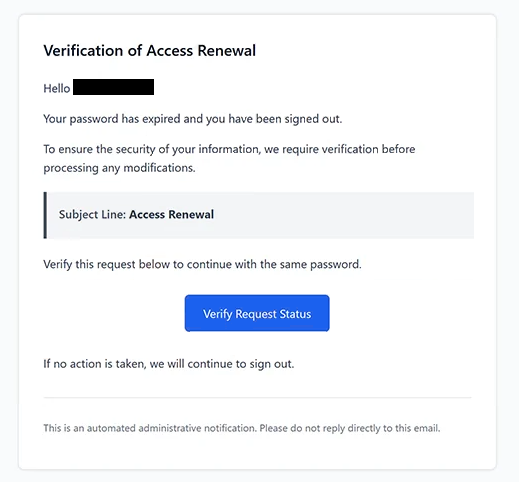
The email uses the subject line “Access Renewal” and displays the heading “Verification of Access Renewal.” It informs recipients that their passwords are no longer valid and that identity verification is required before any account modifications can be processed. However, the notification does not identify a specific email provider or explain why the password supposedly expired.
Recipients are instructed to click a button labeled “Verify Request Status.” The email suggests that completing this step will allow them to continue using their current password. It also warns that they will continue to be signed out if they do not complete the verification, creating pressure to follow the instructions.
The button leads to a phishing website hosted at shanghaijundu.com, a domain unrelated to the recipient’s email service. The website displays the heading “Continue with your email” and presents a login form with the recipient’s email address already entered. Visitors are then asked to provide their passwords.
The prefilled email address is intended to make the authentication page appear personalized and trustworthy. Recipients may assume that the website recognizes their accounts because their addresses are already displayed. However, this information can be included in a phishing link or obtained by scammers before the email is sent.
Passwords submitted through the fake form are collected by the attackers. If the credentials are valid, scammers may attempt to access the affected mailboxes, read private correspondence, and obtain sensitive information from stored emails or attachments. They may also impersonate account owners to send additional phishing emails.
Compromised email accounts can expose other online services to unauthorized access. Attackers may attempt to reset passwords for accounts linked to the affected email address, potentially gaining access to additional personal or business information. The extent of the damage depends on the account’s security settings and whether the stolen credentials can be used successfully.
The “Verification of Access Renewal” phishing email does not establish that the recipient’s password has expired or that their account has been signed out. Its purpose is to obtain login credentials through a fake authentication page rather than complete a legitimate password renewal process.
The full “Verification of Access Renewal” phishing email is below:
Subject: Access Renewal
Verification of Access Renewal
Hello -,
Your password has expired and you have been signed out.
To ensure the security of your information, we require verification before processing any modifications.
Subject Line: Access RenewalVerify this request below to continue with the same password.
[Verify Request Status]If no action is taken, we will continue to sign out.
This is an automated administrative notification. Please do not reply directly to this email.
How to recognize phishing emails
The “Verification of Access Renewal” phishing email contains several warning signs, beginning with its unexpected password expiration notice. It claims that the recipient has been signed out but provides no account-specific information or explanation for the supposed expiration. The notification also fails to identify the organization responsible for managing the account.
Another suspicious detail is the instruction to verify an expired password while continuing to use the same credentials. The email claims that the password has expired but suggests that verification will allow the recipient to keep using it. This inconsistency raises questions about the legitimacy of the supposed account renewal procedure.
The “Verify Request Status” button is particularly important because it directs recipients to a website unrelated to their email provider. Although the button appears to offer a routine administrative function, its destination requests the recipient’s existing password. This mismatch between the claimed verification procedure and the actual website is characteristic of credential-stealing phishing emails.
The fake login page may also appear convincing because it displays the recipient’s email address automatically. However, a prefilled address does not establish that the website belongs to a legitimate service provider. Phishing websites can use information already known to scammers to make authentication forms appear personalized.
The email’s wording provides another clue. It uses administrative phrases such as “Verification of Access Renewal” and refers to security requirements without identifying a specific IT department or explaining the account issue. Such terminology can make an email sound official while providing little verifiable information.
The warning about continued sign-outs also creates urgency. Recipients are encouraged to believe that their accounts will remain inaccessible unless they complete the verification. This pressure can make the embedded button appear more important than checking whether the password expiration claim is genuine.
Finally, the email includes an automated administrative notification disclaimer and instructs recipients not to reply. Although these elements are common in legitimate system-generated emails, they can also be reproduced in phishing attempts.
Site Disclaimer
2-remove-virus.com is not sponsored, owned, affiliated, or linked to malware developers or distributors that are referenced in this article. The article does not promote or endorse any type of malware. We aim at providing useful information that will help computer users to detect and eliminate the unwanted malicious programs from their computers. This can be done manually by following the instructions presented in the article or automatically by implementing the suggested anti-malware tools.
The article is only meant to be used for educational purposes. If you follow the instructions given in the article, you agree to be contracted by the disclaimer. We do not guarantee that the artcile will present you with a solution that removes the malign threats completely. Malware changes constantly, which is why, in some cases, it may be difficult to clean the computer fully by using only the manual removal instructions.