

The “Virus Detected! Your System Is At Risk” phishing email is a fraudulent message that attempts to convince recipients that their computer has been infected with serious malware. The email falsely claims that a critical security threat has been discovered and urges users to take immediate action to prevent data loss, account compromise, or system failure. In reality, the notification is part of a phishing campaign intended to steal sensitive information or direct victims to malicious websites.
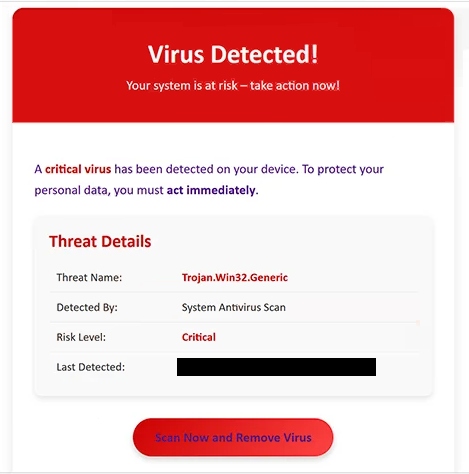
Unlike phishing emails that focus on account verification or password expiration, this campaign relies on fear of malware infections. The message typically states that a recent security scan identified dangerous malicious software running on the recipient’s device. It warns that delaying action could allow the alleged infection to spread, damage files, or expose confidential information.
To supposedly resolve the problem, the email includes a button encouraging recipients to remove the threat or secure their device. Rather than launching a legitimate antivirus application, the link redirects users to a fraudulent webpage controlled by cybercriminals. Depending on the campaign, the page may imitate a security company’s website, display a fake malware scan, or present a login form requesting personal information.
Some versions of the scam attempt to steal email account credentials by asking users to sign in before downloading a supposed security update. Others promote potentially unwanted software or attempt to persuade victims to purchase fake antivirus products that provide no real protection. In every case, the website is designed to benefit the attackers instead of resolving any security issue.
The “Virus Detected! Your System Is At Risk” phishing email often contains alarming language intended to discourage careful evaluation of the message. It may claim that the infection is severe, that personal data is already at risk, or that immediate action is required within minutes. These urgency tactics are commonly used in phishing campaigns to pressure recipients into clicking embedded links before verifying whether the notification is genuine.
To make the message appear authentic, the scammers frequently include security-related graphics, warning icons, fabricated scan results, or references to system protection technologies. Some emails also display random threat names or exaggerated infection statistics. These visual elements are intended solely to increase credibility and should not be interpreted as evidence that the device has actually been scanned.
If a recipient provides login credentials, downloads software, or submits payment information after interacting with the “Virus Detected! Your System Is At Risk” phishing email, the attackers may use that information for unauthorized account access, financial fraud, identity theft, or additional phishing attacks. Anyone who entered credentials should immediately change the password for the affected account and review it for suspicious activity.
How to identify fake virus detection emails
Unexpected emails claiming that a computer has already been infected with malware should be treated as fake. Legitimate antivirus products perform malware detection locally on the protected device and display alerts within the security application itself rather than through unsolicited emails.
Recipients should carefully examine the sender’s email address instead of relying only on the displayed company name. Cybercriminals frequently impersonate well-known security vendors while sending messages from unrelated domains.
Another warning sign is an email claiming that a virus has been detected without identifying the affected device, installed security software, or the method used to perform the alleged scan. Genuine security products provide detailed information within the application installed on the computer rather than requesting immediate action through an email link.
Users should also avoid downloading software or entering credentials after following links contained in unexpected security alerts. If there is concern that a computer may actually be infected, the safest approach is to open the trusted antivirus software already installed on the device or visit the official website of the security vendor by manually entering its web address into a browser.
Any unsolicited email claiming that a device is critically infected should be independently verified before any action is taken. Messages relying on urgency and directing recipients to unfamiliar websites should be considered phishing attempts.
Site Disclaimer
2-remove-virus.com is not sponsored, owned, affiliated, or linked to malware developers or distributors that are referenced in this article. The article does not promote or endorse any type of malware. We aim at providing useful information that will help computer users to detect and eliminate the unwanted malicious programs from their computers. This can be done manually by following the instructions presented in the article or automatically by implementing the suggested anti-malware tools.
The article is only meant to be used for educational purposes. If you follow the instructions given in the article, you agree to be contracted by the disclaimer. We do not guarantee that the artcile will present you with a solution that removes the malign threats completely. Malware changes constantly, which is why, in some cases, it may be difficult to clean the computer fully by using only the manual removal instructions.