

The “Webmail: We detected a suspicious login” phishing email is a credential-stealing scam disguised as a webmail security alert. It claims that a new device has recently accessed the recipient’s email account and encourages them to review the supposed login if they do not recognize it.
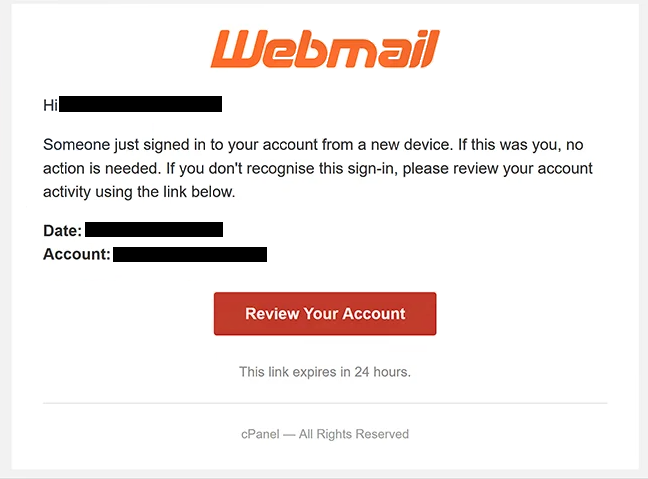
The email is designed to create concern that someone may have gained unauthorized access to the recipient’s mailbox. It provides details about the supposed login and tells recipients that no action is required if they recognize the activity. Those who do not are encouraged to investigate.
To review the alleged security event, recipients are instructed to select the “Review Your Account” button. The email also warns that the provided link will expire within 24 hours, adding urgency to the request.
The “Review Your Account” button does not open a legitimate webmail account management page. It directs recipients to a phishing website hosted on an unrelated domain. The site imitates a cPanel Webmail login page and uses familiar branding to make the sign-in process appear legitimate.
The fake page asks visitors to enter their email address and password. Any credentials submitted through this form are exposed to the scammers rather than being used to review the alleged suspicious login.
Stolen webmail credentials can give scammers unauthorized access to the affected mailbox and the information stored in it. An email account may also be connected to other online services that use the address for account recovery.
Anyone who has entered credentials on the fake login page should change the affected email password. If the same password is used for other accounts, it should be replaced on those services as well.
The security warning in the “Webmail: We detected a suspicious login” phishing email is therefore a lure. Its purpose is to convince recipients to follow the supplied link and enter their credentials on a counterfeit webmail login page.
The full “Webmail: We detected a suspicious login” phishing email is below:
Subject: Webmail : We detected a suspicious login
Webmail
Hi -,
Someone just signed in to your account from a new device. If this was you, no action is needed. If you don’t recognise this sign-in, please review your account activity using the link below.
Date: –
Account: –[Review Your Account]
This link expires in 24 hours.
cPanel — All Rights Reserved
How to recognize phishing emails
The unexpected new-device warning is the main reason to question the “Webmail: We detected a suspicious login” phishing email. Security alerts about unfamiliar logins can encourage an immediate reaction because recipients may believe their account is already compromised.
The 24-hour deadline increases this pressure. The email claims that the “Review Your Account” link will expire, encouraging recipients to investigate the supposed login quickly rather than independently verifying the alert.
The destination behind the button is a more useful indicator than its visible wording. In this campaign, selecting “Review Your Account” takes recipients to a domain unrelated to the legitimate webmail service. Links in unexpected security emails should therefore be checked before any credentials are entered.
The counterfeit login page is another part of the deception. It uses cPanel Webmail branding and asks for an email address and password. A familiar logo or realistic login form, however, does not establish that a website belongs to the service it represents. Phishing sites can reproduce these visual elements.
Recipients should examine the domain displayed in the browser’s address bar before entering login information. If the address does not belong to the expected service, credentials should not be submitted.
The sender address should also be checked instead of relying solely on the displayed sender name. An email can be made to appear as though it comes from a familiar service while originating from an unrelated address.
A suspicious-login alert can be investigated without using the email’s button. Recipients can access their normal webmail service directly and review available account or security information there. This prevents an unsolicited email from determining which website receives their password.
Site Disclaimer
2-remove-virus.com is not sponsored, owned, affiliated, or linked to malware developers or distributors that are referenced in this article. The article does not promote or endorse any type of malware. We aim at providing useful information that will help computer users to detect and eliminate the unwanted malicious programs from their computers. This can be done manually by following the instructions presented in the article or automatically by implementing the suggested anti-malware tools.
The article is only meant to be used for educational purposes. If you follow the instructions given in the article, you agree to be contracted by the disclaimer. We do not guarantee that the artcile will present you with a solution that removes the malign threats completely. Malware changes constantly, which is why, in some cases, it may be difficult to clean the computer fully by using only the manual removal instructions.