

The “You allowed someone access to some of your email data” phishing email is a scam that impersonates an email service provider to steal account passwords. It claims that the recipient has granted another person permission to access their email data and encourages them to review their account activity. The warning is fake and is intended to direct users to a counterfeit login page.
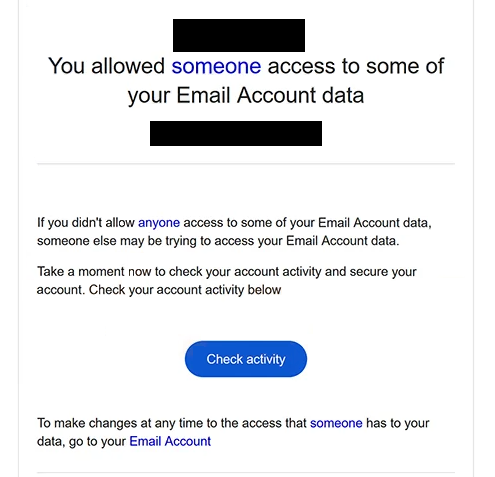
The phishing email uses the subject line “Important Alert : New sign-in to your Account” and states that someone has been allowed to access certain information associated with the recipient’s mailbox. It suggests that an unauthorized person may be attempting to access the account if the recipient did not approve this activity. The email then urges them to check their account immediately.
To make the warning appear legitimate, the phishing email includes a button labeled “Check activity.” The button supposedly allows recipients to review account permissions and determine whether someone else has gained access to their information. However, clicking it opens a phishing website rather than the account security settings of a legitimate email provider.
The destination is hosted on an edgeone.dev subdomain and presents itself as a Gmail authentication portal. It displays an “Authentication Required” notice and automatically fills in the visitor’s email address. The page then requests the account password and provides a button labeled “Keep same password.”
This wording is intended to make entering a password seem like an ordinary security confirmation. Rather than asking users to change their credentials, the phishing page creates the impression that they can maintain their existing password after reviewing the supposed account activity. In reality, any password submitted through the form is captured by the scammers.
If the stolen credentials are valid, attackers may attempt to access the victim’s mailbox. This could expose private correspondence, attachments, contact information, and other sensitive data. Scammers could also impersonate the account owner, send additional phishing emails, or attempt to reset passwords for other online accounts associated with the compromised email address.
The full “You allowed someone access to some of your email data” phishing email is below:
Subject: Important Alert : New sign-in to your Account
You allowed someone access to some of your Email Account data
If you didn’t allow anyone access to some of your Email Account data, someone else may be trying to access your Email Account data.
Take a moment now to check your account activity and secure your account. Check your account activity below
[Check activity]To make changes at any time to the access that someone has to your data, go to your Email Account
How to recognize phishing emails
The “You allowed someone access to some of your email data” phishing email contains several warning signs, beginning with its unexpected security notification. It claims that another person has been granted access to the recipient’s email data but does not identify that person or explain which permissions were supposedly approved. This lack of specific information makes the warning difficult to verify.
Another suspicious characteristic is the email’s wording. The subject line refers to a new sign-in, while the body discusses permission to access account data. These are different types of account activity, yet the phishing email presents them as part of the same warning without providing a clear explanation.
The request to click “Check activity” is particularly important. Although reviewing account activity is a legitimate security practice, the button in this phishing email directs recipients to an unrelated website. A familiar button label does not establish that the destination belongs to the email provider being impersonated.
The phishing login page provides additional clues. It uses Gmail-related branding and displays the recipient’s email address, making the authentication request appear personalized. However, a prefilled email address does not prove that the website is connected to Google or that any suspicious activity has occurred.
The “Keep same password” button is another distinctive warning sign. The page requests the user’s existing password while presenting the action as a way to maintain account security. This is inconsistent with the supposed purpose of reviewing account permissions, since examining recent activity should not require entering credentials into an unfamiliar website.
Recipients should also examine the actual sender address and the destination of embedded links. Phishing emails can imitate security alerts from legitimate providers, including their formatting, terminology, and branding. These visual elements are less reliable than checking whether the email and linked website genuinely belong to the organization they claim to represent.
Incoming search terms:
Site Disclaimer
2-remove-virus.com is not sponsored, owned, affiliated, or linked to malware developers or distributors that are referenced in this article. The article does not promote or endorse any type of malware. We aim at providing useful information that will help computer users to detect and eliminate the unwanted malicious programs from their computers. This can be done manually by following the instructions presented in the article or automatically by implementing the suggested anti-malware tools.
The article is only meant to be used for educational purposes. If you follow the instructions given in the article, you agree to be contracted by the disclaimer. We do not guarantee that the artcile will present you with a solution that removes the malign threats completely. Malware changes constantly, which is why, in some cases, it may be difficult to clean the computer fully by using only the manual removal instructions.