

The “A new device signed in to your account” phishing email is a fraudulent security notification that attempts to steal email account credentials by convincing recipients that someone has accessed their account from an unfamiliar device. The message impersonates a legitimate security alert and urges recipients to review the recent login immediately if they do not recognise the activity. Rather than helping users secure their accounts, the email redirects them to a phishing website designed to capture their login information.
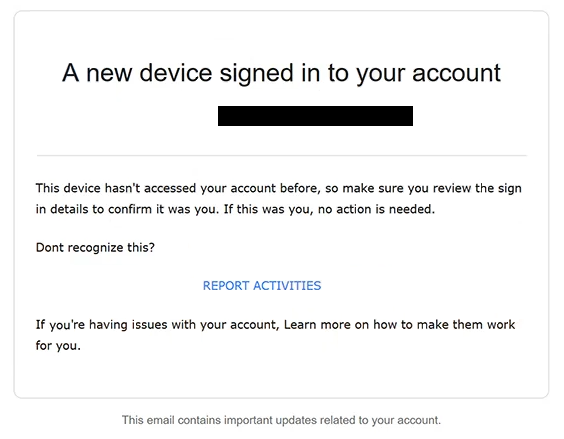
The email typically states that a successful sign-in has been detected from a new device or location. To make the notification appear authentic, it may include details such as the time of the login attempt, the operating system, the browser used, or an approximate geographic location. These details are intended to create the impression that the notification was generated automatically by a legitimate email provider.
Recipients are warned that if they did not authorise the sign-in, they should take immediate action to protect their account. The message usually contains a prominent button labelled “Review Activity”, “Secure Account”, “Check Login”, or similar wording. Clicking the button does not open the official account security page. Instead, it directs users to a counterfeit website controlled by the attackers.
The phishing page is designed to resemble a genuine webmail login portal. Visitors are instructed to sign in with their email address and password to review the suspicious login or block the unfamiliar device. Instead of displaying any security information, the website records the submitted credentials and sends them directly to the operators of the phishing campaign.
An email account often contains valuable personal and professional information. If attackers obtain access, they may read private correspondence, retrieve password reset emails, intercept authentication codes, access financial records, and compromise additional online services connected to the same mailbox. Because many websites use email accounts for identity verification and password recovery, a single compromised mailbox can place numerous other accounts at risk.
The “A new device signed in to your account” phishing email relies on fear rather than technical threats. Recipients who believe that an unknown individual has already gained access to their account may react quickly without verifying whether the notification is genuine. This sense of urgency significantly increases the likelihood that victims will disclose their credentials.
Some versions of the phishing email may also claim that the login originated from an unfamiliar country, a newly registered device, or a suspicious IP address. Others may suggest that immediate verification is required to prevent further unauthorised access. These claims are fabricated solely to persuade recipients to interact with the fraudulent message.
Anyone who entered their login credentials after interacting with the “A new device signed in to your account” phishing email should immediately change the password for the affected account. If the same password has been used on other online services, it should also be replaced there. Users should review recent login history, verify recovery information, sign out of unfamiliar sessions if possible, and enable legitimate multi-factor authentication through the official account settings.
The full “A new device signed in to your account” phishing email is below:
Subject: Sign in from a new device
A new device signed in to your account
–This device hasn’t accessed your account before, so make sure you review the sign in details to confirm it was you. If this was you, no action is needed.
Dont recognize this?
[REPORT ACTIVITIES]
If you’re having issues with your account, Learn more on how to make them work for you.
This email contains important updates related to your account.
How to recognise fake device sign-in notifications
Unexpected security alerts reporting a new device login should always be verified independently. Legitimate email providers usually allow users to review recent sign-in activity by logging into their account through the provider’s official website or application rather than requiring authentication through links included in unsolicited emails.
Recipients should inspect the sender’s email address carefully. Phishing campaigns frequently imitate trusted security teams while using domains that have no connection to the organisation they claim to represent.
Another warning sign is an email urging immediate action through an embedded link. Although genuine providers may send security notifications, users should avoid clicking links in unexpected messages. Instead, they should manually visit the official website, sign in directly, and review their account activity from there.
Before entering credentials on any webpage, users should confirm that the website’s domain belongs to the legitimate email provider. A convincing appearance alone does not guarantee authenticity if the address is unfamiliar or unrelated to the claimed organisation.
The safest approach is to ignore links contained in unexpected login alerts and access the account by typing the provider’s official web address into a browser. If no unfamiliar sign-in activity is reported after logging in, the email should be regarded as a phishing attempt and deleted.
Incoming search terms:
Site Disclaimer
2-remove-virus.com is not sponsored, owned, affiliated, or linked to malware developers or distributors that are referenced in this article. The article does not promote or endorse any type of malware. We aim at providing useful information that will help computer users to detect and eliminate the unwanted malicious programs from their computers. This can be done manually by following the instructions presented in the article or automatically by implementing the suggested anti-malware tools.
The article is only meant to be used for educational purposes. If you follow the instructions given in the article, you agree to be contracted by the disclaimer. We do not guarantee that the artcile will present you with a solution that removes the malign threats completely. Malware changes constantly, which is why, in some cases, it may be difficult to clean the computer fully by using only the manual removal instructions.