

The “Email Verification Guide” phishing email is a credential theft attempt that tells recipients they must verify their email account before a specified deadline. The campaign presents the process as an administrative requirement and warns that ignoring it could eventually result in the account being considered inactive and deleted.
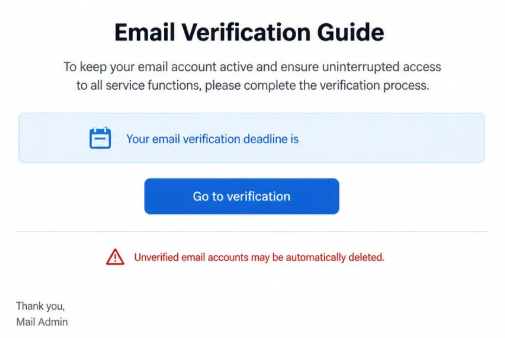
The email is designed to look like an automated notice concerning the recipient’s mailbox. It refers to a verification deadline and claims that authentication must be completed to maintain access to all available email functions.
A link is provided to begin the supposed verification process. Rather than giving recipients a legitimate reason to access their account through their normal email provider, the notification encourages them to follow the route supplied directly in the email.
The verification requirement is fabricated. The sender does not have authority over the recipient’s mailbox, and the threatened consequences are used to pressure users into interacting with a phishing site.
After clicking on the given link, victims can be taken to a counterfeit email sign-in page. The site may resemble a familiar webmail service and can display the targeted email address to make the page appear connected to the recipient’s real account.
This apparent personalization should not be mistaken for legitimate account recognition. Phishing links can contain the recipient’s email address and pass it to the fraudulent website, allowing the page to display information that the scammers already possessed.
The objective is to obtain the password associated with the email address. Credentials entered into the fake sign-in form are captured by the scammers rather than being used to complete account verification.
A compromised mailbox can expose private emails and information about other online services. Since email accounts are commonly used for password recovery, access to an inbox may also help scammers target additional accounts associated with the same address.
The risk increases when the victim reuses the same password across multiple services. Credentials obtained through the “Email Verification Guide” phishing email could potentially expose other accounts if identical login information has been used elsewhere.
Anyone who has submitted credentials through the fraudulent verification page should change the email password through the legitimate provider. Reused passwords should also be replaced, and the mailbox should be checked for unfamiliar sessions or unauthorized changes to account settings.
How to recognize the “Email Verification Guide” phishing email
The verification deadline is central to this scam. By attaching a specific time limit to the supposed authentication requirement, the email attempts to prevent recipients from carefully considering whether verification is actually necessary.
The threat of eventual account deletion adds further pressure. Recipients are led to believe that failing to complete the requested process could cause their mailbox to be classified as inactive, making the verification link appear necessary for preserving access.
Another issue is the vague identity of the supposed administrator. The notification uses generic administrative language rather than establishing a clear connection with the company that actually operates the recipient’s email service.
Specific-looking account details can also make the email seem more credible. A recipient may see their own email address, a verification date, or an automatically generated timestamp. None of these elements prove that the sender has access to the mailbox or knows its genuine account status.
The sign-in request that follows the verification link is particularly important. A page can display a familiar webmail design or show the correct email address while still being controlled by scammers. Users should check the actual domain before entering a password rather than relying on branding or personalization.
Recipients can also avoid the emailed verification process entirely. If an account genuinely requires authentication, this can be checked by opening the normal email application or navigating independently to the provider’s official website.
There is no need to use an unsolicited verification link to determine whether a mailbox requires attention. A legitimate account warning should also be visible through the provider’s own account or security settings.
Site Disclaimer
2-remove-virus.com is not sponsored, owned, affiliated, or linked to malware developers or distributors that are referenced in this article. The article does not promote or endorse any type of malware. We aim at providing useful information that will help computer users to detect and eliminate the unwanted malicious programs from their computers. This can be done manually by following the instructions presented in the article or automatically by implementing the suggested anti-malware tools.
The article is only meant to be used for educational purposes. If you follow the instructions given in the article, you agree to be contracted by the disclaimer. We do not guarantee that the artcile will present you with a solution that removes the malign threats completely. Malware changes constantly, which is why, in some cases, it may be difficult to clean the computer fully by using only the manual removal instructions.