

The “Account expiration confirmation” phishing email is a credential-stealing scam that attempts to convince recipients that their email account is approaching deactivation. The message disguises itself as a routine account-management notice and claims that an additional verification step is necessary to keep the mailbox active. Its actual purpose is to direct recipients to a fraudulent login page where their webmail credentials can be stolen.
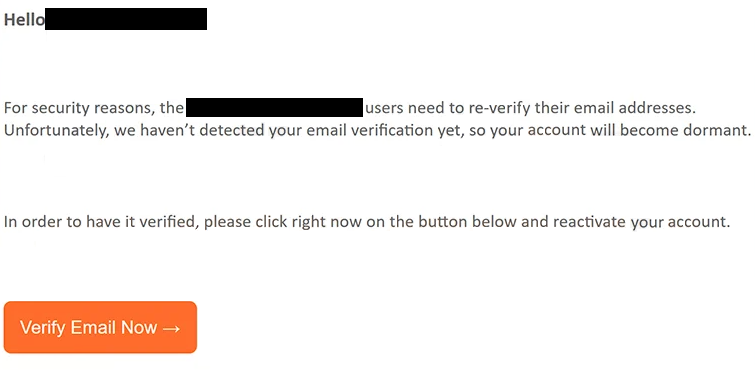
In the observed campaign, the email presents itself as a notification from the service desk associated with everstoneminerals.com. It tells recipients that users of the domain are required to re-verify their email addresses for security reasons. The message then claims that the recipient has not yet completed this process and warns that the account will consequently become dormant.
The company whose domain is mentioned in the email has no connection with this campaign. Its name is being misused to make the fraudulent notification appear credible.
Rather than relying on a lengthy explanation, the scammers give recipients a straightforward choice: verify the email address or supposedly lose normal access to the account. A “Verify Email Now” button is provided as the solution. The prospect of an important mailbox becoming inactive is intended to encourage users to click before investigating whether the request actually originated from their email administrator.
Following the button does not begin a legitimate verification procedure. Instead, it opens a counterfeit cPanel webmail login page. The phishing page used in the analyzed campaign was hosted on listoyo[.]com, which appears to be a legitimate website that had been compromised and repurposed to host the fraudulent content.
The phishing URL also contains the targeted email address as a parameter. This allows the fake login page to automatically populate the username field with the recipient’s email address. Seeing their own address already displayed on the page can make the site appear as though it genuinely knows which account requires verification.
The remaining step asks the victim for their password. Credentials submitted through this form are not used to reactivate or verify anything. They are delivered to the scammers operating the campaign.
Obtaining a webmail password can give attackers much more than access to messages. A compromised inbox may contain private conversations, documents, invoices, business information, password-reset messages, and other sensitive material. Attackers can also search the mailbox for information about other accounts belonging to the victim.
Control of an email account can additionally be used to reset passwords for services connected to that address. If successful, the attackers may expand the compromise from the mailbox to social media profiles, cloud services, business platforms, or other accounts.
A stolen mailbox can also become a tool for targeting other people. Cybercriminals may send phishing emails or fraudulent requests from the legitimate account to colleagues, customers, friends, or relatives. Since the messages originate from an address recipients already recognize, subsequent scams may appear considerably more credible.
Anyone who entered a password after following the link in the “Account expiration confirmation” phishing email should change the affected email password immediately through the genuine provider. Passwords should also be changed on other accounts where the same credentials were reused. Recent sessions and account activity should be checked for unauthorized access, and multi-factor authentication should be enabled when available.
Simply receiving or reading this particular email does not hand the scammers access to the mailbox. Credential theft occurs when a victim provides login information through the fraudulent page.
The full “Account expiration confirmation” phishing email is below:
Subject: Account expiration confirmation.
Hello -,
For security reasons, the everstoneminerals.com users need to re-verify their email addresses. Unfortunately, we haven’t detected your email verification yet, so your account will become dormant.
In order to have it verified, please click right now on the button below and reactivate your account.
[Verify Email Now]
– Service desk
How to recognize account expiration phishing emails
The strongest indication that an account warning may be fraudulent is not necessarily poor grammar or an unusual design. Modern phishing messages can look professional. What matters more is whether the sender and requested action can be independently verified.
An email warning that a mailbox is about to become dormant should not be used as the route for checking the account. Instead, users should open their normal webmail portal independently and inspect account notifications there. If re-verification is genuinely required, the relevant information should be confirmed through the legitimate service rather than through an unsolicited email link.
The destination of a login button is particularly important. In this campaign, the message refers to one domain while the supposed verification process is hosted on an entirely different website. A cPanel-style login interface does not make such a page legitimate. Phishing sites routinely reproduce familiar login forms, logos, and layouts.
Users should also be wary of pages that already contain their email address. A pre-filled username may appear convincing, but it does not demonstrate that the website belongs to the email provider. An email address can simply be inserted into a phishing URL and automatically displayed when the page loads.
Artificial consequences are another common phishing technique. The “Account expiration confirmation” phishing email claims that failure to re-verify the address will cause the account to become dormant. This threat creates a reason to act immediately, while the conveniently placed verification button directs the victim exactly where the scammers want them to go.
Before supplying a password in response to any account notice, users should examine the actual domain shown in the browser’s address bar and compare it with the service they normally use. If the domain is unrelated, unfamiliar, or otherwise inconsistent with the claimed provider, credentials should not be entered.
The safest response to the “Account expiration confirmation” phishing email is to avoid its verification button and access the mailbox through the usual official login method. Any genuine account problem can then be investigated without interacting with the phishing website.
Incoming search terms:
Site Disclaimer
2-remove-virus.com is not sponsored, owned, affiliated, or linked to malware developers or distributors that are referenced in this article. The article does not promote or endorse any type of malware. We aim at providing useful information that will help computer users to detect and eliminate the unwanted malicious programs from their computers. This can be done manually by following the instructions presented in the article or automatically by implementing the suggested anti-malware tools.
The article is only meant to be used for educational purposes. If you follow the instructions given in the article, you agree to be contracted by the disclaimer. We do not guarantee that the artcile will present you with a solution that removes the malign threats completely. Malware changes constantly, which is why, in some cases, it may be difficult to clean the computer fully by using only the manual removal instructions.