

The “Account Sign-In Required Within 48 Hours” email scam is a phishing attempt designed to steal email account login credentials. The phishing emails are disguised as official notifications from email service providers, informing recipients that recent server maintenance requires them to sign in to their accounts. The scammers use a fabricated password expiration warning to pressure recipients into following their instructions.
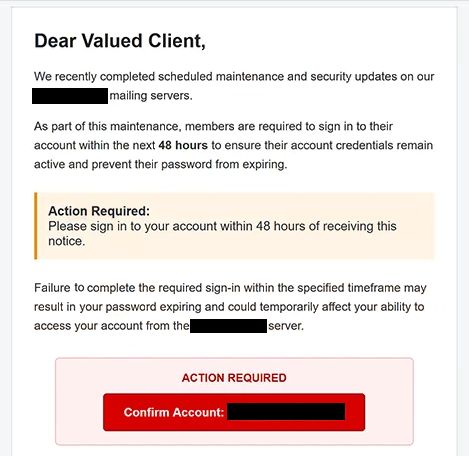
The phishing emails may arrive with the subject line “Urgent: Account Sign-In Required Within 48 Hours.” They claim that scheduled maintenance and security updates have recently been completed on the provider’s mail servers. According to the email, account holders must sign in within 48 hours to keep their credentials active and prevent their passwords from expiring.
Recipients are warned that failing to complete the required sign-in could temporarily disrupt access to their email accounts. The phishing emails also use a generic greeting, “Dear Valued Client,” and are signed by a supposed customer support team. These details help create the appearance of an official administrative notification without identifying a specific email provider.
The phishing emails contain a “Confirm Account” button intended to direct recipients to an external website. However, the linked website was no longer operational when the phishing attempt was examined, so its exact contents could not be verified. Based on the email’s instructions and the nature of the campaign, the link was suspected of leading to a phishing page designed to collect email login credentials.
Such phishing pages can imitate legitimate email login interfaces and request usernames and passwords. If recipients enter their credentials, scammers may obtain unauthorized access to their email accounts. This could expose private correspondence, personal information, and sensitive documents stored in the mailbox.
Access to a compromised email account may also allow attackers to request password resets for other online services associated with the same address. The consequences could include additional account compromises and exposure of financial or personal information. However, there is no confirmed evidence that these outcomes occurred as a result of this particular phishing campaign.
The phishing attempt primarily relies on social engineering rather than a documented malware delivery mechanism. Its central tactic is to present an invented account security requirement as a routine consequence of server maintenance, encouraging recipients to provide their credentials without verifying the warning.
The full “Account Sign-In Required Within 48 Hours” phishing email is below:
Subject: Urgent: Account Sign-In Required Within 48 Hours
Dear Valued Client,
We recently completed scheduled maintenance and security updates on our – mailing servers.
As part of this maintenance, members are required to sign in to their account within the next 48 hours to ensure their account credentials remain active and prevent their password from expiring.
Action Required:
Please sign in to your account within 48 hours of receiving this notice.Failure to complete the required sign-in within the specified timeframe may result in your password expiring and could temporarily affect your ability to access your account from the – server.
ACTION REQUIRED
[Confirm Account] –We appreciate your prompt attention to this matter and apologize for any inconvenience caused by the recent maintenance.
Thank you for your cooperation.
Sincerely,
Customer Support Team
How to Recognize and Avoid Phishing Emails
Unexpected emails requiring account verification after server maintenance should be examined carefully, especially when they impose short deadlines or threaten password expiration. In this case, the 48-hour requirement is intended to make recipients believe that delaying action could result in losing access to their accounts.
One warning sign is the absence of a clearly identified email service provider. The phishing emails refer generally to server maintenance and account credentials without establishing which organization supposedly issued the notification. Generic greetings and signatures can also indicate phishing, although these characteristics alone do not prove that an email is malicious.
Recipients should avoid using account confirmation buttons in unexpected emails. Instead, they should visit their email provider’s official website directly and check whether any security updates or account actions are actually required. If necessary, they can contact the provider through a verified support channel.
It is also important to examine the sender’s email address and the destination of embedded links. Phishing websites may imitate genuine login pages while using unrelated or misleading domain names. Users should verify the website address before entering credentials and avoid assuming that a familiar-looking login form is legitimate.
Anyone who has entered their email password on a suspected phishing website should change it immediately through the official service. If the same password is used for other accounts, those passwords should also be changed. Enabling multifactor authentication and reviewing recent sign-in activity can provide additional protection.
Users should also check their account recovery settings, active sessions, and email forwarding rules for unauthorized changes. If unfamiliar activity is detected, contacting the email provider may help secure the affected account and investigate potential misuse.
Recipients who have not submitted any information should report the phishing email and delete it. Since the identified campaign attempts to exploit a supposed maintenance-related password expiration, the most relevant precaution is to verify account requirements directly with the email provider rather than relying on the 48-hour deadline stated in the email.
Site Disclaimer
2-remove-virus.com is not sponsored, owned, affiliated, or linked to malware developers or distributors that are referenced in this article. The article does not promote or endorse any type of malware. We aim at providing useful information that will help computer users to detect and eliminate the unwanted malicious programs from their computers. This can be done manually by following the instructions presented in the article or automatically by implementing the suggested anti-malware tools.
The article is only meant to be used for educational purposes. If you follow the instructions given in the article, you agree to be contracted by the disclaimer. We do not guarantee that the artcile will present you with a solution that removes the malign threats completely. Malware changes constantly, which is why, in some cases, it may be difficult to clean the computer fully by using only the manual removal instructions.