

The “cPanel Mailbox Storage Limit Reached” email scam is a phishing campaign that uses fake mailbox storage notifications to obtain recipients’ email account credentials. The phishing email impersonates legitimate email management services, including cPanel and Roundcube, and falsely suggests that the recipient’s mailbox has reached its storage capacity.
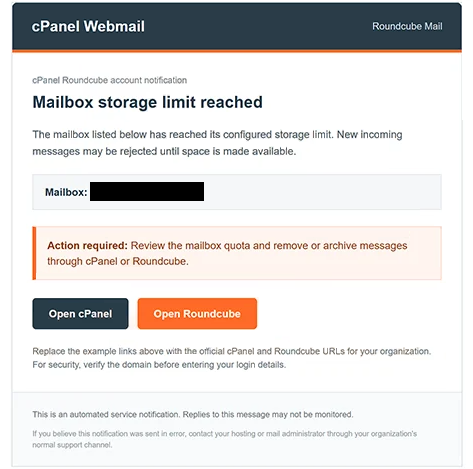
The emails are presented as automated service notifications and may use the subject line “Roundcube Mailbox Storage Alert.” They claim that the recipient’s mailbox has exceeded its allocated storage quota, potentially preventing new messages from being delivered. The warning is intended to create a sense of urgency and encourage recipients to address the supposed problem.
To make the notification appear legitimate, the scammers reference cPanel and Roundcube, both of which are genuine services used in website hosting and email management. The message suggests that recipients can resolve the storage issue by accessing their email administration interface and managing their stored messages.
The phishing email includes two buttons labeled “Open cPanel” and “Open Roundcube.” Although these options appear to provide access to different services, both redirect users to a fraudulent website. The linked page imitates a webmail login interface and requests the visitor’s email address and password.
Information entered into the counterfeit login form is exposed to the scammers. The stolen credentials could be used to gain unauthorized access to the victim’s email account, read private correspondence, and impersonate the account owner. Depending on the services associated with the compromised address, attackers might also attempt to reset passwords for other online accounts.
The full “cPanel Mailbox Storage Limit Reached” phishing email is below:
Subject: Roundcube Mailbox Storage Alert
cPanel Webmail Roundcube Mail
cPanel Roundcube account notification
Mailbox storage limit reached
The mailbox listed below has reached its configured storage limit. New incoming messages may be rejected until space is made available.
Mailbox: –
Action required: Review the mailbox quota and remove or archive messages through cPanel or Roundcube.
[Open cPanel] [Open Roundcube]
Replace the example links above with the official cPanel and Roundcube URLs for your organization. For security, verify the domain before entering your login details.
This is an automated service notification. Replies to this message may not be monitored.
If you believe this notification was sent in error, contact your hosting or mail administrator through your organization’s normal support channel.
How to recognize and avoid phishing emails
Phishing emails of this kind can be identified by examining the claims they make and the actions they request. Unexpected notifications about mailbox storage limits should be treated cautiously, particularly when they instruct recipients to access their accounts through links or buttons embedded in the message. The presence of familiar service names, logos, or professional formatting is not sufficient evidence that a notification is genuine.
Recipients should verify mailbox storage warnings by accessing their email hosting provider’s website directly, using a previously saved bookmark or a known legitimate address. The account’s actual storage usage can then be checked through the appropriate management interface. If the notification appears inconsistent with the account’s status, the hosting provider should be contacted through an official support channel.
Before entering credentials on any login page, users should examine the website’s domain and confirm that it belongs to the service they intend to access. A phishing website may closely resemble a legitimate webmail interface while operating under an unrelated address. Sender addresses should also be inspected, although a familiar-looking sender alone does not establish authenticity.
Anyone who has entered their login details on the fraudulent website should change their email password immediately through the legitimate service. Passwords reused on other accounts should also be replaced, and multifactor authentication should be enabled wherever supported.
Affected users should additionally review recent sign-in activity, active sessions, account recovery information, and email forwarding settings for unauthorized changes. If suspicious activity is discovered, the email provider should be contacted for assistance in securing the account.
Recipients who have not disclosed any information should report the message as phishing and delete it. In this campaign, the supposed mailbox storage problem serves as a pretext for directing users to a counterfeit login page, making independent verification of the notification the most relevant precaution.
Site Disclaimer
2-remove-virus.com is not sponsored, owned, affiliated, or linked to malware developers or distributors that are referenced in this article. The article does not promote or endorse any type of malware. We aim at providing useful information that will help computer users to detect and eliminate the unwanted malicious programs from their computers. This can be done manually by following the instructions presented in the article or automatically by implementing the suggested anti-malware tools.
The article is only meant to be used for educational purposes. If you follow the instructions given in the article, you agree to be contracted by the disclaimer. We do not guarantee that the artcile will present you with a solution that removes the malign threats completely. Malware changes constantly, which is why, in some cases, it may be difficult to clean the computer fully by using only the manual removal instructions.