

The “Account Update Notice” email scam is a phishing attempt that pretends to be an official notification about required changes to a user’s account. It is usually presented as an important message from an email service provider or another online platform, informing the recipient that their account settings must be updated to maintain normal access. Although the message may appear routine and administrative in nature, it is not legitimate and is created with the intent to deceive.
This type of phishing email often uses a neutral but urgent tone. Instead of directly claiming that the account is compromised, it suggests that updates are necessary due to policy changes, system improvements, or security enhancements. The “Account Update Notice” email typically includes a link or button encouraging the recipient to proceed with the update process. This action is framed as a simple step required to avoid service interruptions or limited functionality.
However, the provided link does not lead to a genuine website. Instead, it redirects users to a counterfeit page designed to resemble a real login portal. These pages are often built to match common email platforms or generic webmail interfaces, allowing them to target a wide range of users. Once the user enters their login credentials, the information is immediately captured by the attackers. According to security analyses, phishing emails commonly direct victims to fake login sites specifically to collect usernames and passwords for further misuse.
The “Account Update Notice” scam relies heavily on subtlety rather than alarm. Unlike more aggressive phishing attempts, it does not always threaten immediate consequences. Instead, it presents the update as a standard requirement, making it easier for recipients to trust the message. This approach can be particularly effective because it mirrors legitimate communications that users receive from service providers regarding account maintenance.
Once attackers gain access to an account, they can use it in several ways. Compromised email accounts may be used to send additional phishing emails, collect personal information, or attempt access to other services linked to the same credentials. In many cases, stolen login details are also tested across multiple platforms, increasing the potential impact. Security research shows that hijacked accounts can be exploited for identity theft, financial fraud, or further distribution of malicious content.
It is also important to note that these emails are usually distributed through large-scale spam campaigns. Attackers send them to a wide audience without targeting specific individuals. Because of this, the message may not include personalized information and can arrive unexpectedly. This lack of context is often overlooked, especially when the email appears formal and structured.
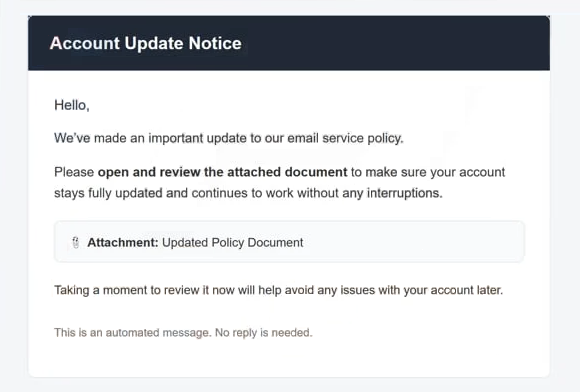
The full “Account Update Notice” phishing email is below:
Subject: Action Required #014210: Confirm Updated Policy for Your–
Account Update Notice
Hello,
We’ve made an important update to our email service policy.
Please open and review the attached document to make sure your account stays fully updated and continues to work without any interruptions.
Attachment: Updated Policy DocumentTaking a moment to review it now will help avoid any issues with your account later.
This is an automated message. No reply is needed.
How to recognize phishing emails
Recognizing phishing emails like the “Account Update Notice” scam requires attention to patterns rather than relying on a single obvious sign. These emails are designed to blend in with legitimate communication, but they often contain small inconsistencies that reveal their true nature.
One key indicator is the nature of the request. Phishing emails frequently ask users to take action through a link, such as updating account details or confirming information. Legitimate services generally do not require users to submit sensitive data through unsolicited emails. Messages that push users to log in via embedded links should always be approached with caution.
Another important sign is urgency, even when it appears subtle. While the “Account Update Notice” email may not be overly alarming, it still implies that action is required to avoid disruptions. This creates a sense of obligation, encouraging users to act without verifying the message. Phishing emails often rely on this tactic to reduce careful evaluation.
The link itself is one of the most reliable indicators. Although it may appear legitimate, the actual destination often leads to an unfamiliar or unrelated domain. Checking the link before clicking can help identify discrepancies. Fraudulent emails frequently disguise malicious URLs to make them look like official ones.
The sender’s address should also be examined closely. Phishing emails often imitate real domains but include slight variations, such as additional characters or misspellings. These differences may be subtle, but they are a strong indication that the email is not genuine. Legitimate organizations typically use consistent and recognizable email addresses.
Language and formatting can provide additional clues. Some phishing emails contain grammatical errors or awkward phrasing, while others may appear polished but still lack specific details. Generic greetings, such as addressing the recipient without using their name, are also common in mass-distributed phishing campaigns.
Attachments, when present, should be treated with caution as well. Malicious emails sometimes include files that appear harmless but contain scripts or programs capable of compromising a device. Opening such files can lead to malware infections, especially if additional actions are required after opening them.
A practical way to verify any suspicious email is to avoid interacting with it directly. Instead of clicking links, users should access their accounts by manually entering the official website address into a browser. If an update is genuinely required, it will be reflected within the account interface.
Developing a habit of verifying unexpected notifications is essential. Phishing scams like the “Account Update Notice” email depend on routine behavior and quick reactions. Taking a moment to review the details, question the context, and confirm information independently can significantly reduce the risk of falling victim to such attacks.
Site Disclaimer
2-remove-virus.com is not sponsored, owned, affiliated, or linked to malware developers or distributors that are referenced in this article. The article does not promote or endorse any type of malware. We aim at providing useful information that will help computer users to detect and eliminate the unwanted malicious programs from their computers. This can be done manually by following the instructions presented in the article or automatically by implementing the suggested anti-malware tools.
The article is only meant to be used for educational purposes. If you follow the instructions given in the article, you agree to be contracted by the disclaimer. We do not guarantee that the artcile will present you with a solution that removes the malign threats completely. Malware changes constantly, which is why, in some cases, it may be difficult to clean the computer fully by using only the manual removal instructions.