

The “Roundcube Mailbox Is Almost Full” email is a credential-stealing phishing scam that impersonates Roundcube Webmail. It is presented as an automated storage warning and attempts to convince the recipient that their mailbox is approaching its maximum capacity. The notification is fake, and Roundcube has no connection to the campaign. The warning is being used as a pretext to send victims to a phishing login page.
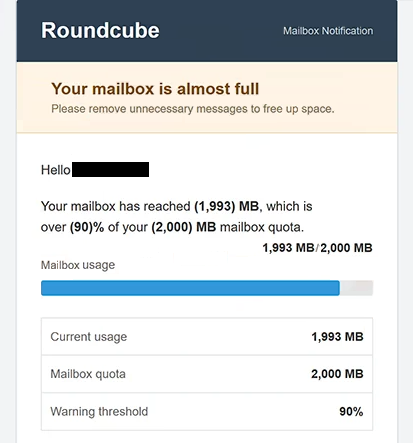
The examined version uses the subject “Mailbox storage full” and tells the recipient that their mailbox has reached 1,993 MB of a 2,000 MB quota. It also claims that usage has passed a 90% warning threshold. According to the message, reaching the maximum capacity could prevent the account from receiving additional emails. These specific figures help the email resemble the type of technical storage notification that a webmail user might expect to receive.
The message does not immediately ask the recipient for a password. Instead, it instructs them to remove unnecessary emails and empty their Trash and Junk folders, which makes the scenario appear more plausible. The dangerous part is a button labeled “Open Roundcube & Clean Up Mailbox.” Rather than opening the recipient’s legitimate Roundcube interface, this button directs the user to a phishing website, specifically to rehier.de. The site was designed to resemble a legitimate Roundcube Webmail login screen. The phishing page also extracted the victim’s email address from the URL and automatically placed it into the username field. This small detail can make the page appear more credible because the victim arrives at what looks like a personalized login form with their address already displayed.
The password field is the actual trap. Any password submitted through this page is provided to the scammers rather than used to authenticate with Roundcube. This means a victim can hand over access to their mailbox while believing they are simply signing in to manage storage.
The consequences can extend far beyond the email account itself. An inbox can contain private conversations, invoices, account notifications, password-reset messages, business documents, and information about other services used by its owner. Attackers controlling the mailbox may therefore search it for valuable information or use it to compromise additional accounts. They can also request password resets for services connected to the affected email address and intercept the resulting recovery messages.
A stolen mailbox can additionally be used for impersonation. Messages sent from an established account are more likely to be trusted by colleagues, customers, friends, or relatives than messages originating from an unfamiliar address. Consequently, control of one account can provide scammers with opportunities to distribute additional fraudulent messages while posing as the legitimate owner.
It is important to distinguish this fraudulent campaign from genuine mailbox quota notifications. Mail servers can legitimately warn users when their available storage is running low. The existence of real quota warnings is precisely what makes this type of phishing lure believable. The relevant issue with the “Roundcube Mailbox Is Almost Full” campaign is that its button takes recipients to an unrelated phishing domain rather than their legitimate webmail service.
The full “Roundcube – Your mailbox is almost full” phishing email is below:
Subject: Mailbox storage full
Roundcube
Mailbox NotificationYour mailbox is almost full
Please remove unnecessary messages to free up space.Hello –
Your mailbox has reached (1,993) MB, which is over (90)% of your (2,000) MB mailbox quota.
Mailbox usage (1,993) MB / (2,000) MBCurrent usage 1,993 MB
Mailbox quota 2,000 MB
Warning threshold 90%To free up space, delete messages you no longer need and empty your Trash and Junk folders.
If your mailbox reaches its maximum quota, you may no longer be able to receive new messages.
[Open Roundcube & Clean Up Mailbox]
Roundcube Webmail
This is an automated mailbox notification. Please do not reply to this message.
How to recognize malicious emails like “Roundcube Mailbox Is Almost Full”
The strongest indication that this particular message is fraudulent is the destination behind its mailbox-cleanup button. A recipient who receives a storage warning should not assume that a link is trustworthy merely because the email contains Roundcube branding. In the analyzed campaign, clicking the button takes the victim to rehierl.de, not to their actual Roundcube Webmail installation.
Links should therefore be examined before they are opened. On a desktop computer, hovering over a button or hyperlink can reveal its destination. A URL belonging to an unfamiliar domain is a significant warning sign when the message supposedly concerns an existing email account. Rather than following the provided button, users can independently access the webmail service through the address they normally use.
The wording of the message should be considered alongside the link. This campaign creates pressure by claiming that the mailbox is almost at its limit and could soon stop accepting new messages. The warning is effective because it presents a believable operational problem with an obvious consequence: missing incoming email. However, urgency does not prove authenticity. Unexpected account warnings should be independently verified before login credentials are entered anywhere.
The fake login page itself provides another opportunity to recognize the attack. A convincing design or a pre-filled email address does not establish that a website is genuine. In this campaign, the victim’s address can be obtained from the URL and inserted into the username field automatically. Users should therefore check the site’s domain before entering a password, even when a login form already appears to know their email address.
Sender information also deserves attention. The visible sender name can be made to resemble a webmail administrator or automated notification system, so it should not be treated as proof of origin. Checking the complete sending address and domain can expose inconsistencies between who the message claims to represent and where it actually originated.
Recipients should also remember that Roundcube is an open-source webmail client, not the organization operating every email account that uses its interface. A legitimate storage limit can be configured by the organization or hosting provider operating the underlying mail service. Therefore, an unexpected message using Roundcube’s name should be verified through the user’s normal webmail portal or administrator rather than through an embedded link.
Site Disclaimer
2-remove-virus.com is not sponsored, owned, affiliated, or linked to malware developers or distributors that are referenced in this article. The article does not promote or endorse any type of malware. We aim at providing useful information that will help computer users to detect and eliminate the unwanted malicious programs from their computers. This can be done manually by following the instructions presented in the article or automatically by implementing the suggested anti-malware tools.
The article is only meant to be used for educational purposes. If you follow the instructions given in the article, you agree to be contracted by the disclaimer. We do not guarantee that the artcile will present you with a solution that removes the malign threats completely. Malware changes constantly, which is why, in some cases, it may be difficult to clean the computer fully by using only the manual removal instructions.