

The “Action required: Confirm and Upgrade your email address” email scam is a phishing campaign designed to steal email account passwords by disguising a credential request as a routine security procedure. The phishing emails impersonate an email service provider and claim that recipients must confirm their contact information to complete a scheduled system upgrade. The supposed verification is presented as necessary to maintain uninterrupted access to their mailboxes.
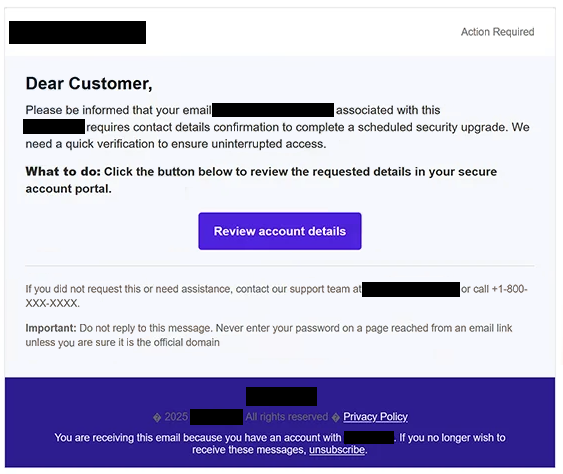
The phishing emails may use the subject line “Action required: Confirm and Upgrade your email address,” followed by the recipient’s email address. They begin with a generic “Dear Customer” greeting and explain that the email account requires additional confirmation as part of a security update. Although the notification sounds administrative, it does not clearly identify the email provider supposedly responsible for the upgrade.
Recipients are instructed to review their information through a button labeled “Review account details.” The phishing email describes the destination as a secure account portal and suggests that completing the process will prevent potential access problems. It also includes a supposed support telephone number and instructions not to reply, giving the phishing email the appearance of an automated service notification.
Clicking the button opens a phishing website hosted through sharemyhtml.com. The website is designed to recognize the visitor’s email provider and display a corresponding login interface. In one observed example, the page imitated Gmail, displayed the recipient’s email address automatically, and claimed that the previous session had expired.
This expired-session warning provides another reason for the visitor to enter their password. Because the email address is already filled in, the counterfeit login form can appear to be part of an existing authentication process. However, the website is controlled by scammers, and any credentials submitted through it are exposed to them.
Stolen email credentials could allow attackers to access private correspondence, examine sensitive attachments, and impersonate the account owner. A compromised mailbox could also be used to request password resets for other online services or distribute additional phishing emails to the victim’s contacts. The legitimate email providers whose login pages are imitated have no identified involvement in the campaign.
The full “Action required: Confirm and Upgrade your email address” phishing email is below:
Subject: Action required: Confirm and Upgrade your email address: –
Action Required
Dear Customer,
Please be informed that your email – associated with this – requires contact details confirmation to complete a scheduled security upgrade. We need a quick verification to ensure uninterrupted access.
What to do: Click the button below to review the requested details in your secure account portal.
[Review account details]
If you did not request this or need assistance, contact our support team or call +1-800-XXX-XXXX.
Important: Do not reply to this message. Never enter your password on a page reached from an email link unless you are sure it is the official domain.
How to recognize phishing emails
Phishing emails disguised as account security notifications often describe routine maintenance or verification requirements without providing enough information to establish their authenticity. In this campaign, the claim that contact details must be confirmed to complete a scheduled security upgrade is a key warning sign. The phishing email does not identify a specific upgrade or explain why the recipient must authenticate through an external website.
The generic greeting and lack of a clearly identified service provider are additional details worth examining. Although legitimate companies sometimes send automated emails with general greetings, an unexpected account verification request from an unnamed provider should raise suspicion. Recipients should also inspect the sender’s actual email address rather than relying on the displayed sender name.
The “Review account details” button is particularly important because it directs recipients away from their usual email service. The destination uses sharemyhtml.com, a third-party hosting platform unrelated to the email provider being impersonated. A familiar-looking login page displayed on an unrelated domain is a strong indication of phishing.
Another characteristic is the expired-session warning displayed on the counterfeit login page. Such warnings can make password requests appear routine, especially when the visitor’s email address has already been entered automatically. However, a prefilled username does not demonstrate that the website is connected to the legitimate email service.
The phishing email also contains reassuring language about secure account verification and includes a warning against entering passwords on unverified websites. These statements can create an impression of legitimacy, but they do not establish that the sender or linked website is trustworthy. Phishing emails may include genuine-sounding security advice while simultaneously directing recipients to credential-stealing pages.
Site Disclaimer
2-remove-virus.com is not sponsored, owned, affiliated, or linked to malware developers or distributors that are referenced in this article. The article does not promote or endorse any type of malware. We aim at providing useful information that will help computer users to detect and eliminate the unwanted malicious programs from their computers. This can be done manually by following the instructions presented in the article or automatically by implementing the suggested anti-malware tools.
The article is only meant to be used for educational purposes. If you follow the instructions given in the article, you agree to be contracted by the disclaimer. We do not guarantee that the artcile will present you with a solution that removes the malign threats completely. Malware changes constantly, which is why, in some cases, it may be difficult to clean the computer fully by using only the manual removal instructions.